
MCP server · Developer tools
Lumino MCP server
by spre-sre
Lets your AI check Kubernetes and OpenShift clusters, debug Tekton pipelines, and spot problems early.
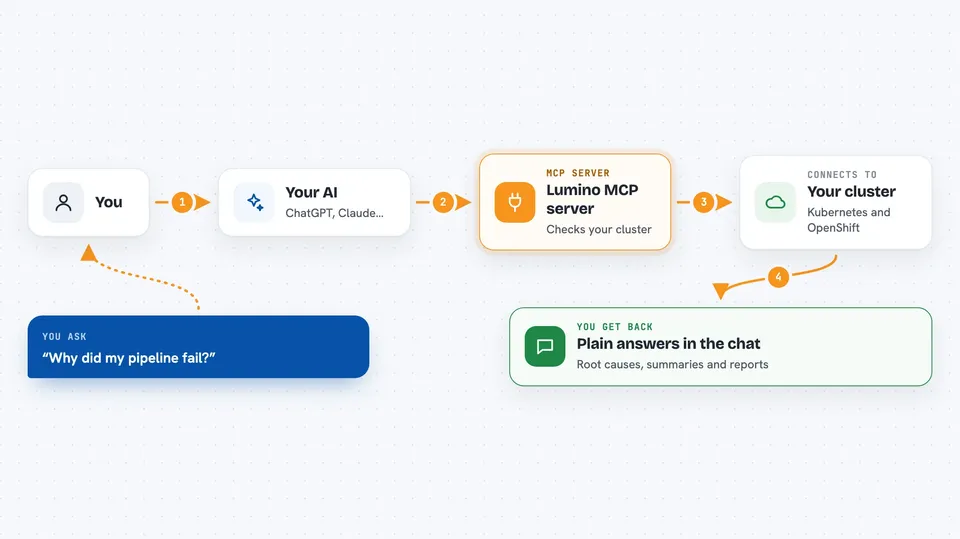
Lumino is a helper that connects your AI assistant to your Kubernetes and OpenShift clusters. It is made for people who keep servers and pipelines running, like site reliability engineers and DevOps teams. If you have ever stared at a wall of logs trying to find why a build failed, this is for you.
What is an MCP server? The 30-second version
On its own, your AI can only chat with you. An MCP server is a small helper program that gives your AI a new skill or a connection to another system. This one connects your AI to your Kubernetes and OpenShift clusters, so it can look things up and run checks for you. You ask a question in plain words, and the helper does the digging behind the scenes.
What this MCP server does
You ask your AI something like why a pipeline failed or which pods are crashing. The AI passes that request to Lumino, which talks to your cluster using your existing login. Lumino gathers logs, events, and resource details, then runs analysis like root cause detection or anomaly spotting. It hands the results back to the AI, which explains them to you in the chat. You get answers and reports without typing a single kubectl command.
 Click to zoom
What you can do with it
- List namespaces, pods, and resources in your cluster
- Debug failed Tekton pipeline runs and find the root cause
- Summarize and search large log files for errors
- Detect anomalies in logs and events before they become outages
- Forecast resource bottlenecks and certificate expiries
- Simulate what a configuration change would do before you apply it
- Map how services and deployments depend on each other
Try asking your AI
- “Generate a root cause analysis report for the failed pipeline run build-api-pr-456 in namespace ci-cd”
- “Analyze what caused pod crashes in namespace production over the last 6 hours”
- “Check cluster certificate health and alert me about any certificates expiring in the next 60 days”
- “Simulate the impact of increasing memory limits to 4Gi for all pods in namespace backend-services”
What it gives back to you
You get back plain answers in the chat: lists of pods or namespaces, summaries of logs, root cause explanations, and reports on pipeline failures. For forecasting, you get predictions like which resources may run out and when certificates expire. For simulations, you get a risk assessment showing what would change and which components are affected. Everything is written out for you to read, not as raw data dumps.
Before you start
What you need
- Python 3.10 or newer
- An MCP client like Claude Desktop, Claude Code CLI, Gemini CLI, or Cursor
- Access to a Kubernetes or OpenShift cluster with a working kubeconfig file
- Read permissions on the cluster (to list pods, namespaces, and similar resources)
Good to know
This server can read logs, events, and resource details from your clusters, so make sure you are comfortable with what your AI assistant can see.
Install it with your AI
Add Lumino MCP server to your AI, no technical skills needed
You don't install anything by hand. You copy one prompt, paste it into an AI that can work on your computer, and it checks, installs and connects the server for you, asking you when it needs something.
Sign in to get the install prompt
Members get a ready-made prompt that lets the Claude desktop app check Lumino MCP server, install it and connect it for them, step by step. You don't need any technical skills: you copy, paste and answer a few questions. Your connected AI can also find and install any of the 4,609 MCP servers here for you.
Who it's for
Site reliability engineers, DevOps teams, and platform engineers who run Kubernetes, OpenShift, or Tekton pipelines and want their AI to help with debugging and monitoring.



