MCP server · Analytics
LLM Prices MCP server
by szp2005
Compare AI model prices and estimate token costs right inside your chat.
This is a small helper that lets your AI look up current prices for popular AI models from OpenAI, Anthropic, Google, DeepSeek, Alibaba, ByteDance, Baidu, Tencent, MiniMax and others. It is handy if you are choosing which AI model to use, or if you want to know roughly what a piece of text will cost to process. The price list is checked every day, so the numbers stay fresh.
What is an MCP server? The 30-second version
On its own, your AI can only chat with you. An MCP server is a small helper program that gives your AI a new skill or a connection to an outside service. This one connects your AI to a daily-updated price list for large language models. Once it is connected, you can just ask about prices in normal words, and the AI fetches the answer for you.
What this MCP server does
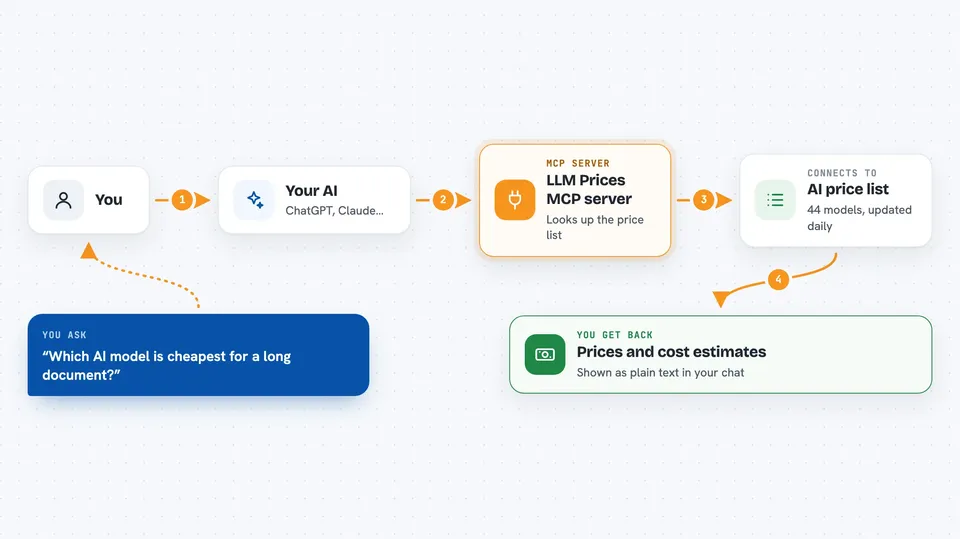
You ask your AI something like which model is cheapest or what a long document would cost to process. Your AI passes that question to this helper. The helper looks up the price list, which covers 44 models and is refreshed every day. It finds the model you asked about, reads its input and output prices, and works out the cost if you gave it some text. Then it sends the answer back, and your AI shows it to you in the chat.
 Click to zoom
What you can do with it
- Look up the current price of a specific AI model
- Compare input and output prices across several models
- Estimate the cost of processing a piece of text
- Check prices in US dollars or Chinese yuan
- See extra details like context window, output limit and quality score
- Filter models by vendor or currency
Try asking your AI
- “How much does GPT-5.5 cost per million tokens?”
- “Compare the input prices of DeepSeek and Claude.”
- “Estimate the cost of running this 3000-word article through Gemini.”
- “Show me the cheapest Chinese model for a long document.”
What it gives back to you
You get back plain answers in the chat: prices per million tokens, side-by-side comparisons, or a cost estimate for the text you provided. It can also list model details like context window, maximum output, and quality score. Everything is shown as normal text, so you can read it without any special tools.
Before you start
What you need
- An AI app that supports MCP servers, like Claude Desktop or another MCP-compatible client
- If you self-host: Docker, or Python with the requirements installed
Good to know
The prices are checked daily but can still change, so double-check important numbers on the official vendor page before making big decisions.
Install it with your AI
Add LLM Prices MCP server to your AI, no technical skills needed
You don't install anything by hand. You copy one prompt, paste it into an AI that can work on your computer, and it checks, installs and connects the server for you, asking you when it needs something.
Sign in to get the install prompt
Members get a ready-made prompt that lets the Claude desktop app check LLM Prices MCP server, install it and connect it for them, step by step. You don't need any technical skills: you copy, paste and answer a few questions. Your connected AI can also find and install any of the 4,361 MCP servers here for you.
Who it's for
Anyone who picks AI models for work or budgets, such as product managers, writers, developers, or finance teams comparing AI costs.