MCP server · Analytics
Neon Enterprise MCP Gateway
Let your AI safely read from your company's Postgres databases and Notion pages without risking changes.
This is a paid gateway that connects your AI assistant to internal company databases and Notion pages in a safe, read-only way. It is made for teams that want their AI to look things up without ever letting it change or delete anything. If your work involves digging through company data or internal docs, this is for you.
What is an MCP server? The 30-second version
On its own, your AI can only chat with you using what it already knows. An MCP server is a small helper program that gives your AI a new skill or a connection to an outside service. This one connects your AI to your company's Postgres databases and Notion knowledge base, through a secure middle layer. So when you ask a question, your AI can actually look things up in those systems instead of guessing.
What this MCP server does
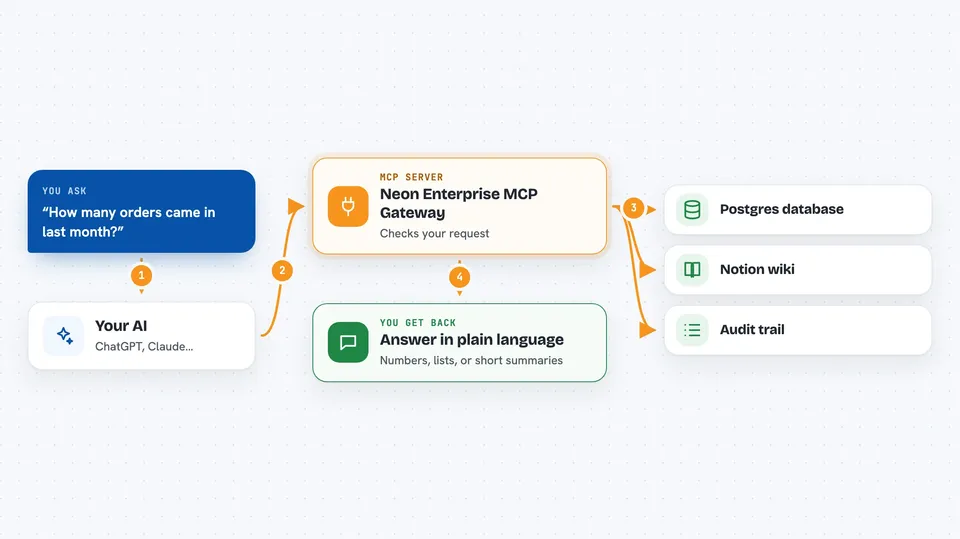
You ask your AI a question, like how many orders came in last month. Your AI sends that request to this gateway instead of trying to reach the database directly. The gateway checks the request, runs it as a read-only query, and sends the result back. Your AI then shows you the answer in plain language. Every request goes through the gateway, so nothing can accidentally delete or change your data.
 Click to zoom
What you can do with it
- Run read-only SQL queries against your company Postgres database
- Search your internal Notion wikis and documents
- Look up numbers, records, and facts from company data
- Keep an audit trail of what your AI asked for
- Avoid exposing root database credentials to your AI
Try asking your AI
- “How many new customers signed up in the last 30 days?”
- “Search our Notion wiki for the onboarding checklist for new hires”
- “What is the total revenue for the EMEA region this quarter?”
- “Find the internal doc that explains our refund policy”
What it gives back to you
You get answers in the chat, usually as short summaries, lists, or numbers pulled from your database or Notion. If you ask for a list of records, it shows up as a table or bulleted list. The gateway itself does not change anything, so you only ever see information, never edits.
Before you start
What you need
- A paid API key from neoninnovationlab.com/mcp (they email it to you)
- The Claude Desktop app
- Node.js installed on your computer (the setup uses npx)
Good to know
This is a paid service, and it can read your internal company data, so only connect databases and Notion workspaces you are allowed to share with your AI.
Install it with your AI
Add Neon Enterprise MCP Gateway to your AI, no technical skills needed
You don't install anything by hand. You copy one prompt, paste it into an AI that can work on your computer, and it checks, installs and connects the server for you, asking you when it needs something.
Sign in to get the install prompt
Members get a ready-made prompt that lets the Claude desktop app check Neon Enterprise MCP Gateway, install it and connect it for them, step by step. You don't need any technical skills: you copy, paste and answer a few questions. Your connected AI can also find and install any of the 4,361 MCP servers here for you.
Who it's for
Teams and agencies that want their AI to safely read internal Postgres data and Notion docs without risking changes.