
MCP server · Social media
Taisly Social Media Posting
by taisly
Let your AI publish or schedule short videos to TikTok, Instagram Reels, YouTube Shorts, X and Facebook through Taisly.
Taisly Agent Kit is a helper that lets your AI post short videos to your social accounts for you. You tell your AI what video to share, where, and when, and it handles the posting through Taisly. It is handy if you make short videos and want to publish them without opening each app one by one.
What is an MCP server? The 30-second version
On its own, your AI can only chat. An MCP server is a small helper program that gives your AI a new skill or a connection to an app or service. This one connects your AI to Taisly, which is the service that actually posts to TikTok, Instagram, YouTube, X and Facebook. Once it is connected, you can ask your AI to publish or schedule a video and it will do it through Taisly for you.
What this MCP server does
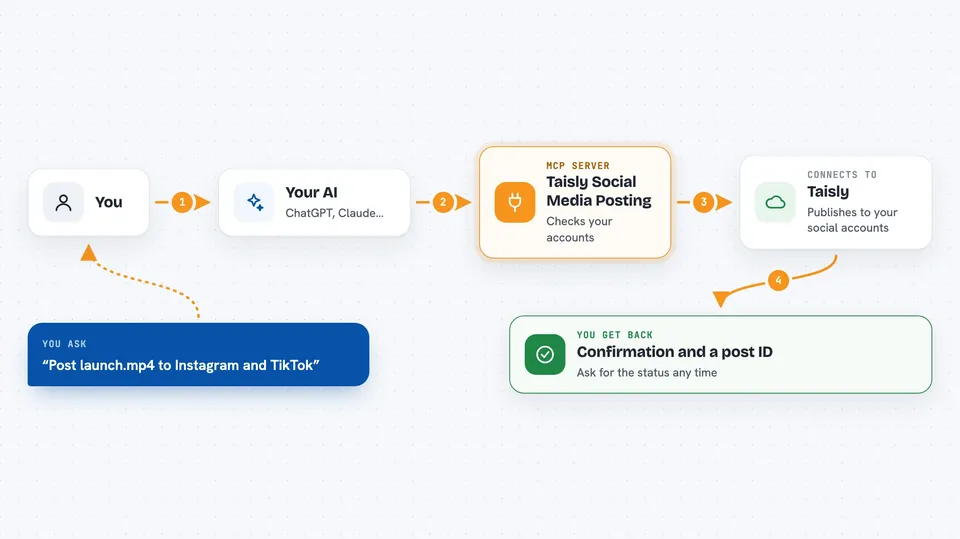
You ask your AI to post a video, for example to Instagram and TikTok. Your AI uses this helper to check which social accounts you have connected. It then checks the video and the caption before anything goes live. After you say yes, it sends the post to Taisly, which publishes it or schedules it for later. You get back a confirmation and a post ID you can use to check the status.
 Click to zoom
What you can do with it
- List the social accounts you have connected to Taisly
- Validate a video and caption before posting
- Publish a video now to one or more platforms
- Schedule a video for a future date and time
- Check the status of a post you sent
- List your recent posts
- Repost a video from one connected account to others
Try asking your AI
- “Post my launch.mp4 to Instagram and TikTok with the caption Launch day, short demo, big update”
- “Schedule this video for tomorrow at 9am on YouTube Shorts and X”
- “Show me which social accounts are connected to Taisly”
- “Check the status of my last post”
What it gives back to you
You get back clear answers in the chat, like a list of your connected accounts or a confirmation that a post was created. It also gives you a post ID (called historyId) so you can ask for the status later. If something is wrong with the video or caption, it tells you before posting. Everything comes back as simple text you can read.
Before you start
What you need
- A Taisly account (free to start)
- At least one social account connected in Taisly (TikTok, Instagram, YouTube, X or Facebook)
- Node.js 18 or newer if you use the local version
- A video file on your computer, or a public video link if you use the remote version
Good to know
This can publish videos to your real social accounts, so always read the caption and destination before you confirm.
Install it with your AI
Add Taisly Social Media Posting to your AI, no technical skills needed
You don't install anything by hand. You copy one prompt, paste it into an AI that can work on your computer, and it checks, installs and connects the server for you, asking you when it needs something.
Sign in to get the install prompt
Members get a ready-made prompt that lets the Claude desktop app check Taisly Social Media Posting, install it and connect it for them, step by step. You don't need any technical skills: you copy, paste and answer a few questions. Your connected AI can also find and install any of the 4,609 MCP servers here for you.
Who it's for
People who make short videos and want their AI to publish or schedule them without opening each social app.




