MCP server · Social media · official
PlanVortex MCP server
by taliasoftworks · official
Let your AI schedule social posts, reply to comments and messages, and read your post numbers across many networks.
This is the official helper that connects your AI assistant to PlanVortex, a tool for managing social media. Once it is set up, you can ask your AI to schedule posts, answer comments and direct messages, and pull up how your posts are doing. It is handy for anyone who runs social accounts and wants to do less clicking.
What is an MCP server? The 30-second version
On its own, your AI can only chat. An MCP server is a small helper program that gives your AI a new skill or a connection to an app. This one connects your AI to PlanVortex, so when you ask it to schedule a post or check your comments, it can actually go and do that in your PlanVortex account.
What this MCP server does
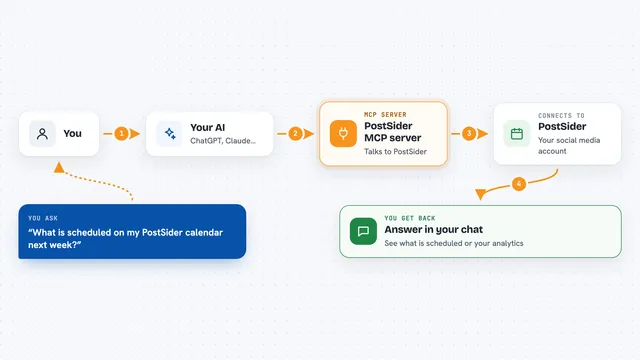
You ask your AI something like what is scheduled this week or which comments are unread. The AI sends that request to this helper. The helper talks to PlanVortex using the app details you set up. PlanVortex then does the work, like listing your posts or sending a reply. The helper brings the answer back and your AI shows it to you in the chat.
What you can do with it
- See what posts are scheduled and when
- Create or update a scheduled post
- Read your comment inbox and reply to comments
- Read your direct messages and send replies
- Check how each post and account is performing
- Upload a picture or video for a post
- Get a link to connect a new social account
Try asking your AI
- “What do I have scheduled this week, and which comments are still unread?”
- “Reply to the last comment on my Instagram post saying thanks for the feedback.”
- “Show me my top three posts from last month and their numbers.”
- “Send a message to the person who asked about shipping in my DMs.”
What it gives back to you
You get back lists, summaries, numbers and answers in the chat. For example, it can show a list of scheduled posts with dates, a count of unread comments, or the likes and reach for a post. When it sends a reply or schedules something, it tells you what it did.
Before you start
What you need
- A PlanVortex account (the free plan works and includes one app)
- A client ID and client secret from your PlanVortex panel under Settings, then Apps
- The Claude desktop app or another AI tool that supports MCP servers
Good to know
It can publish posts, send messages and spend AI credits, and those actions cannot be undone, so keep the confirmation warnings on in your AI tool and check before you send.
Install it with your AI
Add PlanVortex MCP server to your AI, no technical skills needed
You don't install anything by hand. You copy one prompt, paste it into an AI that can work on your computer, and it checks, installs and connects the server for you, asking you when it needs something.
Sign in to get the install prompt
Members get a ready-made prompt that lets the Claude desktop app check PlanVortex MCP server, install it and connect it for them, step by step. You don't need any technical skills: you copy, paste and answer a few questions. Your connected AI can also find and install any of the 4,960 MCP servers here for you.
Who it's for
Social media managers, small business owners and anyone who runs several social accounts and wants to handle posts and messages with less clicking.