MCP server · No-code
Mobius Studio MCP server
by tcgunel
Lets your AI set up and edit WordPress sites that use the Sweipe or FlatMobile theme.
This is a helper that connects your AI assistant to a WordPress site built with the Sweipe or FlatMobile theme. You can ask it to import a demo, build a whole site from a short brief, rewrite the text on your pages, or change basic settings. It is handy if you run one of these theme sites and would rather describe what you want than click through menus.
What is an MCP server? The 30-second version
On its own, your AI can only chat with you. An MCP server is a small helper program that gives your AI a new skill or a connection to an app or service. This one connects your AI to your Sweipe or FlatMobile WordPress site. Once it is set up, you can ask your AI to look things up or make changes on that site for you.
What this MCP server does
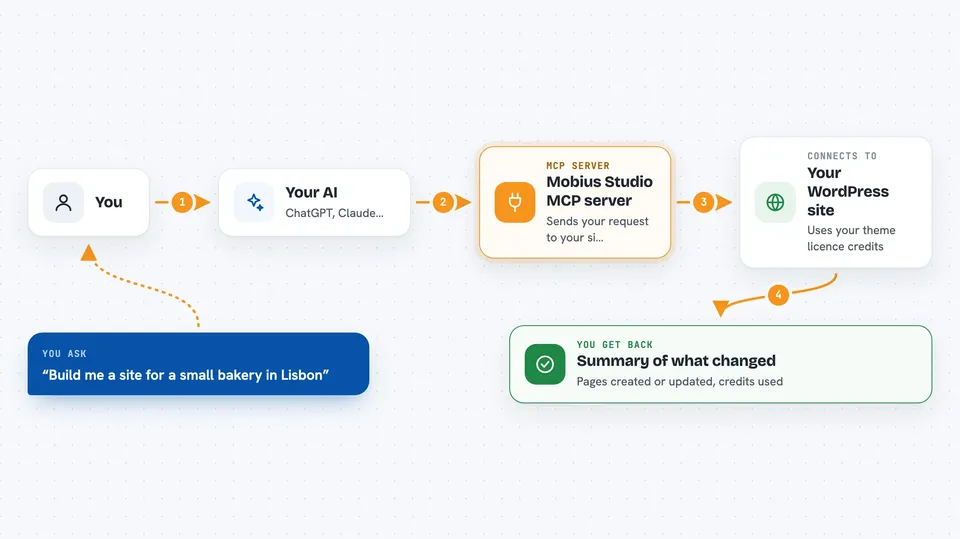
You tell your AI what you want, like build a site about a bakery or rewrite the text on my About page. The AI uses this helper, which talks to your WordPress site through a built-in connection called the agent surface. The helper sends your request to the site, and the site's own AI service does the work using credits from your theme licence. When it is done, you get back a summary of what happened, like which pages were created or changed.
 Click to zoom
What you can do with it
- Import a ready-made demo site
- Build a new site from a one-paragraph brief
- Review a site and get a corrected plan
- Rewrite the text on existing pages
- Undo a copy rewrite if you change your mind
- Check your theme, licence, and AI status
- Change your site title, tagline, timezone, and language
Try asking your AI
- “Build me a site for a small bakery in Lisbon with a menu page and a contact page.”
- “Import the demo that looks closest to a personal trainer site.”
- “Rewrite the copy on my Services page to sound friendlier.”
- “What is my current credit balance and is AI turned on?”
What it gives back to you
You get answers in the chat, like a list of demos, a plan with page names, or a status report. When it builds or rewrites, it tells you what pages were created or changed and how many credits were used. You can also ask for the stored plan or a review summary. It does not show you the pages themselves, but it tells you what it did.
Before you start
What you need
- A WordPress site running the Sweipe or FlatMobile theme
- An administrator account on that site
- A WordPress Application Password (a special password you create in your profile)
- The theme licence activated and AI turned on in the theme settings
Good to know
Building and reviewing sites spends credits from your theme licence, and some actions change your live site, so check the plan before you say yes.
Install it with your AI
Add Mobius Studio MCP server to your AI, no technical skills needed
You don't install anything by hand. You copy one prompt, paste it into an AI that can work on your computer, and it checks, installs and connects the server for you, asking you when it needs something.
Sign in to get the install prompt
Members get a ready-made prompt that lets the Claude desktop app check Mobius Studio MCP server, install it and connect it for them, step by step. You don't need any technical skills: you copy, paste and answer a few questions. Your connected AI can also find and install any of the 4,361 MCP servers here for you.
Who it's for
People who run WordPress sites on the Sweipe or FlatMobile theme and want to set them up or edit them by describing what they want.