
MCP server · Privacy
TrustBoost PII Sanitizer
Your AI can strip emails, phone numbers, IDs and card numbers out of text before it sends that text anywhere.
TrustBoost PII Sanitizer is a helper that cleans personal details out of text before your AI sees it or passes it on. It spots things like email addresses, phone numbers, national ID numbers, card numbers and secret keys, and swaps them for the word [REDACTED]. It is handy if you work with customer messages, forms or documents and you do not want private details floating around.
What is an MCP server? The 30-second version
On its own, your AI can only chat with you. An MCP server is a small helper program that gives your AI a new skill or a connection to an outside service. This one connects your AI to TrustBoost, a cleaning service that removes private information from text. So when you ask your AI to check or tidy a piece of writing, it can send the text to TrustBoost first and get back a version with the personal details taken out.
What this MCP server does
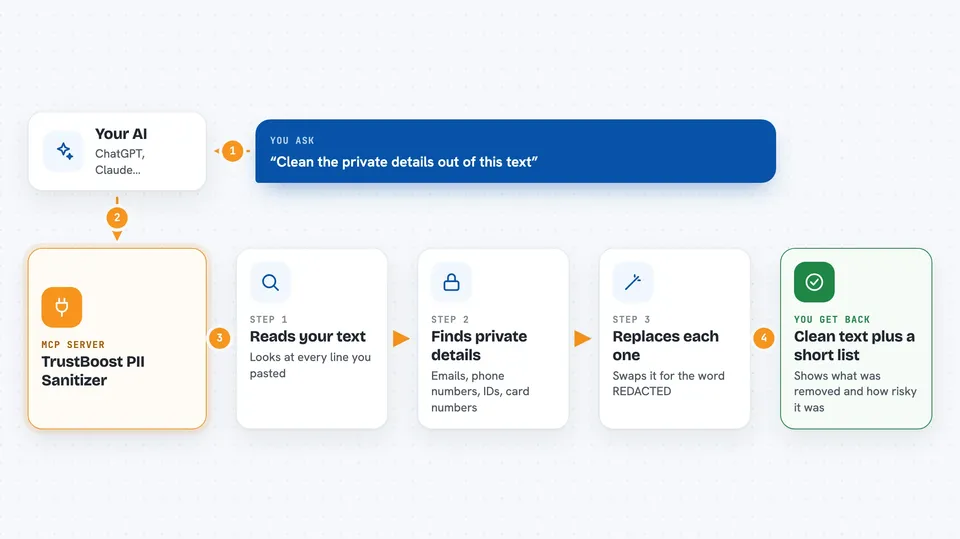
You paste some text into your chat and ask your AI to clean it. Your AI sends that text to the TrustBoost helper. TrustBoost reads it, finds things like emails, phone numbers, ID numbers and secret keys, and replaces each one with [REDACTED]. It also tells you how risky the text was and lists what it removed. Your AI then shows you the cleaned text and the list in the chat.
 Click to zoom
What you can do with it
- Remove emails, phone numbers and national ID numbers from a block of text
- Strip secret keys, passwords and card numbers before sharing text with an AI
- Clean customer messages in English, Spanish, Portuguese, German, Japanese, French, Italian or Korean
- Get a short list of exactly what was removed and how risky it was
- Check a draft before you paste it into another tool or send it to a colleague
What it gives back to you
You get back the same text with each private detail replaced by [REDACTED]. You also get a short list showing what was removed, for example an email or a card number. A safety score between 0 and 1 tells you how risky the original text was, and a risk label like CLEAN, SENSITIVE, PRIVATE or CRITICAL. All of this appears right in your chat.
Before you start
What you need
- An MCP-compatible AI app such as Claude Desktop, Cursor or Windsurf
- An internet connection, since the cleaning happens on TrustBoost's servers
- Nothing else for the free preview: the first few tries per day need no account and no payment
Good to know
The text you send is processed on TrustBoost's servers, so do not use it for anything you are not allowed to send off your own machine.
Install it with your AI
Add TrustBoost PII Sanitizer to your AI, no technical skills needed
You don't install anything by hand. You copy one prompt, paste it into an AI that can work on your computer, and it checks, installs and connects the server for you, asking you when it needs something.
Sign in to get the install prompt
Members get a ready-made prompt that lets the Claude desktop app check TrustBoost PII Sanitizer, install it and connect it for them, step by step. You don't need any technical skills: you copy, paste and answer a few questions. Your connected AI can also find and install any of the 4,361 MCP servers here for you.
Who it's for
Anyone who handles customer messages, forms or documents and wants private details removed before text goes to an AI, especially support, HR, legal and admin teams.





