
MCP server · Research
tube-bridge MCP server
Search YouTube, read transcripts and comments, and build a private searchable library of video content.
tube-bridge is a small helper program that connects your AI assistant to YouTube for research. It lets your AI search videos, read transcripts, pull comments, and even grab a single picture from a specific moment in a video. It is handy if you research topics, follow channels, or want to search across many video transcripts at once without leaving your chat.
What is an MCP server? The 30-second version
On its own, your AI can only chat with you using what it already knows. An MCP server is a small helper program that gives your AI a new skill or a connection to an app or service. This one connects your AI to YouTube, so it can look up videos, read what was said, and gather details for you when you ask. You do not need to be technical to use it once it is set up; you just ask questions in plain words.
What this MCP server does
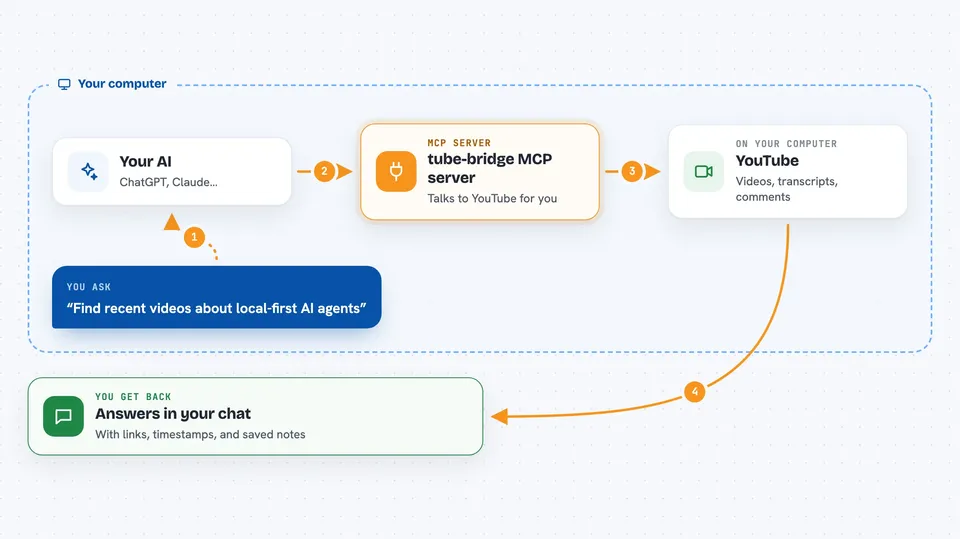
You ask your AI something about YouTube, like finding recent videos on a topic or reading what a video says. Your AI sends that request to tube-bridge, which talks to YouTube on your behalf. tube-bridge brings back titles, transcripts, comments, and links, and hands them to your AI. Your AI then shows you the answer in the chat, often with timestamps and source links. It can also save transcripts into a private local collection so you can search across many videos at once.
 Click to zoom
What you can do with it
- Search YouTube for videos by topic, date, channel, or length
- Read the full transcript of a video, with or without timestamps
- Get a video's title, views, channel, description, and tags
- See the top comments on a video, including likes and reply counts
- List recent uploads from a channel or videos in a playlist
- Save video transcripts into a private local collection and search them
- Grab a single picture from a specific moment in a video
Try asking your AI
- “Find recent videos about local-first AI agents and summarize the best one”
- “Read the transcript of this video and tell me where it talks about memory”
- “Save these three videos into a collection called research and search it for pricing advice”
- “Show me the top comments on this video and what people are complaining about”
What it gives back to you
You get back answers in the chat: lists of videos with titles and links, transcript text with timestamps, comment summaries, and channel or playlist details. When you search a saved collection, you get matching passages with a similarity score, the time in the video, and a link that jumps to that moment. If you ask for a frame, you get a single image from that point in the video. Nothing is stored on a company server; your saved collections stay on your own computer.
Before you start
What you need
- Python 3.12 or newer
- The uvx tool (a small program runner; the setup guide shows how to get it)
- Optional: a YouTube Data API key from Google Cloud for comments and channel search
- Optional: ffmpeg installed if you want to grab pictures from videos
Good to know
It can permanently delete a saved collection and its search index if you ask it to, so be careful with the delete option.
Install it with your AI
Add tube-bridge MCP server to your AI, no technical skills needed
You don't install anything by hand. You copy one prompt, paste it into an AI that can work on your computer, and it checks, installs and connects the server for you, asking you when it needs something.
Sign in to get the install prompt
Members get a ready-made prompt that lets the Claude desktop app check tube-bridge MCP server, install it and connect it for them, step by step. You don't need any technical skills: you copy, paste and answer a few questions. Your connected AI can also find and install any of the 4,609 MCP servers here for you.
Who it's for
Researchers, journalists, students, and anyone who spends time watching or summarizing YouTube videos for work.




