
MCP server · Finance and crypto
TILL Swiss accounting MCP server
by tillbooks
Let your AI post journal entries, sort invoices, and prepare Swiss VAT returns in a local ledger.
TILL is a free, open-source accounting app made for Switzerland. It keeps your books in a single file on your own computer, and it is built so that an AI assistant can work with the ledger directly. It is handy for Swiss freelancers, small business owners, and bookkeepers who want help with everyday bookkeeping without sending their numbers to a cloud service.
What is an MCP server? The 30-second version
On its own, your AI can only chat. An MCP server is a small helper program that gives your AI a new skill or a connection to an app. This one connects your AI to TILL, your local Swiss accounting ledger. Once it is connected, you can ask your AI to record entries or check your VAT, and it will do that work in your own books.
What this MCP server does
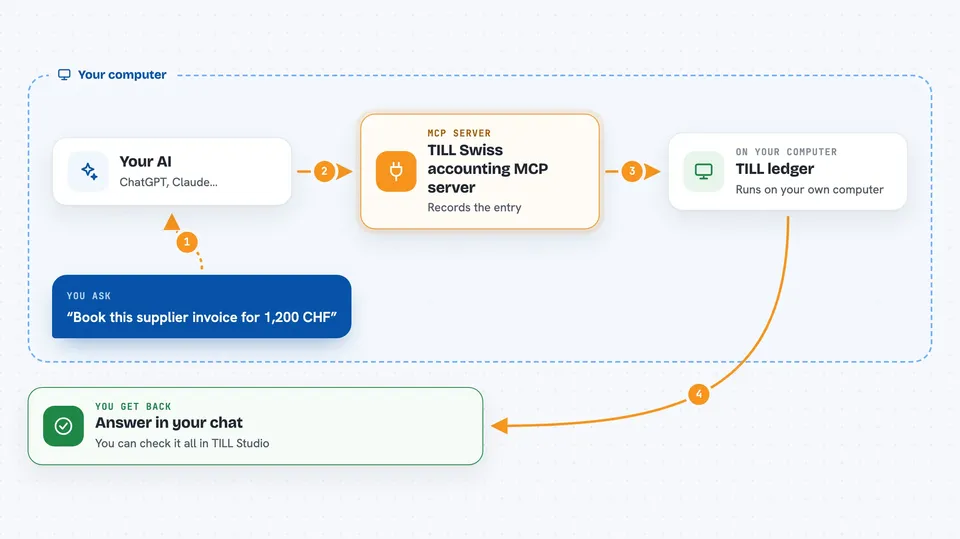
You ask your AI something like "book this invoice" or "how did last quarter look". The AI uses this helper to talk to your TILL ledger on your computer. TILL records the entry, sorts the transaction, or works out the numbers you asked for. Then the AI tells you the result in the chat, and you can review everything in the TILL Studio, a simple screen for humans.
 Click to zoom
What you can do with it
- Post double-entry journal entries to your ledger
- Categorize incoming transactions and invoices
- Draft invoices and follow up on unpaid ones
- Prepare the Swiss MWST (VAT) return
- Answer questions about how a quarter or year went
- Use Swiss QR-bills and the KMU chart of accounts
- Keep everything in a local SQLite file on your machine
Try asking your AI
- “Book this supplier invoice for 1,200 CHF with 8.1% VAT”
- “Categorize last month's bank transactions”
- “Draft an invoice for client X for 3,500 CHF plus VAT”
- “How did my second quarter look, and what VAT do I owe?”
What it gives back to you
You get answers in plain chat: lists of entries, totals, a draft invoice, or a summary of your VAT position. When the AI posts or changes something, it tells you what it did, and you can see the same thing in the TILL Studio. Nothing is hidden: the ledger is append-only, so corrections show up as reversing entries, not silent edits.
Before you start
What you need
- Node.js installed on your computer (the free program that runs TILL)
- The Claude desktop app or another MCP-capable AI client
- A folder on your computer where the ledger file can live
Good to know
TILL is pre-alpha and it keeps books, so do not point it at real accounts yet, and remember you stay responsible for your own tax filings.
Install it with your AI
Add TILL Swiss accounting MCP server to your AI, no technical skills needed
You don't install anything by hand. You copy one prompt, paste it into an AI that can work on your computer, and it checks, installs and connects the server for you, asking you when it needs something.
Sign in to get the install prompt
Members get a ready-made prompt that lets the Claude desktop app check TILL Swiss accounting MCP server, install it and connect it for them, step by step. You don't need any technical skills: you copy, paste and answer a few questions. Your connected AI can also find and install any of the 4,609 MCP servers here for you.
Who it's for
Swiss freelancers, small business owners, and bookkeepers who want an AI to help with everyday bookkeeping while keeping the books on their own machine.



