MCP server · Productivity
ClawTouch HID MCP server
by tinqiao-oss
Lets your AI move a real mouse, click, type and scroll on a machine through a small USB device.
ClawTouch MCP is a helper that gives your AI control of a real mouse and keyboard. It works with a small USB board (a Raspberry Pi Pico 2) that plugs into a computer and acts like a normal keyboard and mouse. It is handy if you want an AI to click and type on a machine that does not allow software automation, or if you are testing how a computer reacts to real input.
What is an MCP server? The 30-second version
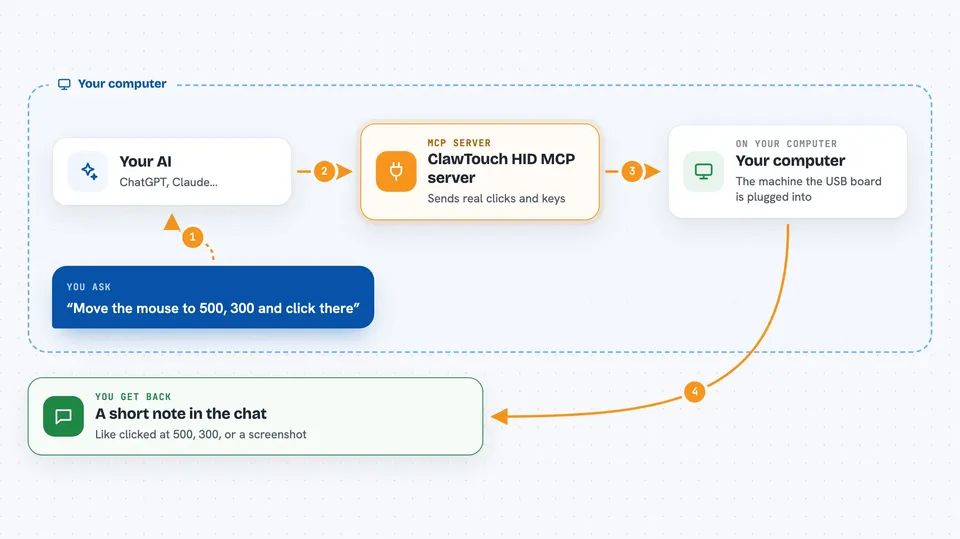
On its own, your AI can only chat with you. An MCP server is a small helper program that gives your AI a new skill or a connection to something outside the chat. This server connects your AI to a physical USB device that pretends to be a keyboard and mouse. When you ask your AI to click or type, the AI tells this helper, the helper sends the command over USB to the board, and the board presses the keys or moves the mouse for real.
What this MCP server does
You ask your AI to do something on a computer, like click a button or type a sentence. The AI turns that into a tool call and sends it to this helper. The helper talks to the ClawTouch board over a USB cable. The board then sends real keyboard and mouse signals to the computer it is plugged into, just like a person using a keyboard. You see the result in the chat, and the computer reacts as if someone had typed or clicked.
 Click to zoom
What you can do with it
- Move the mouse to a spot on the screen
- Click, double-click or drag with the mouse
- Type text using the keyboard
- Press key combinations like Ctrl+C or Alt+Tab
- Scroll up and down
- Take a screenshot of the screen (if you turn it on)
- Release all held keys and buttons as a panic stop
Try asking your AI
- “Move the mouse to 500, 300 and click there”
- “Type hello world into the search box”
- “Press Ctrl+S to save the file”
- “Scroll down three times on this page”
What it gives back to you
You get short answers in the chat that say what happened, like "clicked at 500, 300" or "typed 11 characters". If you turn on screenshots, you can also get an image of the screen back in the chat. The helper does not make decisions for you; it just does what the AI asks and reports back.
Before you start
What you need
- A ClawTouch HID board (a Raspberry Pi Pico 2 with the ClawTouch firmware) or a turnkey ClawTouch box
- Python installed on the computer where the board is plugged in
- The clawtouch-mcp package installed with pip
- An MCP client like Claude Desktop, Cursor or Cline
Good to know
An AI connected to this can do anything a person at the keyboard can do, including opening apps, running commands and deleting files, so use it on a separate machine and keep a way to unplug the device.
Install it with your AI
Add ClawTouch HID MCP server to your AI, no technical skills needed
You don't install anything by hand. You copy one prompt, paste it into an AI that can work on your computer, and it checks, installs and connects the server for you, asking you when it needs something.
Sign in to get the install prompt
Members get a ready-made prompt that lets the Claude desktop app check ClawTouch HID MCP server, install it and connect it for them, step by step. You don't need any technical skills: you copy, paste and answer a few questions. Your connected AI can also find and install any of the 4,609 MCP servers here for you.
Who it's for
People who need an AI to control a locked-down computer, test how software handles real keyboard and mouse input, or set up accessibility tools.