MCP server · Apple, iOS and Mac
Apple apps MCP server
Lets your AI read and act inside Apple Mail, Calendar, Reminders, Messages, Notes, Contacts, Files and more on your Mac.
This is a set of helper programs that let your AI work with the Apple apps already on your Mac. You can ask it to check your calendar, add a reminder, search your mail or send a message, and it does that in the real apps. It is handy if you live in Apple Mail, Calendar and Reminders all day and want your AI to handle the small stuff.
What is an MCP server? The 30-second version
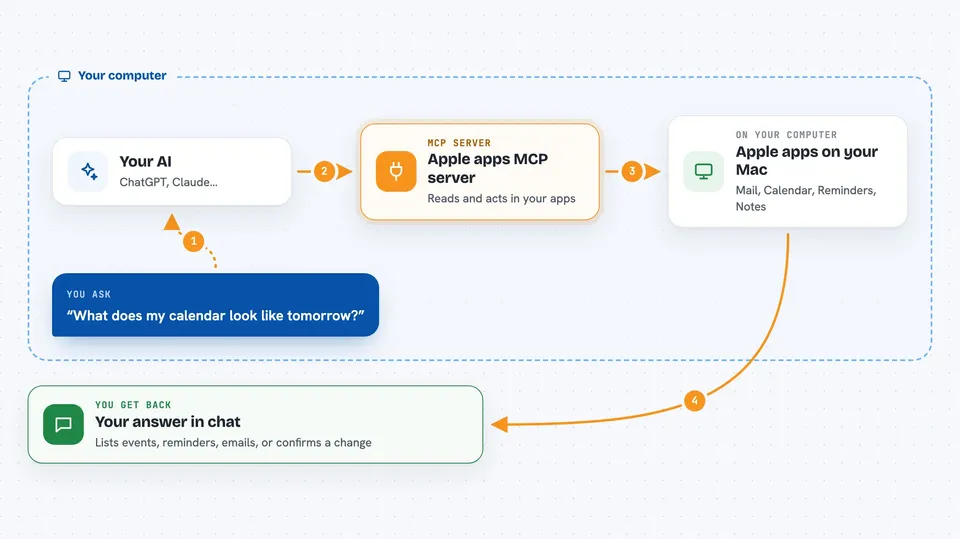
On its own, your AI can only chat with you. It cannot see your calendar or your inbox. An MCP server is a small helper program that gives your AI one new skill, and this one gives it a connection to your Apple apps on your Mac. So when you ask about tomorrow's meetings, the AI asks this helper, the helper looks in Calendar, and the answer comes back to you in the chat.
What this MCP server does
You type a request in plain words, like checking your day or adding a reminder. Your AI passes that request to this helper program running on your Mac. The helper then talks to the right Apple app, such as Calendar, Mail or Reminders, using the access you approved. The app does the work, and the result comes back through the helper into your chat. You see the answer or a short note that the change was made.
 Click to zoom
What you can do with it
- Check your calendar and list what is coming up
- Create and update reminders, including due dates
- Search your mail and read a whole conversation thread
- Send messages and look up recent message history
- Look up a person in Contacts before sending anything
- Read and write notes, and manage files in folders you allow
- Get directions and run your own Shortcuts
Try asking your AI
- “What does my calendar look like tomorrow?”
- “Add a reminder to call the dentist on Friday at 9am.”
- “Search my mail for the invoice from last month and summarise the thread.”
- “Text Alex that I am running ten minutes late.”
What it gives back to you
You get answers in plain chat text: lists of events, reminders, matching emails or contact details. When it changes something, like adding a reminder or sending a message, it tells you what it did. For mail threads you can get a short summary instead of the whole chain. The unified version can also produce a daily or weekly briefing of what is on your plate.
Before you start
What you need
- A Mac running macOS
- Python 3.11 or newer
- uv installed (a small tool that runs these servers; the README links to the install page)
- An MCP client such as Claude Code, Codex or Claude Desktop
Good to know
It can send messages, change reminders and archive mail for real, and anything it reads may be sent on to your AI provider, so check before you let it act on your inbox or contacts.
Install it with your AI
Add Apple apps MCP server to your AI, no technical skills needed
You don't install anything by hand. You copy one prompt, paste it into an AI that can work on your computer, and it checks, installs and connects the server for you, asking you when it needs something.
Sign in to get the install prompt
Members get a ready-made prompt that lets the Claude desktop app check Apple apps MCP server, install it and connect it for them, step by step. You don't need any technical skills: you copy, paste and answer a few questions. Your connected AI can also find and install any of the 4,361 MCP servers here for you.
Who it's for
Anyone who works mostly inside Apple Mail, Calendar, Reminders and Messages on a Mac and wants their AI to handle everyday admin.