
MCP server · Privacy
tilde MCP server
by topskychen
Your AI can read your personal profile and team rules, so you stop repeating yourself in every chat.
tilde is a small helper that keeps one file about you on your own computer: your name, role, the tools you use, and how you like to work. Any AI app that supports this helper can read that file, so it knows who you are without you typing it again. It is handy if you use more than one AI tool and are tired of re-explaining yourself.
What is an MCP server? The 30-second version
On its own, your AI can only chat with you. An MCP server is a small helper program that gives your AI a new skill or a connection to something outside the chat. This one connects your AI to tilde, a folder on your own machine that holds your profile and team rules. So when you ask a question, the AI can look up your details there and answer with them.
What this MCP server does
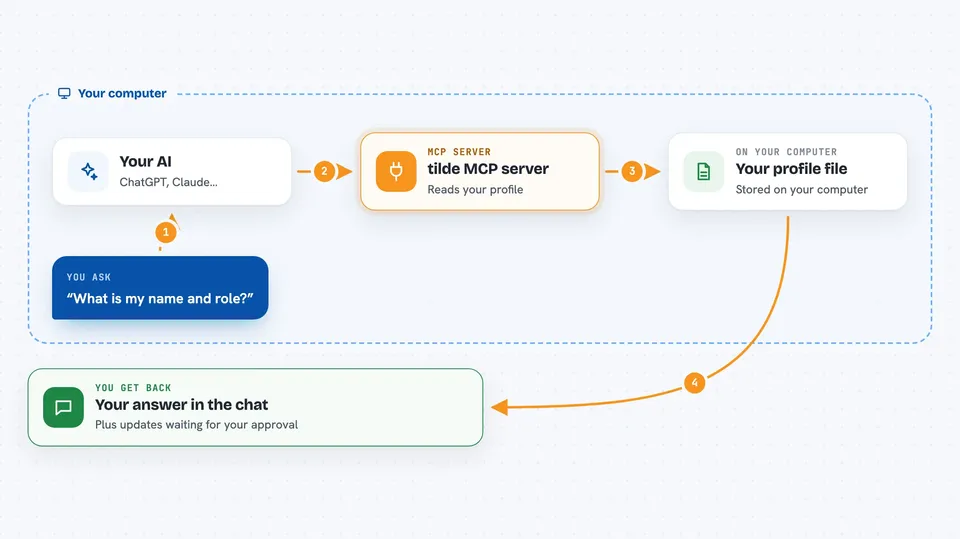
You ask your AI something, like what your name is or which languages you prefer. The AI calls this helper, and the helper reads your profile file on your computer. It sends back only the part that was asked for, such as your identity or your tech stack. If the AI thinks something in your profile should change, it does not change it by itself. It writes a suggestion that waits for you to approve or reject.
 Click to zoom
What you can do with it
- Look up your name, role and years of experience
- Read your preferred languages, frameworks and working habits
- Check your team's coding standards and rules
- Suggest an update to your profile and wait for your approval
- List the updates that are still waiting for your decision
- Import your resume to fill in your profile
- Keep some skills private and share others with your team
Try asking your AI
- “What is my name and role?”
- “Which programming languages do I prefer?”
- “What are my team's coding standards?”
- “Show me the profile updates waiting for my approval”
What it gives back to you
You get plain answers in the chat, built from your own profile file. For example, ask what your name is and the AI replies with your name and role. Ask about your team and it replies with your team's standards. It can also show you a list of suggested changes that are waiting for you to approve or reject.
Before you start
What you need
- Python installed on your computer (the setup page tells you how)
- The tilde program itself, installed with one command
- A free Google API key if you want to import documents or a resume (a kind of password for apps)
- An AI app that supports MCP, such as Claude Desktop or Cursor
Good to know
The AI can suggest changes to your profile, so read each suggestion before you approve it, and remember that anything in your profile is visible to the AI tools you connect.
Install it with your AI
Add tilde MCP server to your AI, no technical skills needed
You don't install anything by hand. You copy one prompt, paste it into an AI that can work on your computer, and it checks, installs and connects the server for you, asking you when it needs something.
Sign in to get the install prompt
Members get a ready-made prompt that lets the Claude desktop app check tilde MCP server, install it and connect it for them, step by step. You don't need any technical skills: you copy, paste and answer a few questions. Your connected AI can also find and install any of the 4,361 MCP servers here for you.
Who it's for
People who use several AI tools and want their preferences and team rules to follow them everywhere, without repeating themselves.





