
MCP server · Developer tools
ADR Analysis MCP server
by tosin2013
Lets your AI check your written architecture decisions against your real code and flag what no longer matches.
This is a helper for software teams that write down their big technical decisions in documents, then forget to update them. It connects your AI assistant to those documents and to your actual code, so the AI can compare the two and tell you where they disagree. It is handy for architects, tech leads, and developers who want to catch stale decisions before they cause trouble.
What is an MCP server? The 30-second version
On its own, your AI can only chat with you using what it already knows. An MCP server is a small helper program that gives your AI a new skill or a connection to an app or service. This one connects your AI to your project folder, where your decision documents and your code live. Once connected, the AI can look things up there and do work for you when you ask.
What this MCP server does
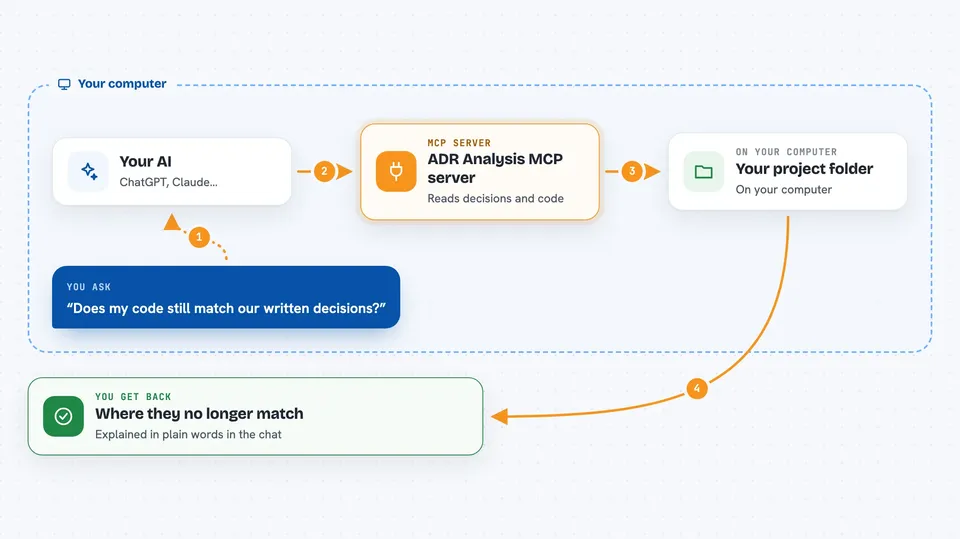
You ask your AI something about your project's architecture. The AI uses this helper to look inside your project folder. The helper reads your decision documents and scans your code to see what technologies and patterns are really there. It then hands the AI a set of instructions and findings, and the AI turns that into an answer for you. You get back a plain explanation of where your documents and your code no longer match.
 Click to zoom
What you can do with it
- Detect your project's technology stack and architectural patterns
- Compare your written decisions against your live code and flag drift
- Generate new decision documents from a requirements file
- Find code files related to a specific decision
- Spot secrets, personal data, and sensitive content and suggest masking
- Check whether your project is ready to deploy based on tests
- Remember decisions and tool usage across a session
What it gives back to you
You get answers in the chat, not files you have to hunt for. That can be a list of detected technologies, a summary of where your documents and code disagree, suggested new decision records, or a list of related code files. When you ask it to write documents, it can create them in your project folder. The AI explains the findings in normal words.
Before you start
What you need
- Node.js version 20 or newer, plus npm (both free from nodejs.org)
- An AI client that supports MCP, such as Claude Desktop, Cline, Cursor, or Windsurf
- The path to your project folder on your computer
- Internet access during installation so some code-reading parts can be built
Good to know
It reads the files in the project folder you point it at, so only aim it at a folder you are comfortable having your AI look through, and check any documents it offers to create before keeping them.
Install it with your AI
Add ADR Analysis MCP server to your AI, no technical skills needed
You don't install anything by hand. You copy one prompt, paste it into an AI that can work on your computer, and it checks, installs and connects the server for you, asking you when it needs something.
Sign in to get the install prompt
Members get a ready-made prompt that lets the Claude desktop app check ADR Analysis MCP server, install it and connect it for them, step by step. You don't need any technical skills: you copy, paste and answer a few questions. Your connected AI can also find and install any of the 4,361 MCP servers here for you.
Who it's for
Software architects, tech leads, and developers who keep written architecture decisions and want them checked against the real code.





