
MCP server · Developer tools
AWS EC2 Pricing MCP server
Ask your AI for up-to-date EC2 instance prices and it looks them up for you.
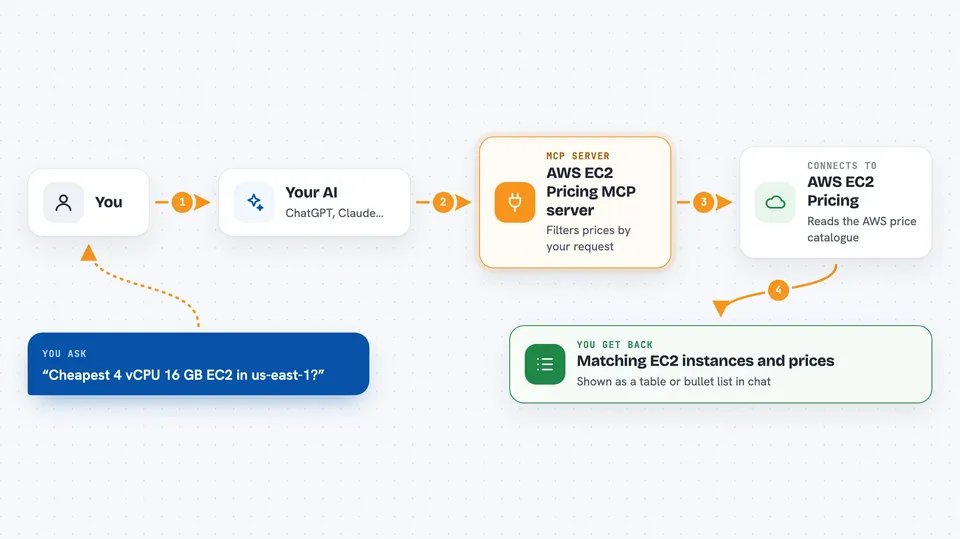
This is a small helper that lets your AI look up current prices for Amazon EC2 instances, which are the virtual computers you rent from Amazon Web Services. It is handy if you work with cloud costs, budgets, or you just want to compare instance options without clicking around the AWS website. You ask in plain words, and your AI brings back the numbers.
What is an MCP server? The 30-second version
On its own, your AI can only chat. It cannot see live prices or open the AWS pricing pages for you. An MCP server is a small helper program that gives your AI a new skill, and this one connects it to AWS EC2 pricing data. Once it is connected, your AI can look up instance prices and compare options when you ask.
What this MCP server does
You ask your AI something like which EC2 instances are cheapest in a certain region. Your AI passes that question to this helper. The helper reads a pre-parsed AWS price catalogue and filters it by what you asked for, such as region, platform, vCPU count, or memory. Then your AI shows you the matching instances and their prices in the chat.
 Click to zoom
What you can do with it
- Find the cheapest EC2 instances that match your requirements
- Compare prices across different AWS regions
- Filter by vCPU, RAM, GPU, platform, or tenancy
- Look up On Demand prices for a specific instance type
- Check Reserved Instance pricing options
- See CloudFix RightSpend pricing where available
Try asking your AI
- “What are the cheapest EC2 instances with 4 vCPUs and 16 GB of RAM in us-east-1?”
- “Show me On Demand prices for m5.large in Europe and the US”
- “Find GPU instances under a certain price in us-west-2”
- “Compare Reserved Instance and On Demand prices for c5.xlarge”
What it gives back to you
You get back a list of matching EC2 instances with their prices, usually as a short table or bullet list in the chat. Your AI can also summarize the cheapest options or compare a few side by side. Nothing is changed in your AWS account; it only reads pricing information.
Before you start
What you need
- Python and pip if you run the server yourself, or an AWS account if you deploy the Lambda version
- The AWS SAM CLI if you want to deploy the Lambda version
- Access to the AWS pricing data source the server reads from (S3)
Good to know
It only reads pricing data, so it will not change anything in your AWS account, but the numbers come from a catalogue that updates over time, so double-check before making big decisions.
Install it with your AI
Add AWS EC2 Pricing MCP server to your AI, no technical skills needed
You don't install anything by hand. You copy one prompt, paste it into an AI that can work on your computer, and it checks, installs and connects the server for you, asking you when it needs something.
Sign in to get the install prompt
Members get a ready-made prompt that lets the Claude desktop app check AWS EC2 Pricing MCP server, install it and connect it for them, step by step. You don't need any technical skills: you copy, paste and answer a few questions. Your connected AI can also find and install any of the 4,609 MCP servers here for you.
Who it's for
Cloud engineers, finance and FinOps people, and anyone who needs to check or compare AWS EC2 prices quickly.



