
MCP server · Analytics
Sonar MCP server
by trysonar
Lets your AI look up apps, research keywords, audit ASO, mine reviews, and estimate revenue on the App Store and Google Play.
This is a helper for your AI that connects it to Sonar, a service for App Store Optimization. App Store Optimization, or ASO, is the work of getting your app found and downloaded in the App Store and Google Play. If you make apps, market them, or want to know how they stack up against others, this is for you.
What is an MCP server? The 30-second version
On its own, your AI can only chat with you using what it already knows. An MCP server is a small helper program that gives your AI a new skill or a connection to an app or service. This one connects your AI to Sonar, so it can look up apps, research keywords, check reviews, and estimate revenue for you. You ask in plain words, and the AI uses this helper behind the scenes to get the answer.
What this MCP server does
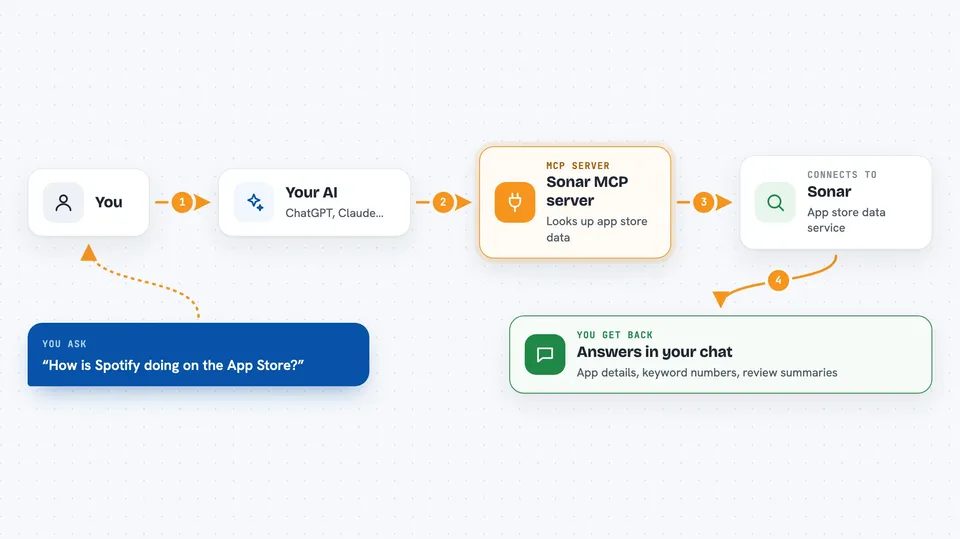
You ask your AI something like how a certain app is doing or which keywords are worth targeting. The AI passes your request to this helper, which talks to Sonar's service. Sonar looks up the app store data, keyword numbers, reviews, or revenue estimates. The helper sends the results back to your AI, and your AI explains them to you in the chat.
 Click to zoom
What you can do with it
- Look up an app's rating, review count, and category on iOS or Android
- Research a keyword's difficulty and popularity, plus related terms
- Run an ASO audit on an app and see what to fix
- Pull recent low-star reviews and group complaints by theme
- Estimate monthly revenue for apps and see the method behind it
- Track your apps and keywords daily and watch rank changes
- Compare your app's keywords against a competitor and find gaps
Try asking your AI
- “Use Sonar to look up Spotify on iOS in the US store and report its rating, review count, and category.”
- “Run an ASO audit on com.duolingo on Android and tell me what to fix.”
- “Research the keyword habit tracker on iOS and give me difficulty, popularity, and 5 related terms with lower difficulty.”
- “Pull the 50 most recent 1- and 2-star reviews of 1517783697 on iOS US and group complaints by theme.”
What it gives back to you
You get answers in your chat: app details, keyword numbers, review summaries grouped by theme, audit scores with a list of checks, and revenue estimates with the method explained. For tracked apps and keywords, you get daily rank history and lists of changes over time. Everything comes back as text your AI can read and explain.
Before you start
What you need
- The Claude desktop app, Claude Code, Cursor, Cline, or another app that supports MCP
- Node.js installed on your computer (the helper runs through npx, a tool that comes with Node.js)
- A Sonar API key for tracking, rankings, and higher limits (get one at trysonar.app/developers; there is a free mode without a key for a few tools)
- An Indie plan for workspace and write tools (an active trial counts)
Good to know
The write tools can change your Sonar workspace by adding products, apps, and keywords, so check with your AI before letting it make changes.
Install it with your AI
Add Sonar MCP server to your AI, no technical skills needed
You don't install anything by hand. You copy one prompt, paste it into an AI that can work on your computer, and it checks, installs and connects the server for you, asking you when it needs something.
Sign in to get the install prompt
Members get a ready-made prompt that lets the Claude desktop app check Sonar MCP server, install it and connect it for them, step by step. You don't need any technical skills: you copy, paste and answer a few questions. Your connected AI can also find and install any of the 4,066 MCP servers here for you.
Who it's for
App makers, indie developers, and marketing people who want to check how their app and its keywords are doing without digging through dashboards.





