MCP server · Developer tools
SSH MCP server
by tufantunc
Let your AI run commands on your remote Linux or Windows servers over SSH, with safety rules and approvals.

This is a helper that lets your AI connect to a remote server over SSH and run commands there for you. It is made for people who look after servers and want to check things or make small changes without opening a terminal themselves. It comes with safety rules, so risky commands need your approval first.
What is an MCP server? The 30-second version
On its own, your AI can only chat. It cannot reach your servers or run anything on them. An MCP server is a small helper program that gives your AI a new skill. This one gives it an SSH connection, so when you ask your AI to check a server or run a command, it can actually do it through this helper.
What this MCP server does
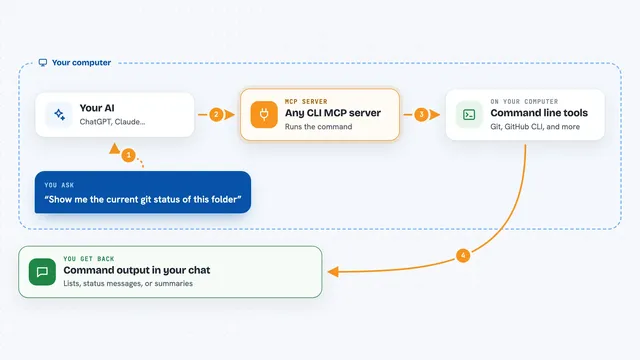
You ask your AI something about a server, like listing files or restarting a service. The AI passes that request to this helper program running on your computer. The helper opens an SSH connection to the server you set up in its config file, runs the command there, and sends the output back. The AI then shows you the result in plain words. If the command looks risky, the helper asks you to approve it first.
 Click to zoom
What you can do with it
- List the servers you have set up and check which ones are reachable
- Run read-only commands like ls, cat, and grep on a remote server
- Run other commands, with approval for anything destructive
- Open a session that remembers your folder and settings between commands
- Start a long-running process like tail -f and read its output
- Upload and download files over SFTP
- Send a stop signal to a process on the remote server
Try asking your AI
- “List the files in /var/log on my dev server”
- “Check how much disk space is left on prod-web-1”
- “Show me the last 20 lines of the syslog on the staging server”
- “Restart the nginx service on my dev server”
What it gives back to you
You get the output of the command back in the chat, shown as text, like a list of files or a chunk of a log. For file transfers, you get a short confirmation with the number of bytes moved and the file paths. If a command needs approval, you get a question first, and nothing runs until you say yes. Every decision is written to an audit log on your computer.
Before you start
What you need
- Node.js installed on your computer
- A server you can reach over SSH, with a username and either a password or an SSH key
- A config file listing your servers, placed in the right folder for your system
- The Claude desktop app or another MCP client
Good to know
This helper can run commands and change or delete files on your servers, so set up a non-root account, keep approval on for anything important, and check what your AI is about to run before you say yes.
Install it with your AI
Add SSH MCP server to your AI, no technical skills needed
You don't install anything by hand. You copy one prompt, paste it into an AI that can work on your computer, and it checks, installs and connects the server for you, asking you when it needs something.
Sign in to get the install prompt
Members get a ready-made prompt that lets the Claude desktop app check SSH MCP server, install it and connect it for them, step by step. You don't need any technical skills: you copy, paste and answer a few questions. Your connected AI can also find and install any of the 4,609 MCP servers here for you.
Who it's for
People who look after servers, like sysadmins, developers, and IT staff who want to check or fix things without opening a terminal.