
MCP server · Notes
Membase MCP server
by unibaseio
Let your AI save and recall conversation memories through the Membase network.
Membase is a memory service for AI agents. This MCP server connects your AI assistant to it so it can save messages and look them up again later. It is handy if you want your AI to remember things across chats instead of starting fresh every time.
What is an MCP server? The 30-second version
On its own, your AI can only chat with you in the moment. An MCP server is a small helper program that gives your AI a new skill or a connection to another service. This one connects your AI to Membase, a memory service. Once it is set up, your AI can save messages there and read them back when you ask.
What this MCP server does
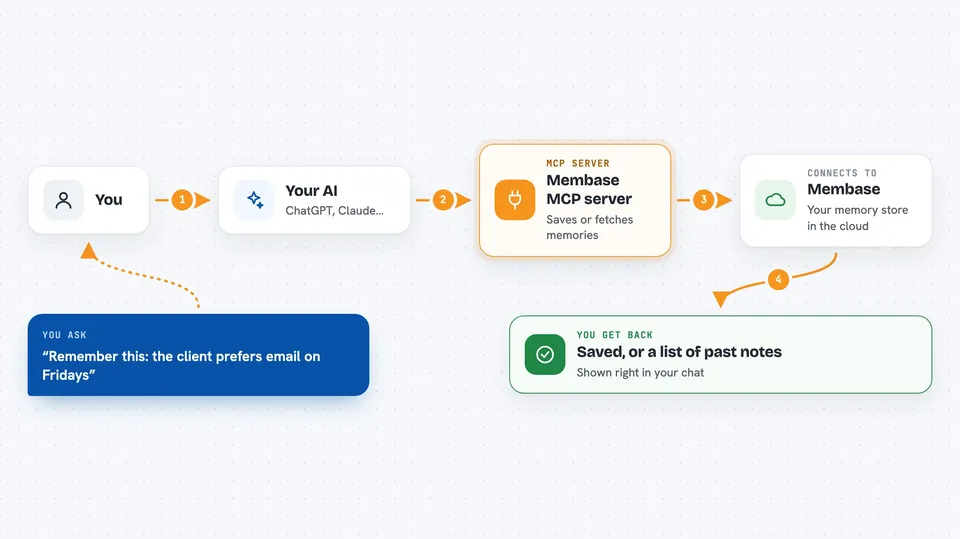
You ask your AI to remember something or to look something up. The AI uses this helper to talk to Membase. Membase stores the message in a conversation, or fetches the last few messages from it. Then the AI shows you the result in the chat. You can also switch between different conversations, so memories stay in separate buckets.
 Click to zoom
What you can do with it
- Save a message or note into your current conversation
- Fetch the last few messages from the current conversation
- Check which conversation you are currently in
- Switch to a different conversation
- Keep separate memory buckets for different topics or projects
Try asking your AI
- “Save this to my Membase memory: the client prefers email on Fridays.”
- “What were the last five things I saved in this conversation?”
- “Which conversation am I in right now?”
- “Switch to my project-alpha conversation.”
What it gives back to you
You get back short answers in the chat. When you save something, the AI confirms it was saved. When you ask for messages, you get a list of the last few saved messages. When you switch or check conversations, you get the conversation id.
Before you start
What you need
- Python and uv installed on your computer (uv is a tool that runs Python programs)
- A Membase account id (looks like 0x... and comes from Unibase)
- A conversation id you make up yourself, like a folder name
- An instance id, which is just any short label you choose
Good to know
Anything you save goes to the Membase network, so do not store passwords, private keys, or sensitive personal details there.
Install it with your AI
Add Membase MCP server to your AI, no technical skills needed
You don't install anything by hand. You copy one prompt, paste it into an AI that can work on your computer, and it checks, installs and connects the server for you, asking you when it needs something.
Sign in to get the install prompt
Members get a ready-made prompt that lets the Claude desktop app check Membase MCP server, install it and connect it for them, step by step. You don't need any technical skills: you copy, paste and answer a few questions. Your connected AI can also find and install any of the 4,066 MCP servers here for you.
Who it's for
People who want their AI assistant to keep memory across chats, like writers, researchers, or anyone running long projects.




