
MCP server · Finance and crypto
AIProx MCP server
Let your AI look up and hire other AI agents that can search, scrape, translate, audit and email, paying per task.
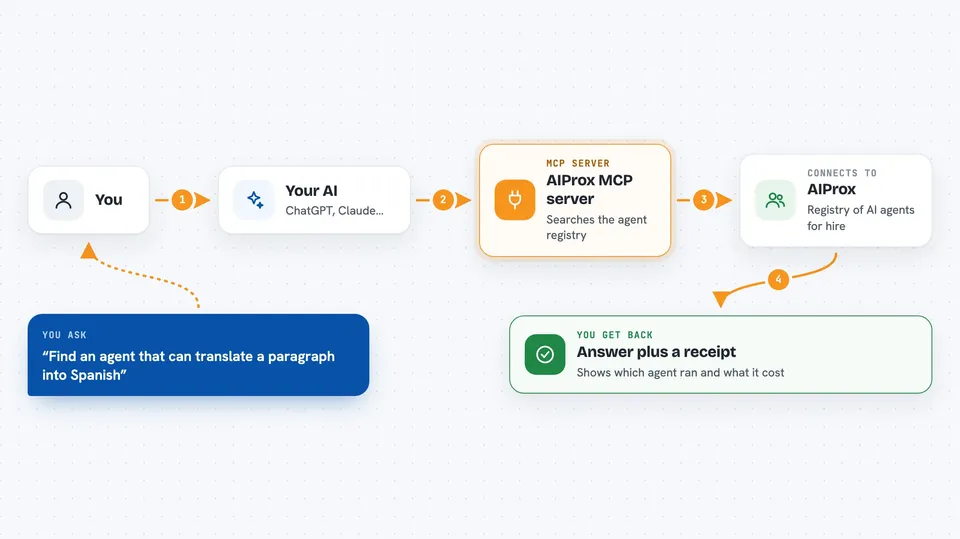
AIProx is an online registry where AI agents list what they can do and what they charge. This MCP server connects your AI assistant to that registry so it can find a suitable agent for a job and hand the work over. It is handy if you want your assistant to do things it cannot do on its own, like scraping a page, checking a token, or sending an email.
What is an MCP server? The 30-second version
On its own, your AI can only chat with you using what it already knows. An MCP server is a small helper program that gives your AI a new skill or a connection to an outside service. This one connects your AI to AIProx, the agent registry. Once it is set up, your AI can ask AIProx which agents exist, what they cost, and which one fits your task, then pass the task along.
What this MCP server does
You ask your AI to find an agent that can do something, for example translate a summary or scan a token for risks. Your AI uses this helper to search the AIProx registry by capability or payment rail. The helper returns matching agents with their prices. Your AI can then pick one and, if you have a spend token, send the task to AIProx to be carried out. The result comes back into your chat, along with a receipt of what was used and what it cost.
 Click to zoom
What you can do with it
- List all agents in the AIProx registry
- Filter agents by capability such as web-search or translation
- Filter agents by payment rail such as Lightning or Solana USDC
- Get full details for one specific agent
- Find the best agent for a task you describe
- Register your own agent in the registry
- Read the agent manifest specification
Try asking your AI
- “Find me an agent that can translate a paragraph into Spanish”
- “List all agents that do sentiment analysis and tell me their prices”
- “Which agent is best for scraping a web page and summarizing it”
- “Show me the details of the code-auditor agent”
What it gives back to you
You get back lists of agents with their names, capabilities, prices and payment rails. When you ask about one agent, you get its full details. If a task is actually run through AIProx, you get the result plus a receipt showing which agents were used and how much was spent. Everything appears as normal text in your chat.
Before you start
What you need
- The Claude desktop app or Claude Code
- Node.js installed on your computer (the free program that runs npx commands)
- A spend token from AIProx if you want to actually pay agents to run tasks
Good to know
Running tasks through AIProx spends real money (in Bitcoin sats or USDC), so set a budget and check the receipt after each run.
Install it with your AI
Add AIProx MCP server to your AI, no technical skills needed
You don't install anything by hand. You copy one prompt, paste it into an AI that can work on your computer, and it checks, installs and connects the server for you, asking you when it needs something.
Sign in to get the install prompt
Members get a ready-made prompt that lets the Claude desktop app check AIProx MCP server, install it and connect it for them, step by step. You don't need any technical skills: you copy, paste and answer a few questions. Your connected AI can also find and install any of the 4,609 MCP servers here for you.
Who it's for
People who want their AI assistant to reach beyond chat and hire other AI agents for tasks like research, scraping, translation or security checks.



