
MCP server · Social media · official
Upload-Post MCP server
by Upload-Post · official
Let your AI publish, schedule, and check social media posts across TikTok, Instagram, YouTube, LinkedIn, and more.
This is a helper that connects your AI assistant to Upload-Post, a service for posting to many social networks from one place. Once it is connected, you can ask your AI in plain words to publish a video, schedule a post, or pull up your numbers. It is handy for anyone who runs social accounts for a brand, a client, or themselves and wants to skip the app-by-app clicking.
What is an MCP server? The 30-second version
On its own, your AI can only chat. An MCP server is a small helper program that gives your AI a new skill or a connection to an app or service. This one connects your AI to Upload-Post, so it can post, schedule, and read data on TikTok, Instagram, YouTube, LinkedIn, Facebook, X, Reddit, and more. You ask in normal words, and the AI uses this helper to do the work for you.
What this MCP server does
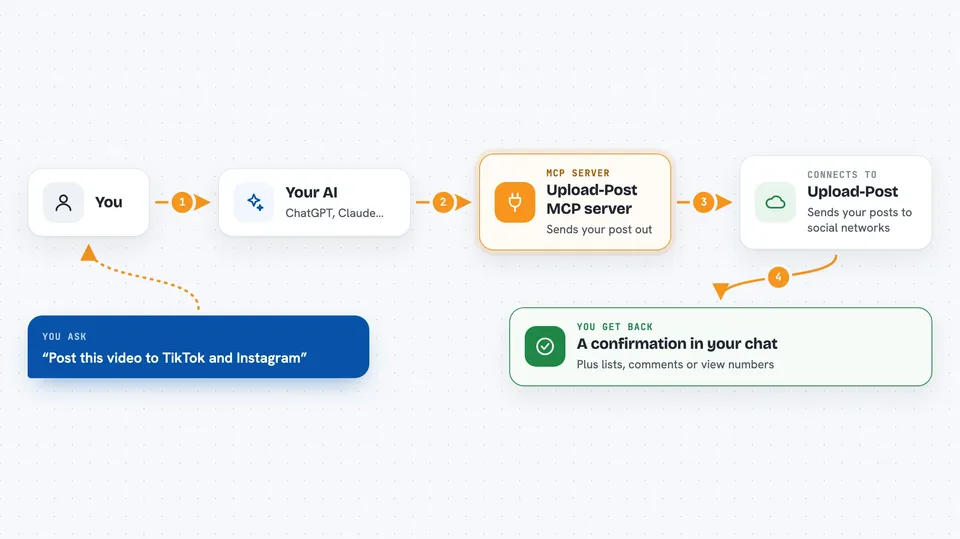
You tell your AI what you want, like posting a video or checking how a post did. The AI sends that request to this helper, which talks to Upload-Post. Upload-Post then pushes your post to the networks you picked or fetches the numbers you asked for. The AI brings the result back into your chat, so you see a confirmation, a list, or a summary without leaving the conversation.
 Click to zoom
What you can do with it
- Publish a video, photo set, text post, or document to one or many social networks
- Schedule posts for later and edit or cancel them
- Check analytics for a single post or your whole account
- See who your audience is and when they are online
- Read and reply to comments, including hiding or pinning them
- Send direct messages and manage auto-DMs
- Look up trending TikTok music, locations, and publishing settings
Try asking your AI
- “Post this video to TikTok and Instagram with the caption in the file”
- “Schedule a LinkedIn post for tomorrow at 9am about our new product”
- “How did my last YouTube video do? Show me views and watch time”
- “What are the top comments on my latest Instagram post?”
What it gives back to you
You get back plain answers in the chat: a confirmation that a post went out, a list of scheduled posts, comment threads, or numbers like views, likes, and followers. Analytics come as summaries or tables you can read at a glance. If something went wrong, the AI tells you what the problem was, like a network needing to be reconnected.
Before you start
What you need
- An Upload-Post account (free to start)
- An API key from your Upload-Post dashboard (a kind of password for apps)
- Your social accounts connected inside Upload-Post
Good to know
This server can publish, edit, and delete real posts and comments on your live social accounts, so double-check what you ask it to do before it runs.
Install it with your AI
Add Upload-Post MCP server to your AI, no technical skills needed
You don't install anything by hand. You copy one prompt, paste it into an AI that can work on your computer, and it checks, installs and connects the server for you, asking you when it needs something.
Sign in to get the install prompt
Members get a ready-made prompt that lets the Claude desktop app check Upload-Post MCP server, install it and connect it for them, step by step. You don't need any technical skills: you copy, paste and answer a few questions. Your connected AI can also find and install any of the 4,609 MCP servers here for you.
Who it's for
Social media managers, small business owners, and anyone who posts to several networks and wants to do it by chatting instead of clicking.




