
MCP server · Security
urlDNA MCP server
by urldna
Lets your AI check if a link is safe, scan suspicious URLs, and search past scans for phishing clues.
This is a helper that connects your AI assistant to urlDNA, a service that checks whether web links are safe or malicious. Once it is set up, you can just ask your AI in plain words to look into a link, and it will do the checking for you. It is handy for anyone who gets odd links in email and wants a quick second opinion.
What is an MCP server? The 30-second version
On its own, your AI can only chat with you using what it already knows. An MCP server is a small helper program that gives your AI a new skill or a connection to another service. This one connects your AI to urlDNA, a threat intelligence platform that scans web links. So when you ask about a link, your AI can actually look it up on urlDNA and bring the answer back to you.
What this MCP server does
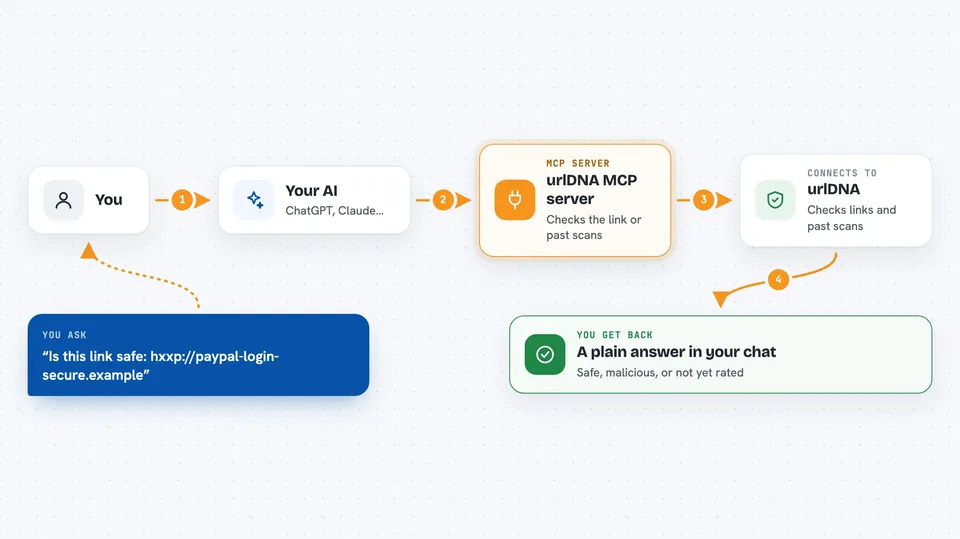
You ask your AI something like whether a link is safe or which scans look like phishing. Your AI passes that request to this helper, which talks to the urlDNA platform for you. urlDNA checks the link or searches its records of past scans. Then the helper sends the result back, and your AI shows it to you in the chat as a short answer or a list.
 Click to zoom
What you can do with it
- Check quickly whether a URL is safe, malicious, or not yet rated
- Run a full scan on a suspicious link and get the result
- Search past scans by domain, IP, technology, or malicious flag
- Save a search you use often so you can run it again later
- Look up scans tied to a brand you are watching
- Pull up the full details of an earlier scan by its ID
Try asking your AI
- “Is this link safe: hxxp://paypal-login-secure.example”
- “Search urlDNA for malicious scans with title like paypal”
- “Create a saved query for mobile scans from Italy flagged as malicious”
- “Show me all scans associated with the Google brand”
What it gives back to you
You get back plain answers in the chat, like SAFE, MALICIOUS, or UNRATED for a quick check. For a full scan you get a summary of what urlDNA found, such as the page title, the technologies used, and whether it looks like phishing. Searches come back as a list of matching scans you can read through. Saving or deleting a query just changes your saved list on urlDNA.
Before you start
What you need
- A urlDNA account and an API key from https://urldna.io (a kind of password for apps; the site gives you one)
- The uv tool installed if you run it yourself (the README shows how)
- Or just use the hosted address, no install needed
Good to know
Deleting a saved query is permanent, and scanning or searching uses your urlDNA account, so keep an eye on your plan limits.
Install it with your AI
Add urlDNA MCP server to your AI, no technical skills needed
You don't install anything by hand. You copy one prompt, paste it into an AI that can work on your computer, and it checks, installs and connects the server for you, asking you when it needs something.
Sign in to get the install prompt
Members get a ready-made prompt that lets the Claude desktop app check urlDNA MCP server, install it and connect it for them, step by step. You don't need any technical skills: you copy, paste and answer a few questions. Your connected AI can also find and install any of the 4,609 MCP servers here for you.
Who it's for
Security analysts, IT and helpdesk staff, and anyone who regularly checks suspicious links or watches a brand for phishing.



