
MCP server · Notes
Claude Handoff MCP server
by Vasilispapg
Turn any Claude Code session into a clean handoff file and build a memory brief of your project.
This is a small helper tool called claude-handoff. It takes your Claude Code sessions, even ones that crashed, and turns them into a tidy handoff file you can paste into another AI. It is handy if you work in Claude Code and want to continue your work somewhere else without retyping everything.
What is an MCP server? The 30-second version
On its own, your AI can only chat with you. An MCP server is a small helper program that gives your AI a new skill or a connection to an app or service. This one connects your AI to your own Claude Code session history on your computer, so it can look up past conversations and turn them into handoff files or project memory when you ask.
What this MCP server does
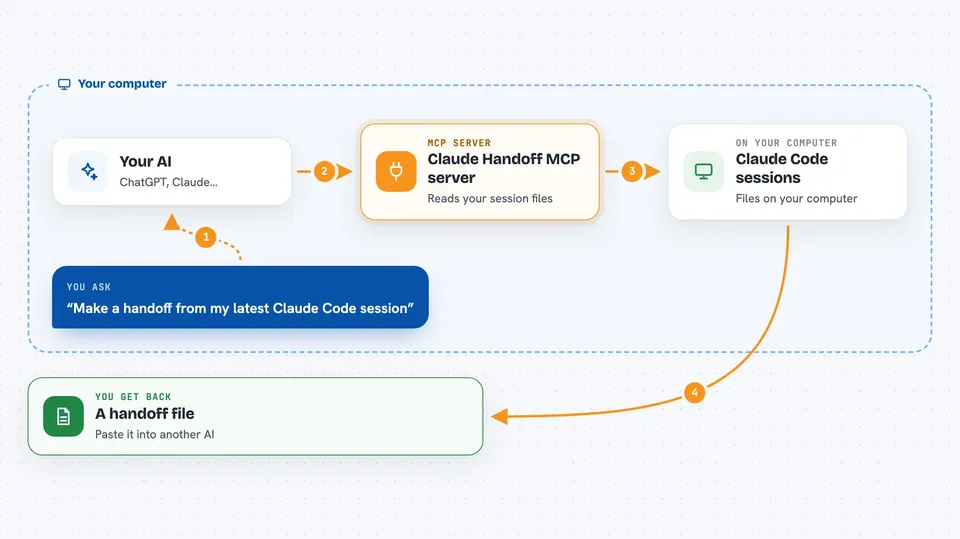
You ask your AI to make a handoff from your latest Claude Code session. The AI uses this helper, and the helper reads the session files stored on your computer. It cleans out the noise, like tool results and system reminders, and keeps what matters: what you asked, what the assistant answered, files changed, and commands run. Then it gives you a handoff.md file you can paste into another AI, or a memory brief that summarizes your whole project history.
 Click to zoom
What you can do with it
- Turn your latest Claude Code session into a handoff file
- Merge several sessions into one handoff
- Search your session history for a topic like CORS
- Build a project memory brief from all your sessions
- Install hooks so every new session starts knowing your project
- Summarize a session with a real AI summary instead of a transcript
- Redact secret-looking strings before you paste anything
Try asking your AI
- “Make a handoff from my latest Claude Code session and copy it to my clipboard”
- “Find the session where we talked about CORS and summarize it”
- “Build a memory brief for this project and install the hook”
- “Merge my last three sessions into one handoff sized for a 32k context”
What it gives back to you
You get a markdown file called handoff.md, or text in your chat if you ask for it that way. It shows the session details, files created or modified, commands run, and a condensed conversation. If you ask for a brief, you get a memory document with a timeline, decisions, fixes, and open threads, each citing the session it came from.
Before you start
What you need
- Python 3.9 or newer
- Claude Code sessions stored on your computer
- Optional: pipx or Homebrew to install the tool
- Optional: a Claude, OpenAI, or Gemini API key if you want AI summaries
Good to know
It reads your local Claude Code session files, which may contain private code or secrets, though it tries to redact secret-looking strings before output.
Install it with your AI
Add Claude Handoff MCP server to your AI, no technical skills needed
You don't install anything by hand. You copy one prompt, paste it into an AI that can work on your computer, and it checks, installs and connects the server for you, asking you when it needs something.
Sign in to get the install prompt
Members get a ready-made prompt that lets the Claude desktop app check Claude Handoff MCP server, install it and connect it for them, step by step. You don't need any technical skills: you copy, paste and answer a few questions. Your connected AI can also find and install any of the 4,609 MCP servers here for you.
Who it's for
People who use Claude Code for coding or project work and want to move their work to another AI or keep project memory between sessions.





