
MCP server · Developer tools
retrieval-lens MCP server
by Vbj1808
Lets your AI keep a log of what its search step found, so you can look back and compare runs.
retrieval-lens is a small helper that records what your AI's search step found each time it looks something up. It is made for people building or testing AI assistants that answer questions from your own documents. If you have ever wondered why the AI gave a wrong answer, this helps you see what it actually read first.
What is an MCP server? The 30-second version
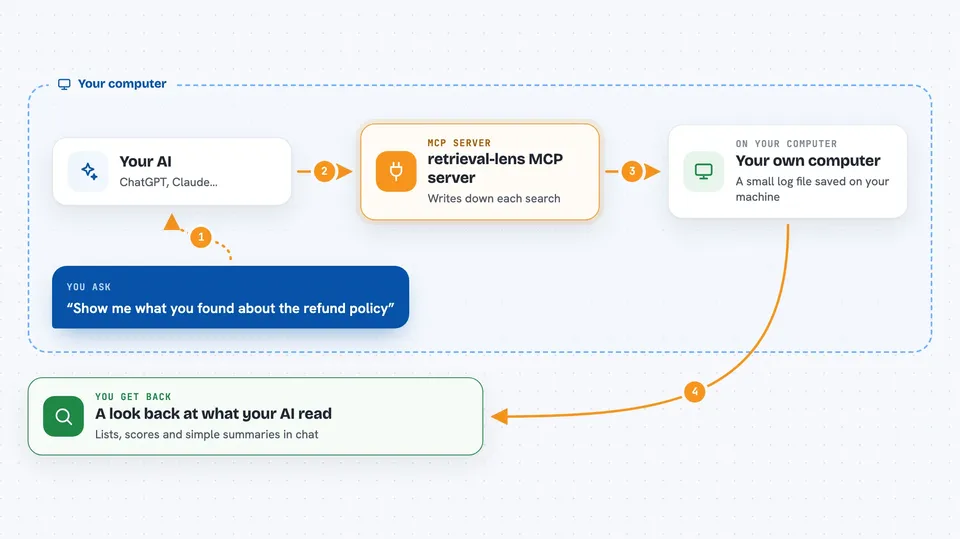
On its own, your AI can only chat with you. An MCP server is a small helper program that gives your AI a new skill or a connection to something else. This one connects your AI to a local logbook where it writes down every search it does. Once it is connected, your AI can save those searches and read them back when you ask.
What this MCP server does
You ask your AI to look something up in your documents. The AI uses this helper to write down what it found: the pieces of text, their scores, where they came from, and their order. Later, you can ask the AI to show you exactly what it saw before it answered a certain question. You can also ask it to compare two searches and point out what changed between them. Everything is saved in a small file on your own computer.
 Click to zoom
What you can do with it
- Save a record of every search your AI does
- Look back at what your AI read before a specific answer
- Compare two searches to see what changed
- See average scores and which sources come up most
- Track how your searches change over time
- Keep all of this on your own machine, with no signup
Try asking your AI
- “Show me what you found when I asked about the refund policy yesterday”
- “Compare the search from before the update with the one after it”
- “Which sources come up most often in my support bot searches”
- “What was the average score of the chunks you retrieved last week”
What it gives back to you
You get back lists and short summaries in the chat. For example, it can show the pieces of text your AI read, their scores, and where they came from. When you compare two runs, it tells you what appeared, what disappeared, and which scores moved. The stats view gives you simple numbers like top sources and score ranges.
Before you start
What you need
- Node.js installed on your computer (the free program that runs npx commands)
- The Claude desktop app or another app that supports MCP servers
Good to know
It only records searches, so it does not change your documents, but the log may contain text from your private files, so keep that in mind if you share it.
Install it with your AI
Add retrieval-lens MCP server to your AI, no technical skills needed
You don't install anything by hand. You copy one prompt, paste it into an AI that can work on your computer, and it checks, installs and connects the server for you, asking you when it needs something.
Sign in to get the install prompt
Members get a ready-made prompt that lets the Claude desktop app check retrieval-lens MCP server, install it and connect it for them, step by step. You don't need any technical skills: you copy, paste and answer a few questions. Your connected AI can also find and install any of the 4,361 MCP servers here for you.
Who it's for
People building or testing AI assistants that answer questions from their own documents, especially developers and support teams.



