MCP server · Analytics
SiteAudit MCP server
by vdalhambra
Lets your AI check any website for SEO, speed, security and broken links, then explain what to fix.

SiteAudit is a helper that lets your AI look at any website and tell you what is good and what needs fixing. You give it a web address, and it checks things like page titles, security settings, loading speed and broken links. It is handy if you run a website, write content for one, or just want a plain-English health check without learning SEO tools.
What is an MCP server? The 30-second version
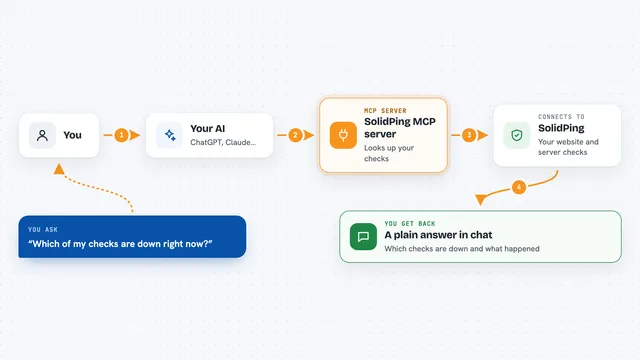
On its own, your AI can only chat with you. It cannot open a website and inspect it. An MCP server is a small helper program that gives your AI a new skill. SiteAudit is that helper for websites: once it is connected, your AI can ask SiteAudit to look at a page, and SiteAudit sends back the findings so your AI can explain them to you.
What this MCP server does
You ask your AI something like check my homepage for SEO problems. Your AI passes the web address to SiteAudit. SiteAudit opens the page, reads the HTML and the response headers, and runs its checks. It sends the results back to your AI, which turns them into a short report with scores and a list of issues. You never have to open a separate tool or copy numbers around.
 Click to zoom
What you can do with it
- Run a full audit of any web page and get an overall score out of 100
- Check SEO basics like title, meta description, headings and image alt text
- Check security headers, HTTPS, cookies and the SSL certificate
- Measure response time, page size, compression and caching
- Run a Google Lighthouse check for performance, accessibility and best practices
- Find broken links, redirects and timeouts on a page
- Compare your site side by side with competitors
- Read and explain a site's robots.txt rules
Try asking your AI
- “Audit example.com and give me a prioritized list of SEO fixes”
- “Check the security headers on my production site and tell me what is missing”
- “Compare my site with three competitors and show the scores side by side”
- “Find all broken links on my homepage”
- “Run a Lighthouse audit on my homepage and explain the Core Web Vitals”
What it gives back to you
You get a short report in the chat, not a file. It usually includes scores for SEO, performance and security, plus a list of warnings and issues with a one-line explanation for each. For link checks you get a list of URLs with their status, and for comparisons you get a small table of scores across the sites you named.
Before you start
What you need
- An AI app that supports MCP, such as Claude Desktop, Claude Code, Cursor or Windsurf
- For the hosted option: nothing else, it works right away with a free tier
- For the self-hosted option: Python and the uvx tool installed on your computer
Good to know
The hosted version has a free tier with a monthly limit, and paid tiers above it, so check the plan before running many audits.
Install it with your AI
Add SiteAudit MCP server to your AI, no technical skills needed
You don't install anything by hand. You copy one prompt, paste it into an AI that can work on your computer, and it checks, installs and connects the server for you, asking you when it needs something.
Sign in to get the install prompt
Members get a ready-made prompt that lets the Claude desktop app check SiteAudit MCP server, install it and connect it for them, step by step. You don't need any technical skills: you copy, paste and answer a few questions. Your connected AI can also find and install any of the 4,361 MCP servers here for you.
Who it's for
Website owners, marketers, content writers and small business teams who want a quick, plain-English health check on a site without learning a dedicated SEO tool.