MCP server · Productivity
plugged.in MCP Hub
by VeriTeknik
Combine all your MCP servers into one connection, with document search, memory, and a built-in testing playground.
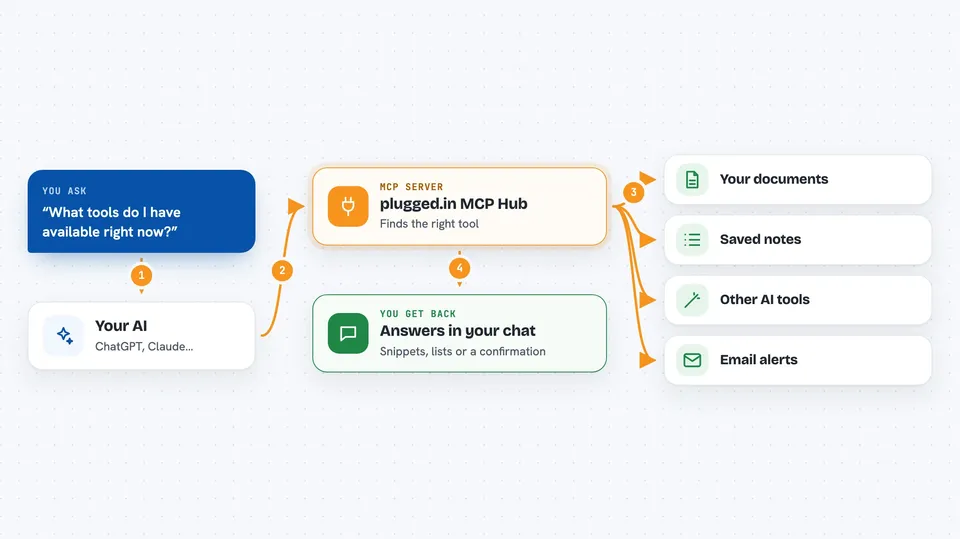
This is a helper that lets your AI talk to many other AI helpers through a single connection. Instead of setting up each one separately, you set up this one, and it passes your requests to the right place. It is handy if you use several tools with your AI and want them all in one spot, plus a place to search your documents and remember things between chats.
What is an MCP server? The 30-second version
On its own, your AI can only chat with you. An MCP server is a small helper program that gives your AI a new skill or a connection to an app or service. This one is a hub: it connects to plugged.in and to other MCP servers you have set up, so your AI can reach all of them through one link. When you ask your AI to do something, it uses this hub to find the right tool and get the job done.
What this MCP server does
You ask your AI a question or give it a task. The AI sends that request to this hub. The hub looks at what you need and either handles it itself (like searching your documents or saving a note to memory) or passes it to one of your other connected MCP servers. Then the answer or result comes back to your AI, and your AI shows it to you in the chat. You only set up one connection, but you get access to everything behind it.
 Click to zoom
What you can do with it
- Search across all your connected documents and knowledge sources at once
- Save and recall notes or pieces of text between chats using the built-in clipboard
- Discover what tools are available from all your connected servers
- Create and manage documents in your library with version history
- Send notifications, optionally by email
- Switch between different sets of server configurations with one click
- Test your MCP servers directly with a built-in playground
Try asking your AI
- “Search my documents for anything about the deployment guide”
- “Save this customer context to the clipboard under the name customer_context”
- “What tools do I have available right now?”
- “Create a new document called Weekly Report with this content”
What it gives back to you
You get back answers, lists, or summaries right in your chat. For example, if you search your documents, you see relevant snippets with the source and which AI model created them. If you save something to the clipboard, you get a confirmation. If you ask for tools, you get a list of everything available from all your connected servers.
Before you start
What you need
- Node.js 18 or newer (a free program you install once)
- An API key from plugged.in (a kind of password for apps; you get one free at plugged.in/api-keys)
Good to know
It can create, update, and delete documents and clipboard entries, so be careful when you ask it to change or clear things.
Install it with your AI
Add plugged.in MCP Hub to your AI, no technical skills needed
You don't install anything by hand. You copy one prompt, paste it into an AI that can work on your computer, and it checks, installs and connects the server for you, asking you when it needs something.
Sign in to get the install prompt
Members get a ready-made prompt that lets the Claude desktop app check plugged.in MCP Hub, install it and connect it for them, step by step. You don't need any technical skills: you copy, paste and answer a few questions. Your connected AI can also find and install any of the 4,609 MCP servers here for you.
Who it's for
Anyone who uses several MCP servers with their AI and wants one simple connection, plus people who want document search and memory built in.