MCP server · Finance and crypto
VeroQ MCP server
by veroq-ai
Lets your AI check facts, look up market data, and read SEC filings with evidence for every claim.
VeroQ is a helper that connects your AI assistant to a fact-checking and market data service. You ask a question or paste a claim, and your AI comes back with an answer plus the sources behind it. It is handy for anyone who works with numbers, news, or reports and wants to know what is actually true.
What is an MCP server? The 30-second version
On its own, your AI can only chat with you using what it already learned. An MCP server is a small helper program that gives your AI a new skill or a connection to an outside service. This one connects your AI to VeroQ, a service that checks claims and pulls financial data. So when you ask about a company or a statement, your AI can look it up there and bring the answer back to you.
What this MCP server does
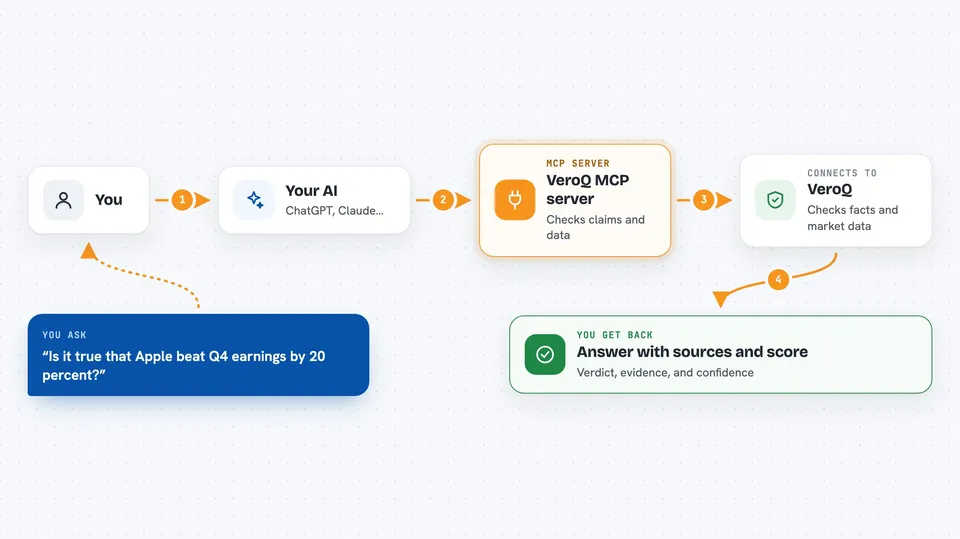
You type a question or a claim into your AI, like how a company is doing or whether a statement is true. Your AI passes that to the VeroQ helper. The helper talks to the VeroQ service, which gathers prices, news, filings, and other sources. It then checks each claim against those sources and gives a verdict with a confidence score. Your AI shows you the result in the chat, with the evidence listed.
 Click to zoom
What you can do with it
- Check whether a claim is true and see the sources behind the verdict
- Look up a stock's price, technicals, earnings, and recent news
- Compare two companies side by side
- Read recent SEC filings and insider trades
- Get a market briefing on indices, movers, and trending topics
- Generate a trading signal from a plain-English description
- Ask a financial question and get a routed answer with context
Try asking your AI
- “Is it true that Apple beat Q4 earnings by 20 percent?”
- “How is NVIDIA doing right now?”
- “Compare Microsoft and Google for me”
- “What did insiders buy or sell at Tesla last month?”
What it gives back to you
You get back a written answer in the chat, plus a list of the sources used and a confidence score for each claim. For market questions you get numbers like prices, changes, and key stats. For fact-checks you get a verdict such as supported or not supported, with the evidence shown. Some tools can also save a report you can ask for later.
Before you start
What you need
- Node.js installed on your computer (the free program that runs the helper)
- A VeroQ account and API key from veroq.ai/settings (an API key is like a password for apps)
- The Claude desktop app or Cursor, if you want to add it there
Good to know
Each request uses credits from your VeroQ account, so heavy use can cost money, and the answers are only as good as the sources behind them.
Install it with your AI
Add VeroQ MCP server to your AI, no technical skills needed
You don't install anything by hand. You copy one prompt, paste it into an AI that can work on your computer, and it checks, installs and connects the server for you, asking you when it needs something.
Sign in to get the install prompt
Members get a ready-made prompt that lets the Claude desktop app check VeroQ MCP server, install it and connect it for them, step by step. You don't need any technical skills: you copy, paste and answer a few questions. Your connected AI can also find and install any of the 4,609 MCP servers here for you.
Who it's for
Analysts, traders, researchers, and anyone who checks facts or numbers for a living and wants sources behind the answers.