
MCP server · Analytics · official
VictoriaMetrics MCP server
by VictoriaMetrics-Community · official
Lets your AI look up and explore your VictoriaMetrics monitoring data and docs for you.
This is a helper program made by VictoriaMetrics itself. It connects your AI assistant to your VictoriaMetrics monitoring setup, so you can ask questions about your data in plain words. It is handy if you work with dashboards, alerts, or server metrics and want quick answers without clicking around.
What is an MCP server? The 30-second version
On its own, your AI can only chat with you. An MCP server is a small helper program that gives your AI a new skill or a connection to another app. This one connects your AI to VictoriaMetrics, the place where your monitoring numbers live. Once it is connected, your AI can look things up there and bring answers back to you when you ask.
What this MCP server does
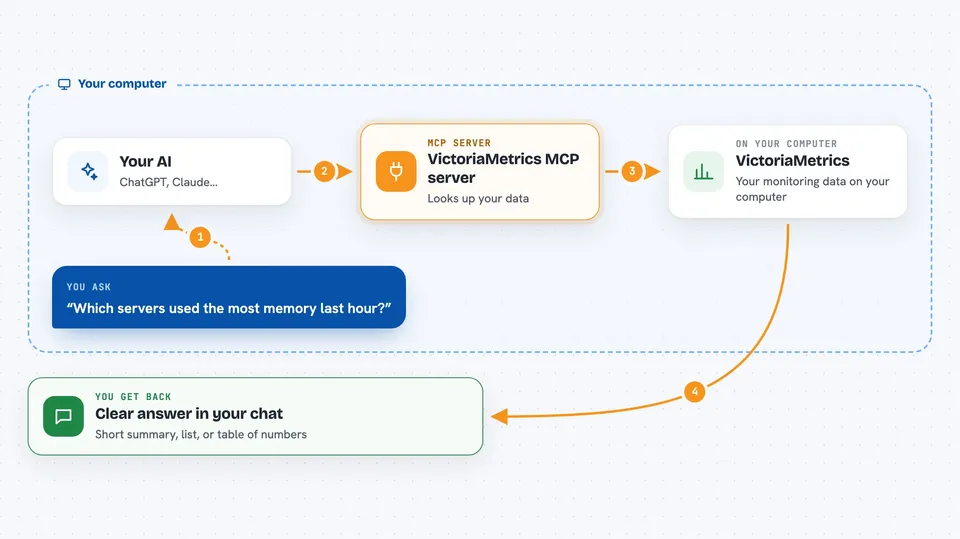
You ask your AI something about your monitoring data, like which servers are using the most memory. The AI sends that request to this helper program. The helper talks to your VictoriaMetrics instance using its normal web addresses. VictoriaMetrics sends back the numbers or lists, and the AI turns them into a clear answer in your chat. It can also search the VictoriaMetrics documentation for you, even without internet access.
 Click to zoom
What you can do with it
- Ask questions about your metrics and see the numbers
- List your metrics, labels, and label values
- Test and check your alerting and recording rules
- Look at your VictoriaMetrics instance settings
- Explore how many unique series and labels you have
- Explain or clean up a query you paste in
- Search the built-in VictoriaMetrics documentation
Try asking your AI
- “Which servers had the highest CPU usage in the last hour?”
- “Show me all the metrics that start with node_”
- “Test this alert rule and tell me if it would fire”
- “Explain what this PromQL query is doing”
What it gives back to you
You get answers in your chat, usually as short summaries, lists, or tables of numbers. If your AI app supports it, it can also draw simple graphs of your data. For rule tests, it tells you whether the rule would trigger and why. For documentation searches, it gives you the relevant explanation in plain words.
Before you start
What you need
- A VictoriaMetrics instance (single-node or cluster) or a VictoriaMetrics Cloud account
- The web address of your VictoriaMetrics instance, or an API key from VictoriaMetrics Cloud
- An MCP client like Claude Desktop
- Docker if you want the easiest install, or Go 1.26+ if you build from source
Good to know
This helper uses read-only parts of VictoriaMetrics, so it should not change your data, but it can see your monitoring numbers and settings, so only connect it to instances you are allowed to share with your AI.
Install it with your AI
Add VictoriaMetrics MCP server to your AI, no technical skills needed
You don't install anything by hand. You copy one prompt, paste it into an AI that can work on your computer, and it checks, installs and connects the server for you, asking you when it needs something.
Sign in to get the install prompt
Members get a ready-made prompt that lets the Claude desktop app check VictoriaMetrics MCP server, install it and connect it for them, step by step. You don't need any technical skills: you copy, paste and answer a few questions. Your connected AI can also find and install any of the 4,609 MCP servers here for you.
Who it's for
Engineers, SREs, and anyone who watches servers and wants to ask questions about monitoring data in plain language.



