
MCP server · Notes · official
Forge MCP server
by VoxellInc · official
Turn text into number lists your AI can compare, so it can find similar or matching text.
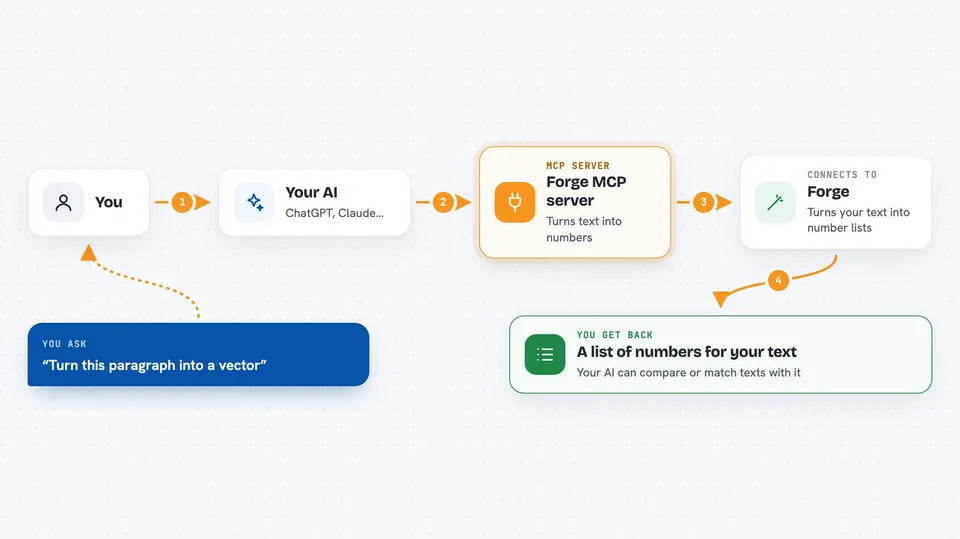
Forge is a service from Voxell that turns text into vectors. A vector is just a long list of numbers that captures the meaning of a piece of text, so two pieces of text with similar meaning end up with similar number lists. This MCP server lets your AI use Forge directly, which is handy if you work with search, document matching, or grouping text by topic.
What is an MCP server? The 30-second version
On its own, your AI can only chat with you. An MCP server is a small helper program that gives your AI a new skill or a connection to an app or service. This one connects your AI to Forge, Voxell's text-embedding service, so the AI can send text there and get back the number lists that describe it. You stay in your chat window; the helper does the talking to Forge behind the scenes.
What this MCP server does
You ask your AI to turn some text into vectors. The AI passes that text to this helper program. The helper sends it to Forge, which runs it through an embedding model and returns a list of numbers. The AI shows you those numbers, or uses them right away to compare texts, group them, or find the closest match. You never have to write code or call the service yourself.
 Click to zoom
What you can do with it
- Turn a sentence, a paragraph, or a whole file into vectors
- Compare two pieces of text and see how similar they are
- Embed a batch of documents at once
- Get shorter vectors on purpose to save space
- List the available Forge models and their sizes
- Use a different input type for search queries versus documents
Try asking your AI
- “Turn this paragraph into a vector using the default model.”
- “Embed these five product descriptions and tell me which two are most alike.”
- “Give me the same vector but cut down to 256 numbers.”
- “List the Forge models and how many dimensions each one has.”
What it gives back to you
You get back the vectors themselves, which look like long lists of numbers. Along with them, the AI tells you which model was used, how many dimensions the vector has, and how many tokens the text counted as. If you asked for a comparison or a match, the AI gives you the answer in plain words instead of raw numbers.
Before you start
What you need
- Node.js 18 or newer on your computer
- A Forge API key from dash.voxell.ai (a kind of password for apps; new accounts get 10 million free tokens, no card needed)
Good to know
Your text is sent to Voxell's servers to be turned into vectors, so do not paste anything private or confidential unless your workplace is fine with that.
Install it with your AI
Add Forge MCP server to your AI, no technical skills needed
You don't install anything by hand. You copy one prompt, paste it into an AI that can work on your computer, and it checks, installs and connects the server for you, asking you when it needs something.
Sign in to get the install prompt
Members get a ready-made prompt that lets the Claude desktop app check Forge MCP server, install it and connect it for them, step by step. You don't need any technical skills: you copy, paste and answer a few questions. Your connected AI can also find and install any of the 4,609 MCP servers here for you.
Who it's for
People who work with search, document collections, or text grouping and want their AI to handle the embeddings without writing a script.


