MCP server · Customer communication
Sequencer Lead Push MCP server
by mambalabsdev
Let your AI push enriched leads into an Instantly or Smartlead campaign, with score filtering and a safe preview.
This is a small helper that connects your AI assistant to a lead pushing tool made by Mamba Labs. It takes a list of leads you already have and sends the good ones into an existing Instantly or Smartlead campaign. It is handy if you do outreach and want your AI to handle the boring copy and paste part.
What is an MCP server? The 30-second version
On its own, your AI can only chat with you. An MCP server is a small helper program that gives your AI a new skill, here the ability to talk to a lead pushing tool that sends contacts into your email campaigns. Once it is connected, you can ask your AI in plain words to push leads, and it will use this helper to do the actual work. You do not need to understand how it talks to the other services, you just ask and it handles it.
What this MCP server does
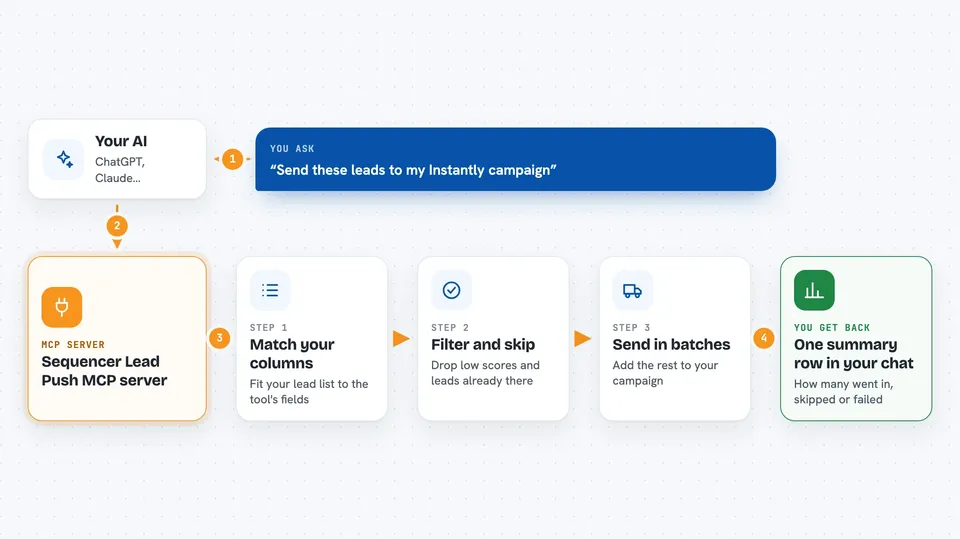
You give your AI a list of leads, either typed in or pulled from a previous Apify run. Your AI passes them to this helper, which maps your column names onto the field names the sequencer expects. It then drops any lead below your score threshold, drops any lead already in the campaign, and sends the rest in batches. You get back one summary row telling you how many leads went in and how many were skipped, with the vendor's own message for anything that failed.
 Click to zoom
What you can do with it
- Push a list of leads into an Instantly campaign
- Push leads into a Smartlead campaign
- Filter out leads below a score you set
- Skip leads that are already in the campaign
- Preview exactly what would be sent before sending anything
- Pull leads from a previous Apify run by dataset ID
- See a count of created, skipped and failed leads
What it gives back to you
You get one flat summary row in the chat. It shows how many leads were received, dropped for having no usable email or LinkedIn URL, dropped by the score gate, dropped as duplicates, eligible, created, skipped and failed. For any failed address you also see the vendor's own error message. In a dry run you get the exact request batches that would have been sent, with no leads created.
Before you start
What you need
- An Apify account and an Apify token (a kind of password for apps; you get it free from your Apify account page)
- An Instantly v2 key or a Smartlead key, depending on which one you use
- A campaign that already exists in Instantly or Smartlead
- Node.js installed on your computer if you run it locally
Good to know
It writes real leads into your live campaign unless you set dry_run to true, so try a dry run first and check the campaign ID before sending.
Install it with your AI
Add Sequencer Lead Push MCP server to your AI, no technical skills needed
You don't install anything by hand. You copy one prompt, paste it into an AI that can work on your computer, and it checks, installs and connects the server for you, asking you when it needs something.
Sign in to get the install prompt
Members get a ready-made prompt that lets the Claude desktop app check Sequencer Lead Push MCP server, install it and connect it for them, step by step. You don't need any technical skills: you copy, paste and answer a few questions. Your connected AI can also find and install any of the 4,361 MCP servers here for you.
Who it's for
People doing outreach and lead generation who already have a list of leads and want their AI to push them into a campaign without manual work.