MCP server · Notes
Agent Receipts MCP server
by webaesbyamin
Give your AI a memory it can prove, with signed receipts for everything it remembers and does.
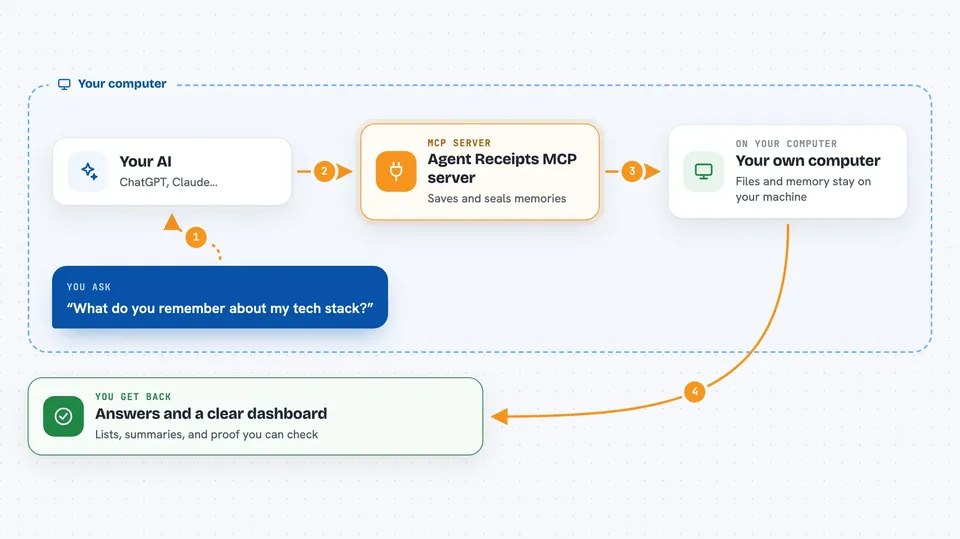
Agent Receipts is a helper that gives your AI a lasting memory and a paper trail. Every fact it learns and every action it takes gets written down and signed, so you can check later that it really happened. It is handy if you use an AI for work you may need to explain or defend later, like quotes, reports, or code changes.
What is an MCP server? The 30-second version
On its own, your AI can only chat. It forgets everything once the conversation ends, and it cannot prove what it did. An MCP server is a small helper program that gives your AI a new skill or a connection to something. This one connects your AI to Agent Receipts, a memory and record-keeping tool that runs on your own computer, so your AI can remember things between chats and leave signed proof of its work.
What this MCP server does
You add this helper to your AI app, and then you just talk to your AI like normal. When your AI learns something worth keeping, like your name or your favourite tools, it saves that as a memory through this helper. When it does something important, like editing files or making a quote, it records that too. Each record gets a special signature, like a wax seal, so anyone can later check it was not changed. You can then look at everything in a dashboard or ask your AI to search its own memory.
 Click to zoom
What you can do with it
- Remember facts about you and your projects between chats
- Search that memory when you ask a question
- Record actions your AI takes, with proof they happened
- Check that a record has not been tampered with
- Export your AI's memory as a file you can hand to someone else
- Forget something on purpose, with a note that you did
- See a simple overview of what your AI has been doing
Try asking your AI
- “What do you remember about my tech stack?”
- “Save that I prefer short emails and use a Mac.”
- “Show me the receipts from today.”
- “Forget what I told you about the old pricing.”
What it gives back to you
You get answers in plain chat: lists of memories, short summaries, or a yes/no on whether a record checks out. The dashboard shows a fuller picture, with pages for memories, records, and invoices. Exports come as a single file you can save or send. Nothing is hidden; you can open the files yourself.
Before you start
What you need
- Node.js 18 or newer installed on your computer
- An AI app that supports MCP servers, like Claude Desktop, Claude Code, or Cursor
Good to know
This tool can store personal details about you and your work on your computer, and it can also forget or delete memories, so keep an eye on what you ask it to save.
Install it with your AI
Add Agent Receipts MCP server to your AI, no technical skills needed
You don't install anything by hand. You copy one prompt, paste it into an AI that can work on your computer, and it checks, installs and connects the server for you, asking you when it needs something.
Sign in to get the install prompt
Members get a ready-made prompt that lets the Claude desktop app check Agent Receipts MCP server, install it and connect it for them, step by step. You don't need any technical skills: you copy, paste and answer a few questions. Your connected AI can also find and install any of the 4,609 MCP servers here for you.
Who it's for
People who use AI for work they may need to explain later, like freelancers writing quotes, developers changing code, or anyone who wants a clear record of what their AI did.