
MCP server · Developer tools
Kubernetes MCP server (mcp-k8s-eye)
by wenhuwang
Lets your AI look at your Kubernetes cluster, check what is healthy, and make changes when you ask.
This is a helper that connects your AI assistant to a Kubernetes cluster. Kubernetes is the system many companies use to run their apps in the cloud, and it can be hard to see what is going on inside it. If you work with a cluster and want to ask questions about it in plain English, this is for you.
What is an MCP server? The 30-second version
On its own, your AI can only chat. An MCP server is a small helper program that gives your AI a new skill or a connection to another system. This one connects your AI to your Kubernetes cluster, so it can look things up there or make changes for you. You just ask in normal words, and the helper does the technical part behind the scenes.
What this MCP server does
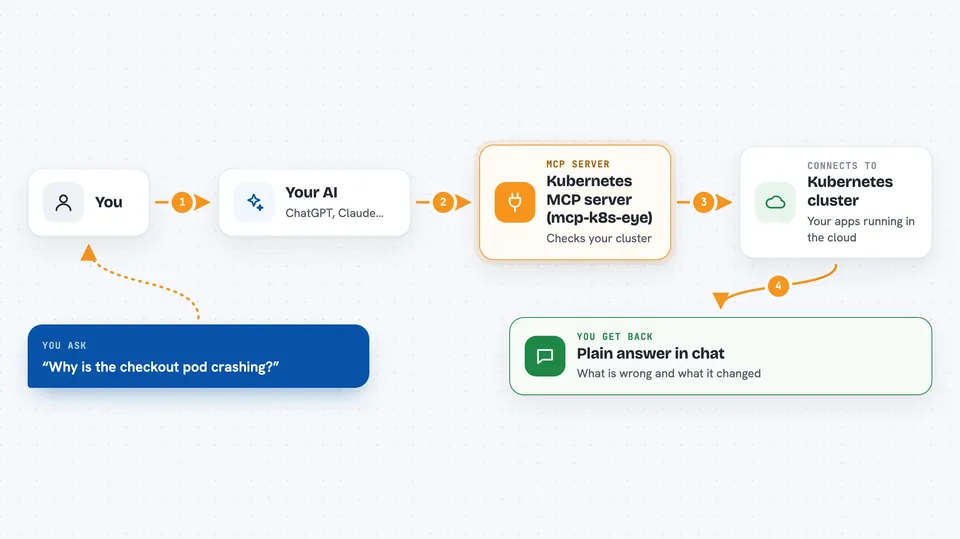
You ask your AI something about your cluster, like why a pod is failing. The AI sends that request to this helper program. The helper talks to your Kubernetes cluster using your existing setup, gathers the details, and runs a check on the resource you asked about. Then your AI explains the result back to you in the chat, in plain words.
 Click to zoom
What you can do with it
- List and read resources like pods, deployments, and services in a namespace
- Create, update, or delete Kubernetes resources
- Fetch logs from a pod or run a command inside it
- Scale a deployment up or down
- Diagnose pods, services, deployments, and other resources for problems
- Check CPU and memory usage of your workloads
- Check the health of the nodes in your cluster
Try asking your AI
- “Why is the checkout pod crashing in the production namespace?”
- “List all deployments in the staging namespace and tell me which ones look unhealthy”
- “Show me the logs from the api pod in the backend namespace”
- “Scale the web deployment in staging to 3 replicas”
What it gives back to you
You get answers in the chat: lists of resources, short health summaries, log lines, or the reason a pod is not starting. When it makes a change, like scaling a deployment, it tells you what it did. It can also show CPU and memory numbers for your workloads.
Before you start
What you need
- Go 1.23 or higher to build the tool
- kubectl installed and configured so it can reach your cluster
- A kubeconfig file in your home folder (the file kubectl uses to connect)
Good to know
It can create, change, and delete things in your cluster, so be careful with what you ask it to do, especially in a live environment.
Install it with your AI
Add Kubernetes MCP server (mcp-k8s-eye) to your AI, no technical skills needed
You don't install anything by hand. You copy one prompt, paste it into an AI that can work on your computer, and it checks, installs and connects the server for you, asking you when it needs something.
Sign in to get the install prompt
Members get a ready-made prompt that lets the Claude desktop app check Kubernetes MCP server (mcp-k8s-eye), install it and connect it for them, step by step. You don't need any technical skills: you copy, paste and answer a few questions. Your connected AI can also find and install any of the 4,609 MCP servers here for you.
Who it's for
Developers, DevOps engineers, and support staff who already work with a Kubernetes cluster and want to ask questions about it in plain English.



