
MCP server · Research
Research Hub MCP server
by WenyuChiou
Lets your AI search for papers, save them to Zotero, and write notes into your Obsidian vault for you.
Research Hub is a helper for people who collect academic papers and keep notes about them. It connects the tools you already use, like Zotero, Obsidian, and NotebookLM, so your AI assistant can do the boring steps for you. It is handy if you are a student, researcher, or anyone who reads a lot of papers and wants them organised without endless copying and pasting.
What is an MCP server? The 30-second version
On its own, your AI can only chat with you. An MCP server is a small helper program that gives your AI a new skill or a connection to an app. This one connects your AI to Research Hub, which in turn talks to Zotero, Obsidian, and NotebookLM. So when you ask for papers on a topic, your AI can actually go and find them and file them away for you.
What this MCP server does
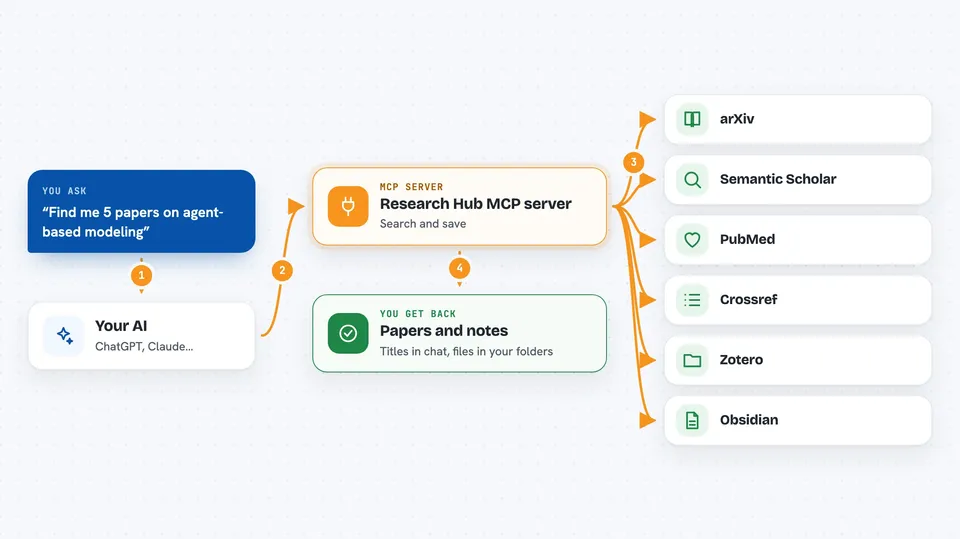
You ask your AI something like find me five papers on a topic. Your AI passes that request to this helper. The helper searches places like arXiv, Semantic Scholar, PubMed, and Crossref, checks that each paper is real, and then saves the details into your Zotero library and writes a note in your Obsidian vault. When you want, it can also bundle those papers and send them to NotebookLM to make a summary brief. You get the results back in your chat, and the files appear in your own folders.
 Click to zoom
What you can do with it
- Search arXiv, Semantic Scholar, PubMed, and Crossref for papers on a topic
- Add papers with their details into your Zotero library
- Write Markdown notes for each paper into your Obsidian vault
- Tag and group papers into clusters so they stay tidy
- Send a group of papers to NotebookLM and ask for a summary brief
- Check that a paper is real before saving it, and skip fakes
- Show you a dashboard of your papers, clusters, and notes
Try asking your AI
- “Find me 5 papers on agent-based modeling and put them in a notebook”
- “Add these three papers to my Zotero library and write notes for each one”
- “Make a summary brief of everything in my climate cluster”
- “What papers did I save last week, and which ones still need notes”
What it gives back to you
You get answers in your chat, like a list of paper titles with authors and years, or a short summary. The helper also writes real files into your Zotero library and your Obsidian vault, so you can open them later. If something looks fake or does not match, it tells you and keeps it out of your notes.
Before you start
What you need
- Python 3.10 or newer on your computer
- A Zotero account with an API key and library ID (the site gives you these in your Zotero settings)
- An Obsidian vault folder, if you want notes written there
- A Google sign-in in a browser, if you want to use NotebookLM
Good to know
It writes real files into your Zotero library and Obsidian vault, so try it on a small sample first before pointing it at your main collection.
Install it with your AI
Add Research Hub MCP server to your AI, no technical skills needed
You don't install anything by hand. You copy one prompt, paste it into an AI that can work on your computer, and it checks, installs and connects the server for you, asking you when it needs something.
Sign in to get the install prompt
Members get a ready-made prompt that lets the Claude desktop app check Research Hub MCP server, install it and connect it for them, step by step. You don't need any technical skills: you copy, paste and answer a few questions. Your connected AI can also find and install any of the 4,361 MCP servers here for you.
Who it's for
Students, researchers, and anyone who reads a lot of academic papers and wants their AI to help organise them.





