MCP server · Analytics
PyMOL MCP server
by wjgoarxiv
Let your AI load molecules, render pictures, and analyze water cages and hydrogen bonds for you.
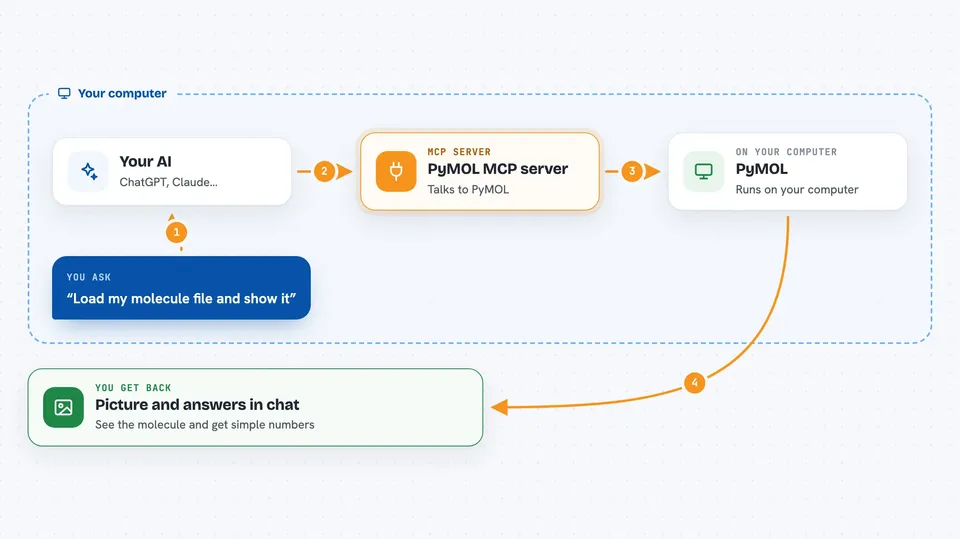
This is a helper that connects your AI to PyMOL, a well-known program for looking at molecules in 3D. It runs quietly in the background, so your AI can load a structure, draw it, and hand you back a picture. It is handy for students and researchers who work with molecular files and want to skip the clicking.
What is an MCP server? The 30-second version
On its own, your AI can only chat. An MCP server is a small helper program that gives your AI a new skill or a connection to another program. This one connects your AI to PyMOL, the molecular viewer. So when you ask for a molecule to be loaded or drawn, the AI passes that request to PyMOL and brings the result back to your chat.
What this MCP server does
You ask your AI something about a molecule, in plain words. The AI picks the right action from this helper, like loading a file or coloring part of the structure. The helper talks to PyMOL behind the scenes and does the work. Then it sends the result back, often as a picture you can see right in the chat. For water and ice structures it can also run deeper analysis, like finding cages and counting hydrogen bonds.
 Click to zoom
What you can do with it
- Load a molecule file from your computer or fetch one from the Protein Data Bank
- Color, show, or hide parts of a structure
- Render a ray-traced picture and see it right in the chat
- Measure distances, angles, and twists between atoms
- Load a simulation trajectory and look at a chosen frame
- Find water cages in a hydrate structure and draw them as shapes
- Check hydrogen bonds and order parameters to tell hydrate, ice, and liquid apart
Try asking your AI
- “Load ./hydrate.gro, color the water by F4 order parameter, and render it.”
- “Load md.gro and traj.xtc, show the CO2 guests as spheres, and render frame 50.”
- “What is the mean hydrogen-bond coordination of the water in this structure?”
- “Load tests/fixtures/hydrate_sII.gro, find and mark the cages, hide the waters, and render.”
What it gives back to you
You get answers in the chat, often with a picture attached. The picture is a rendered image of the molecule, sent right into the conversation. For analysis steps you get numbers and short summaries, like how many cages of each type were found or the average number of hydrogen bonds per water. If you ask it to save a file, it writes a picture or structure file to your computer.
Before you start
What you need
- A computer with conda installed (a tool that manages Python environments)
- The PyMOL open-source package, which comes through conda
- An MCP-capable chat app, like Claude Desktop or Claude Code
Good to know
It can run raw PyMOL or Python commands if you switch that option on, so leave it off unless you know what you are doing.
Install it with your AI
Add PyMOL MCP server to your AI, no technical skills needed
You don't install anything by hand. You copy one prompt, paste it into an AI that can work on your computer, and it checks, installs and connects the server for you, asking you when it needs something.
Sign in to get the install prompt
Members get a ready-made prompt that lets the Claude desktop app check PyMOL MCP server, install it and connect it for them, step by step. You don't need any technical skills: you copy, paste and answer a few questions. Your connected AI can also find and install any of the 4,361 MCP servers here for you.
Who it's for
Chemistry and biology students, researchers, and anyone who works with molecular structures or simulation files and wants quick pictures and analysis without learning PyMOL by hand.