
MCP server · Developer tools
Kafka MCP server
by wklee610
Lets your AI look at Kafka topics and consumer groups, and safely reset or rewind their offsets.
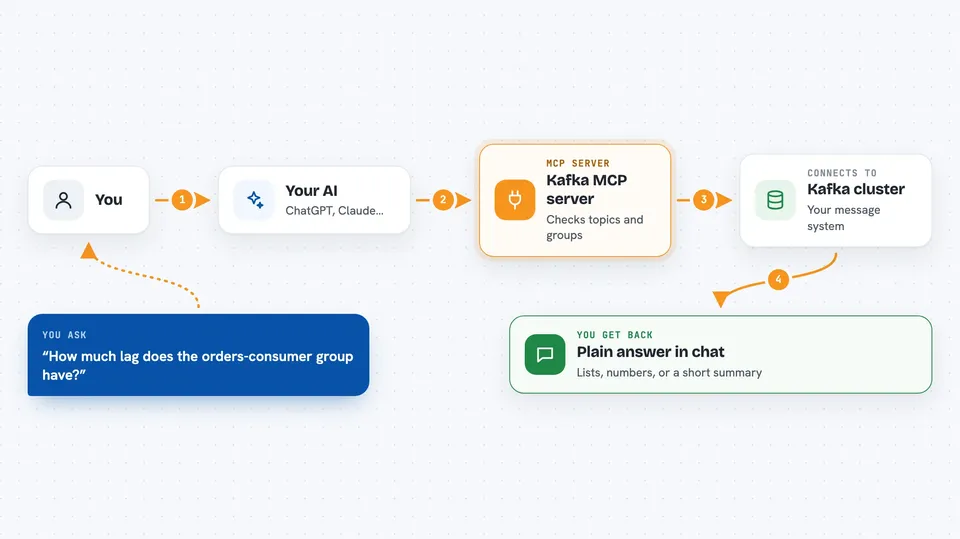
This is a helper that connects your AI assistant to Apache Kafka, the system many companies use to move messages between programs. Once it is set up, you can ask your AI plain questions about your Kafka topics and consumer groups instead of clicking around in a dashboard. It is handy for anyone who works with data pipelines or support tickets about Kafka, even if you are not the person who built the cluster.
What is an MCP server? The 30-second version
On its own, your AI can only chat with you. An MCP server is a small helper program that gives your AI one new skill or connection. This one connects your AI to your Kafka cluster, so it can look up topics, check consumer groups, and make changes there when you ask. Think of it as giving your assistant a key to the Kafka room, but only the doors you allow.
What this MCP server does
You ask your AI something about Kafka in normal words. The AI sends that request to this helper program. The helper talks to your Kafka cluster using the connection details you set up. It brings back the answer, like a list of topics, a group's lag, or a summary of cluster health. If you ask it to change something, like resetting an offset, it does that and tells you what it changed.
 Click to zoom
What you can do with it
- List all topics in your Kafka cluster
- Describe a topic to see its partitions and replicas
- Create or delete a topic
- Add partitions to an existing topic
- List consumer groups and see their state
- Check how far behind a consumer group is (lag)
- Reset or rewind a consumer group's offsets
- Read or send messages to a topic
Try asking your AI
- “List all Kafka topics in my cluster”
- “How much lag does the orders-consumer group have?”
- “Show me the last 5 messages from the payments topic”
- “Reset the inventory-consumer group offset to earliest”
What it gives back to you
You get back plain answers in the chat: lists of topics or groups, numbers like lag or partition counts, short summaries of cluster health, or the messages you asked for. When it makes a change, like resetting an offset or creating a topic, it tells you what it did. Some tools also support a dry run, so you can see what would happen before it actually happens.
Before you start
What you need
- A running Kafka cluster you can connect to
- Python 3.10 or newer
- The uv package manager (recommended)
- Connection details for your cluster, like the broker address and any username or password
Good to know
This server can create and delete topics and change consumer group offsets, so a wrong request can affect real data or break a running consumer; use the dry run option when you can.
Install it with your AI
Add Kafka MCP server to your AI, no technical skills needed
You don't install anything by hand. You copy one prompt, paste it into an AI that can work on your computer, and it checks, installs and connects the server for you, asking you when it needs something.
Sign in to get the install prompt
Members get a ready-made prompt that lets the Claude desktop app check Kafka MCP server, install it and connect it for them, step by step. You don't need any technical skills: you copy, paste and answer a few questions. Your connected AI can also find and install any of the 4,361 MCP servers here for you.
Who it's for
Data engineers, support engineers, and anyone who needs to check or fix Kafka topics and consumer groups without opening a separate dashboard.


