MCP server · Developer tools
Quilt MCP server
by wkoverfield
Keep several AI coding agents in one repo, each committing only the lines it wrote.
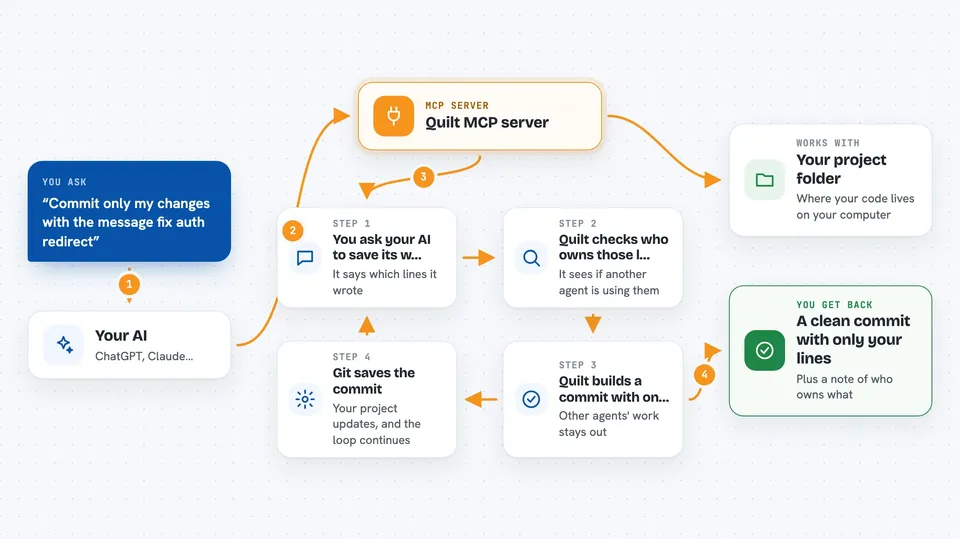
Quilt is a helper for people who run more than one AI coding agent in the same project folder. Normally, when several agents edit the same repo, their changes get mixed together and one agent can quietly overwrite another's work. Quilt keeps track of who wrote which lines, so each agent commits only its own changes.
What is an MCP server? The 30-second version
On its own, your AI can only chat with you. An MCP server is a small helper program that gives your AI a new skill or a connection to another tool. This one connects your AI to Quilt, which watches a shared project folder and remembers which agent wrote which lines. So when you ask your AI to save its work, it can use Quilt to commit just its own lines instead of sweeping up everyone else's.
What this MCP server does
You run several AI coding agents in one project folder at the same time. As each agent edits files, Quilt records which agent made each change. When an agent is ready to save its work, you ask it to commit only its own lines, and Quilt builds that commit for it. If one agent tries to change code another agent is working on, Quilt blocks the write and tells it who holds that code and why. Git stays in charge, and Quilt's notes live in a small folder you can delete anytime.
 Click to zoom
What you can do with it
- Run several AI agents in one project folder without them stepping on each other
- Commit only the lines a specific agent wrote, even in a shared file
- Reserve a single function or symbol instead of a whole file
- See who is working on what and who is blocked on whom
- Get warned when your change depends on code another agent is editing
- Recover another agent's overwritten lines from a snapshot
- Check the history of who wrote which lines in a commit
Try asking your AI
- “Commit only my changes with the message fix auth redirect”
- “Show me which agent owns which files right now”
- “Claim the formatPrice function in utils.js before I edit it”
- “Preview the exact patch that would be committed for me”
What it gives back to you
You get clear answers in the chat: which agent owns which lines, what a commit would include before it happens, and who is blocked on whom. When you commit, you get a normal Git commit that contains only your agent's lines. If a write is blocked, you get a short message saying who holds that code and when their claim ends.
Before you start
What you need
- Node.js installed on your computer
- A Git project folder you want to work in
- One or more AI coding agents, like Claude Code
Good to know
Quilt can block writes and change which lines go into a commit, so check quilt status or quilt preview before committing if you are unsure.
Install it with your AI
Add Quilt MCP server to your AI, no technical skills needed
You don't install anything by hand. You copy one prompt, paste it into an AI that can work on your computer, and it checks, installs and connects the server for you, asking you when it needs something.
Sign in to get the install prompt
Members get a ready-made prompt that lets the Claude desktop app check Quilt MCP server, install it and connect it for them, step by step. You don't need any technical skills: you copy, paste and answer a few questions. Your connected AI can also find and install any of the 4,361 MCP servers here for you.
Who it's for
Developers and teams who run several AI coding agents in the same project folder and want each agent's work kept separate.