MCP server · Music
Reaper Daemon MCP server
by wretcher207
Let your AI mix and edit your REAPER music project by reading plugins, changing settings, and measuring the result.
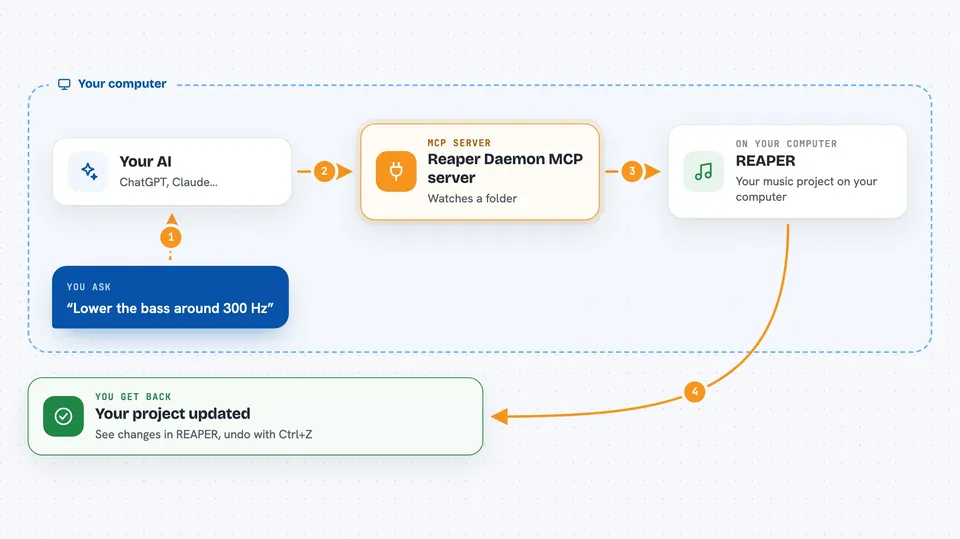
Reaper Daemon is a helper that connects an AI assistant to REAPER, the music recording and mixing program. You ask your AI to change a track, adjust a plugin, or measure the mix, and it does the work inside your open project. It is handy if you use REAPER and want an extra pair of hands for mixing or MIDI tasks.
What is an MCP server? The 30-second version
On its own, your AI can only chat and write text. An MCP server is a small helper program that gives your AI a new skill or a connection to an app or service. This one connects your AI to REAPER on your computer, so it can look at your project and make changes when you ask. It runs locally, so nothing is sent over the internet.
What this MCP server does
You ask your AI to do something in your REAPER project, like lower the bass or add a plugin. The AI writes a small command file into a folder that Reaper Daemon watches. A script inside REAPER picks up that file, performs the action, and writes a result file back. The AI reads the result and tells you what happened, all inside a single undo step so you can press Ctrl+Z to revert.
 Click to zoom
What you can do with it
- Read every plugin and setting on a track
- Change plugin values in real units like decibels
- Write automation for volume, pan, and effects
- Measure loudness and spectrum before and after a change
- Add, rename, or delete tracks
- Insert MIDI files and humanize drum parts
- Render or save your project
Try asking your AI
- “The bass is muddy around 300 Hz, pull it down.”
- “Bring the vocal down so it sits with the mix instead of on top.”
- “Tune the bass until its LUFS is down 3 dB.”
- “What plugins are on the drum bus, and what are they set to?”
What it gives back to you
You get answers in the chat, like a list of plugins and their settings, or a short report of what changed. If you ask for a measurement, it gives you numbers for loudness, spectrum, or dynamics. It can also create or change things in your project, and those changes appear in REAPER right away.
Before you start
What you need
- REAPER installed on your computer
- Python 3 installed
- The Reaper Daemon folder cloned from GitHub
- An AI client that can use MCP servers, like Claude Desktop
Good to know
Any program that can write to the inbox folder can control REAPER, so keep the folder private and local.
Install it with your AI
Add Reaper Daemon MCP server to your AI, no technical skills needed
You don't install anything by hand. You copy one prompt, paste it into an AI that can work on your computer, and it checks, installs and connects the server for you, asking you when it needs something.
Sign in to get the install prompt
Members get a ready-made prompt that lets the Claude desktop app check Reaper Daemon MCP server, install it and connect it for them, step by step. You don't need any technical skills: you copy, paste and answer a few questions. Your connected AI can also find and install any of the 4,361 MCP servers here for you.
Who it's for
Music producers, mixing engineers, and hobbyist musicians who use REAPER and want AI help with mixing or MIDI.