MCP server · Productivity
Scrivener MCP server
by writerslogic
Let your AI open, read, edit, and search your Scrivener writing projects directly.
This is a small helper that connects your AI assistant to Scrivener, the writing app many novelists and screenwriters use. Once it is set up, you can ask your AI to open a project, read a chapter, fix a scene, or check your characters for contradictions. It is handy for anyone who writes long things and keeps them in Scrivener.
What is an MCP server? The 30-second version
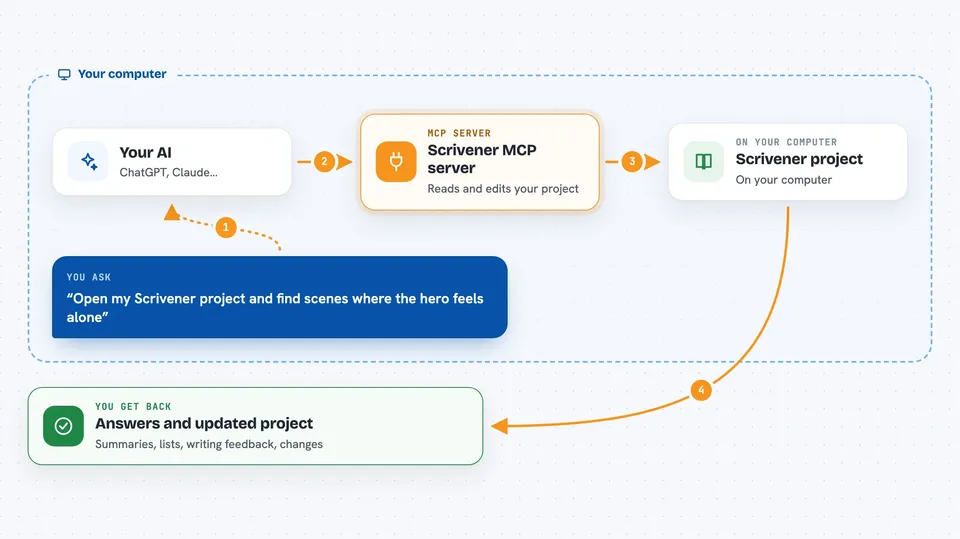
On its own, your AI can only chat with you. An MCP server is a small helper program that gives your AI a new skill or a connection to an app, and here that app is Scrivener. With this helper running, your AI can open your .scriv project, read your chapters, and make changes when you ask. You stay in the chat; the helper does the reaching out to your files.
What this MCP server does
You tell your AI which Scrivener project to open, and the helper reads it from your computer. From there, your AI can read documents, create new scenes, move things around the binder, and update synopses. It can also run writing analysis on your prose, like pacing or readability, and search your project by meaning, not just by exact words. Anything it changes is written back into your project, and it keeps notes about your characters and plot across sessions.
 Click to zoom
What you can do with it
- Open a Scrivener project and browse its structure
- Read, create, edit, move, and delete documents in the binder
- Analyze pacing, style, and readability of a chapter
- Search your project by meaning, even if the exact word is not there
- Save character profiles and plot threads that persist across sessions
- Compile chapters into one manuscript and export to Markdown, DOCX, EPUB, or PDF
- Check your project for continuity problems across characters, plot, and timeline
Try asking your AI
- “Open my Scrivener project at ~/Documents/My Novel.scriv”
- “Discover my Scrivener projects”
- “Analyze the pacing in Chapter 12 and tell me which paragraphs stall”
- “Find scenes where the protagonist feels isolated”
- “Create a new scene called The Reveal after Chapter 5 and move the old epilogue to the trash”
What it gives back to you
You get answers in the chat: summaries, lists of documents, word counts, and specific feedback on your writing, like which paragraphs slow a chapter down. When it makes changes, it tells you what it changed, and those changes show up in your project. Exports come back as text in the chat or as files on your computer.
Before you start
What you need
- Scrivener 3 installed on macOS, Windows, or Linux
- Node.js installed on your computer (the install command uses it)
- An Anthropic, OpenAI, or OpenRouter API key if you want the AI-powered features like analysis, generation, and semantic search (a kind of password for apps; the provider gives you one)
- A Scrivener project saved on your computer
Good to know
It can change, move, and delete documents in your project, so save or close the project in Scrivener first if it is also open there, or the two can write over each other.
Install it with your AI
Add Scrivener MCP server to your AI, no technical skills needed
You don't install anything by hand. You copy one prompt, paste it into an AI that can work on your computer, and it checks, installs and connects the server for you, asking you when it needs something.
Sign in to get the install prompt
Members get a ready-made prompt that lets the Claude desktop app check Scrivener MCP server, install it and connect it for them, step by step. You don't need any technical skills: you copy, paste and answer a few questions. Your connected AI can also find and install any of the 4,361 MCP servers here for you.
Who it's for
Novelists, screenwriters, and anyone who writes long manuscripts in Scrivener and wants an AI to help read, analyze, and edit them.