
MCP server · Productivity
Agentic Task System MCP server
Lets your AI search your tasks, notes and decisions across TickTick, Obsidian and more, then write results back.
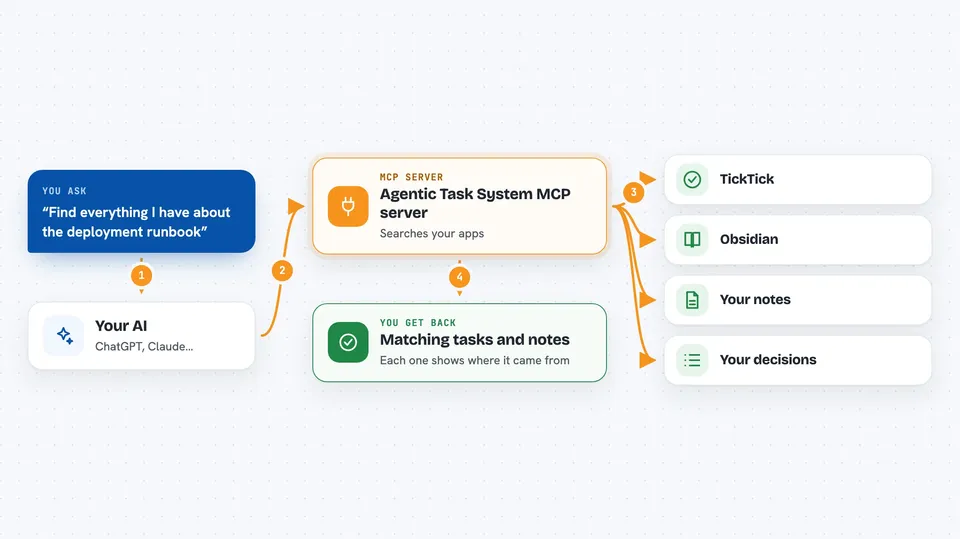
This is a helper that connects your AI to the task apps and note vaults you already use, like TickTick, Obsidian, Notion or GitHub. Instead of copying things into a new tool, your AI reads and writes in the place where your work already lives. It is handy if you keep your to-dos and notes in one of these apps and want your AI to actually use them.
What is an MCP server? The 30-second version
On its own, your AI can only chat with you. An MCP server is a small helper program that gives your AI a new skill or a connection to an app. This one connects your AI to your task manager or notes vault, so it can look things up and, where supported, add or update items for you. You stay in charge: your task app remains the real record, and this helper just reads from it and writes back to it.
What this MCP server does
You ask your AI something like "find my deployment runbook" or "what did we decide about the auth migration". Your AI passes that request to this helper. The helper searches your connected task app or vault, looking through tasks, notes, decisions and runbooks. It ranks what it finds and tells your AI which source each result came from. Your AI then gives you the answer in the chat, and if the app supports it, can write a result back.
 Click to zoom
What you can do with it
- Search across your tasks and notes for a topic
- Read the details and context of a specific task
- Attach a decision or dependency link between two tasks
- Record the outcome and done-when for a piece of work
- Write a result back into your task app
- Keep a list of facts your AI proposed and you approved
- Watch for task changes as they happen
Try asking your AI
- “Find everything I have about the deployment runbook”
- “What decisions are linked to the auth migration task?”
- “Add a note to my TickTick task saying the review is done”
- “What do I know about the onboarding checklist across my notes?”
What it gives back to you
You get back a ranked list of matching tasks and notes, each with a note about where it came from. Your AI can summarise them, point you to the exact item, or show the linked decisions and dependencies around a task. When a write is supported, you also see confirmation that the change landed in your app.
Before you start
What you need
- Node.js 18 or newer installed on your computer
- An account with one of the supported apps, like TickTick
- A way to log in to that app (the helper walks you through it)
Good to know
This helper can read your private tasks and notes, and where your app allows it, change or add items, so only connect apps you are comfortable letting your AI see and edit.
Install it with your AI
Add Agentic Task System MCP server to your AI, no technical skills needed
You don't install anything by hand. You copy one prompt, paste it into an AI that can work on your computer, and it checks, installs and connects the server for you, asking you when it needs something.
Sign in to get the install prompt
Members get a ready-made prompt that lets the Claude desktop app check Agentic Task System MCP server, install it and connect it for them, step by step. You don't need any technical skills: you copy, paste and answer a few questions. Your connected AI can also find and install any of the 4,361 MCP servers here for you.
Who it's for
People who keep their work in task apps or note vaults and want their AI to read and update those instead of starting from scratch.



