
MCP server · Productivity
ADHD Progress Hub MCP server
by uniskela
Your AI can track unfinished work, check for overlap, and remind you later across your coding sessions.
This is a self-hosted hub that keeps track of your half-finished plans, migrations, and setups. It is handy if you start work in one coding tool, continue in another, and forget what you were doing a week later. Your AI can check it, save progress to it, and nudge you when something has been sitting too long.
What is an MCP server? The 30-second version
On its own, your AI can only chat with you. An MCP server is a small helper program that gives your AI a new skill or a connection to an app or service. This one connects your AI to your own ADHD Progress Hub, a place where your unfinished work is stored. Once connected, your AI can look up your open threads, check whether you are about to redo something, and save progress for you.
What this MCP server does
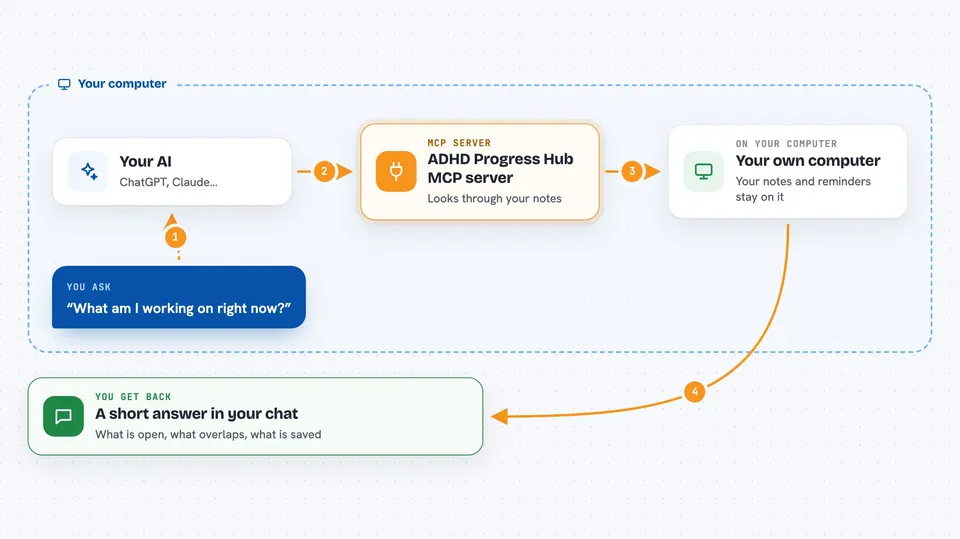
You ask your AI something like what am I working on or am I about to redo something. The AI uses this helper to talk to your Hub. The Hub looks through your open work items, your progress notes, and your reminders. Then it sends back a short summary, a ranked list of possible overlaps, or a confirmation that your progress was saved. You see the answer right in your chat.
 Click to zoom
What you can do with it
- See a compact digest of your open threads and reminders
- Check whether new work overlaps with something you already started
- Save progress and a next step for a thread
- Create or update a work item with one finishable outcome
- Pause a thread and leave a concrete resume step
- Mark a known thread as done
- Set a reminder for once, this session, daily, or random
Try asking your AI
- “What am I working on right now?”
- “Am I about to redo something half-done with this Proxmox migration?”
- “Save progress on the homelab refactor and set my next step to update the firewall rules”
- “Remind me about the blocked DNS setup tomorrow”
What it gives back to you
You get back short summaries, lists of open threads, ranked overlap checks, and confirmations that your progress or reminder was saved. The answers appear as plain text in your chat, often with a goal, a focus, a next step, and a resume cue. If you asked for a digest, you get a compact view of what is open and what is waiting.
Before you start
What you need
- A computer or server to run the Hub on, such as a home server or a small cloud machine
- Docker or Python with uv if you run it from source
- A long random auth token you create yourself
- An MCP client like Cursor, Codex, or Claude Code
Good to know
It can change or delete your project records and progress notes, so review rename or delete requests in the web UI before confirming.
Install it with your AI
Add ADHD Progress Hub MCP server to your AI, no technical skills needed
You don't install anything by hand. You copy one prompt, paste it into an AI that can work on your computer, and it checks, installs and connects the server for you, asking you when it needs something.
Sign in to get the install prompt
Members get a ready-made prompt that lets the Claude desktop app check ADHD Progress Hub MCP server, install it and connect it for them, step by step. You don't need any technical skills: you copy, paste and answer a few questions. Your connected AI can also find and install any of the 4,361 MCP servers here for you.
Who it's for
People who juggle many coding projects across different tools and want their AI to remember what is unfinished.



