
MCP server · Notes
AgentDocs MCP server
by hoornet
Lets your AI read, search, write, comment on and share your AgentDocs pages for you.
AgentDocs is a place to keep shared documents, a bit like a wiki for your team. This helper connects your AI assistant to your AgentDocs account so it can look things up and make changes there when you ask. It is handy if you write or read a lot of team docs and want your AI to do the boring parts.
What is an MCP server? The 30-second version
On its own, your AI can only chat with you. An MCP server is a small helper program that gives your AI a new skill or a connection to an app. This one connects your AI to AgentDocs, your team's document site. Once it is set up, you can ask your AI to find a page, write a new one, or leave a comment, and it will do that in AgentDocs for you.
What this MCP server does
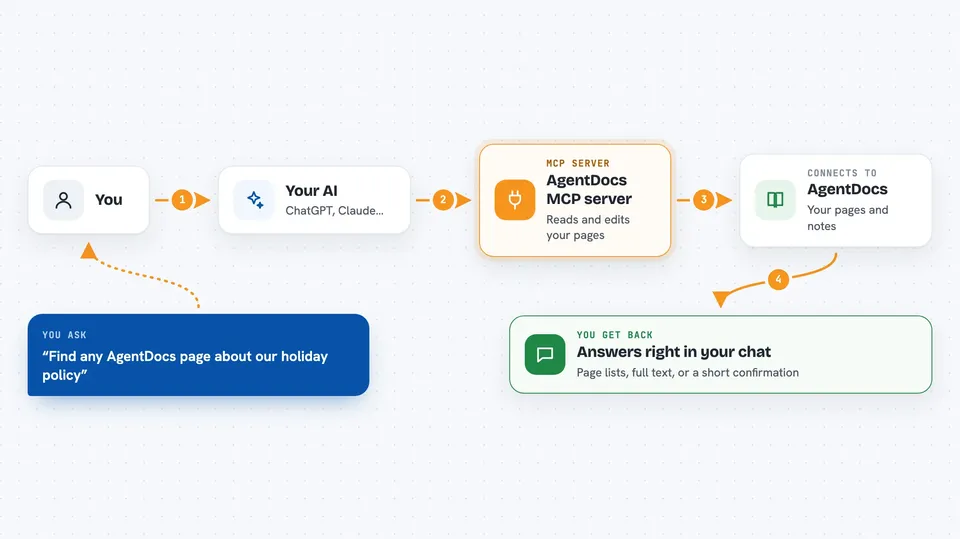
You ask your AI something about your AgentDocs pages, like finding a note or writing a new one. The AI passes your request to this helper. The helper talks to AgentDocs over the internet using your account. AgentDocs sends back the page text, a list of results, or a confirmation that something changed. Your AI then shows you the answer or tells you what it did, right in the chat.
 Click to zoom
What you can do with it
- Search your AgentDocs pages by keyword or by meaning
- Read a page and show you its full text and comments
- Create a new Markdown page, or add to an existing one
- Update a page's title or content
- Leave a comment or reply in a comment thread
- Share a page with a public link
- Import a folder of Markdown files as a set of pages
- Upload an image and get the Markdown to embed it
Try asking your AI
- “Find any AgentDocs page that mentions our holiday policy”
- “Create a new page called Meeting notes 12 May in my team space”
- “Add a comment to the onboarding page saying the link is broken”
- “Show me the comments on the budget page”
What it gives back to you
You get back plain answers in the chat: a list of pages, the full text of a page, a summary of search results, or a short confirmation that a page was created, updated, or commented on. If you ask for a page with images, the images show up as pictures you can look at. Comments come back as a list with who wrote them and which comment they reply to.
Before you start
What you need
- An AgentDocs account
- An AgentDocs API token from your profile page (a kind of password for apps; the site gives you one)
- Node.js installed if you run the local version (the hosted version needs nothing)
- The Claude desktop app or another AI app that supports MCP servers
Good to know
It can change or delete your AgentDocs pages, so check what your AI is about to do before saying yes, and remember that a shared link makes a page public.
Install it with your AI
Add AgentDocs MCP server to your AI, no technical skills needed
You don't install anything by hand. You copy one prompt, paste it into an AI that can work on your computer, and it checks, installs and connects the server for you, asking you when it needs something.
Sign in to get the install prompt
Members get a ready-made prompt that lets the Claude desktop app check AgentDocs MCP server, install it and connect it for them, step by step. You don't need any technical skills: you copy, paste and answer a few questions. Your connected AI can also find and install any of the 4,361 MCP servers here for you.
Who it's for
Anyone who keeps team notes or documentation in AgentDocs and wants their AI to read and update those pages for them.



