
MCP server · Developer tools
JSR MCP server
by wyattjoh
Lets your AI search the JSR registry and look up JavaScript package details for you.
This is a small helper that connects your AI to JSR, the JavaScript Registry. JSR is a place where people publish JavaScript and TypeScript packages, a bit like a public library of code. If you or your team work with JavaScript packages, this helper lets your AI look things up in that library for you.
What is an MCP server? The 30-second version
On its own, your AI can only chat with you. An MCP server is a small helper program that gives your AI a new skill or a connection to an app or service. This one connects your AI to JSR, the JavaScript Registry. Once it is set up, your AI can look up packages and details there when you ask, instead of guessing.
What this MCP server does
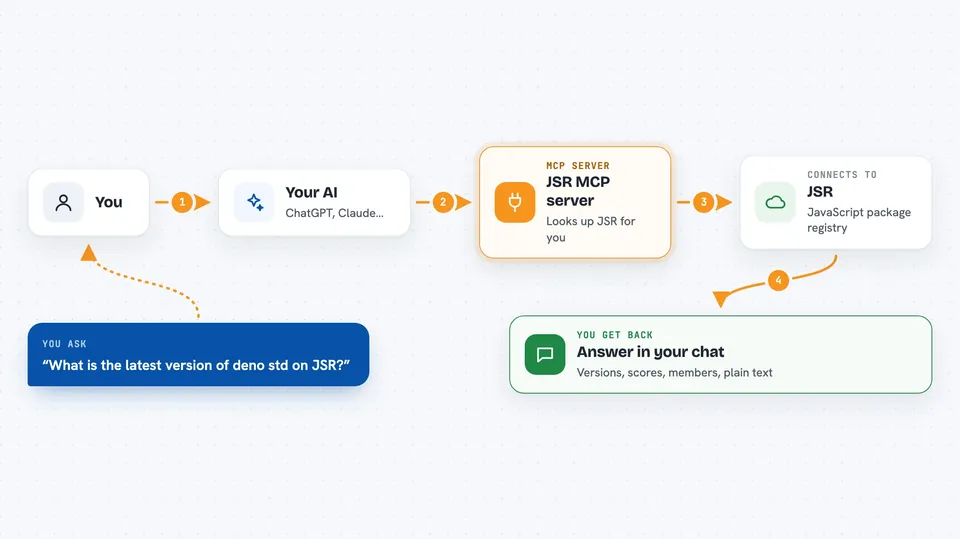
You ask your AI something about a JavaScript package, like whether it exists or what its latest version is. Your AI passes that question to this helper program. The helper talks to the JSR website and pulls back the answer. Then your AI shows it to you in the chat, in plain words. If you have given it your JSR token, it can also do things like create a scope or invite a team member, but only when you ask.
 Click to zoom
What you can do with it
- Search the JSR registry for packages by name or topic
- Look up details about a specific package, like its versions and dependencies
- Check a package's quality score and see which packages depend on it
- List all packages inside a scope, which is like a team or organization folder
- See the members and pending invites in a scope you belong to
- Create or update a scope and manage who is in it, if you are signed in
- Check the status of a publishing task
Try asking your AI
- “Search JSR for packages related to react and show me the top 10”
- “What is the latest version of the deno std package on JSR?”
- “List the dependencies for deno std version 1.0.0”
- “Show me the members of my scope on JSR”
What it gives back to you
You get answers in the chat: lists of packages, version numbers, dependency names, quality scores, member lists, and short summaries. For write actions, it tells you what it changed, like a new scope being created. Everything shows up as normal text you can read and copy.
Before you start
What you need
- The Deno runtime, version 2 or newer, installed on your computer
- An internet connection so it can reach the JSR website
- A JSR API token if you want it to do things that change your account (the JSR site gives you one; it works like a password for apps)
Good to know
If you give it your JSR token, it can change or delete things in your JSR account, like packages, scopes, and members, so only ask it to do those things when you are sure.
Install it with your AI
Add JSR MCP server to your AI, no technical skills needed
You don't install anything by hand. You copy one prompt, paste it into an AI that can work on your computer, and it checks, installs and connects the server for you, asking you when it needs something.
Sign in to get the install prompt
Members get a ready-made prompt that lets the Claude desktop app check JSR MCP server, install it and connect it for them, step by step. You don't need any technical skills: you copy, paste and answer a few questions. Your connected AI can also find and install any of the 4,609 MCP servers here for you.
Who it's for
JavaScript and TypeScript developers, and anyone on a team who needs to check or manage packages on the JSR registry.



