
MCP server · Finance and crypto
Xero MCP server
by XeroAPI
Lets your AI look up and create Xero invoices, contacts, payments and reports for you.
This is a small helper that connects your AI assistant to Xero, the online accounting app. Once it is set up, you can ask your AI questions about your invoices, contacts, payments and reports, and it will fetch the answers straight from your Xero organisation. It is handy for bookkeepers, small business owners and anyone who spends time clicking around Xero.
What is an MCP server? The 30-second version
On its own, your AI can only chat with you using what it already knows. An MCP server is a small helper program that gives your AI a new skill or a connection to an app, and in this case it connects your AI to Xero. When you ask a question about your accounts, your AI passes the request to this helper, the helper talks to Xero, and the answer comes back into your chat. You do not need to understand how it works under the hood, you just need to set it up once.
What this MCP server does
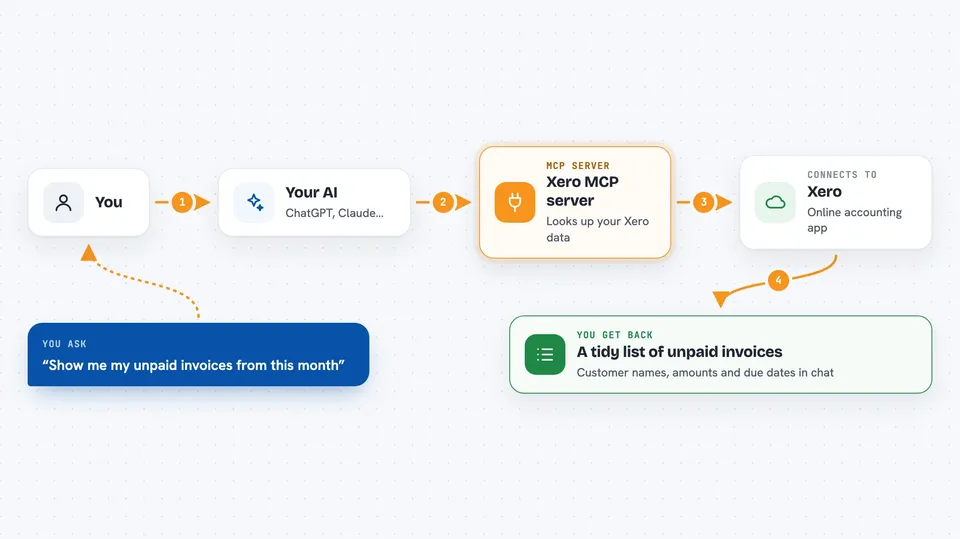
You ask your AI something like "show me my unpaid invoices" or "create an invoice for Acme Ltd". Your AI sends that request to this helper program running on your computer. The helper signs in to Xero using the credentials you gave it and asks Xero for the information or makes the change you requested. Xero sends the result back, and the helper hands it to your AI, which shows it to you in plain language in the chat.
 Click to zoom
What you can do with it
- List your invoices, credit notes, quotes and payments
- Look up contacts, contact groups and your chart of accounts
- Create new invoices, contacts, items, payments and credit notes
- Update draft invoices, quotes, credit notes and contacts
- Pull reports like profit and loss, balance sheet, trial balance and aged receivables
- Check payroll employees, timesheets and leave balances
- Create and update tracking categories and options
Try asking your AI
- “Show me all my unpaid invoices from this month”
- “Create a draft invoice for Acme Ltd for 500 dollars plus tax”
- “What is my profit and loss for the last quarter”
- “List my payroll employees and their leave balances”
What it gives back to you
You get back plain answers in your chat: lists of invoices with amounts and dates, contact details, report figures, or a short confirmation that something was created or updated. For example, if you ask for unpaid invoices, your AI will show a tidy list with customer names, amounts and due dates. If you ask it to create an invoice, it will tell you the invoice number and status once Xero has saved it.
Before you start
What you need
- A Xero account with an organisation (a free trial works, and a Demo Company is a good place to start)
- A Xero developer account with API credentials (a client ID and client secret, which are like a username and password for apps)
- Node.js version 18 or newer installed on your computer
- The Claude desktop app or another AI app that supports MCP servers
Good to know
This helper can create and change real records in your Xero organisation, so check with your AI before letting it create or update anything important, and be careful not to share your client secret with anyone.
Install it with your AI
Add Xero MCP server to your AI, no technical skills needed
You don't install anything by hand. You copy one prompt, paste it into an AI that can work on your computer, and it checks, installs and connects the server for you, asking you when it needs something.
Sign in to get the install prompt
Members get a ready-made prompt that lets the Claude desktop app check Xero MCP server, install it and connect it for them, step by step. You don't need any technical skills: you copy, paste and answer a few questions. Your connected AI can also find and install any of the 4,361 MCP servers here for you.
Who it's for
Bookkeepers, accountants, small business owners and finance staff who use Xero daily and want to ask questions or make simple changes without clicking through the app.




