
MCP server · Research
Baseline MCP server
by yamanoku
Lets your AI check whether a web feature is safe to use in browsers, using Baseline status.
This is a small helper that lets your AI look up how well a web feature is supported by browsers. It uses Baseline, a simple label that says whether something works everywhere, is brand new, or only works in some places. It is handy if you write about web features, plan a website, or just want a quick answer before you use something.
What is an MCP server? The 30-second version
On its own, your AI can only chat with you. An MCP server is a small helper program that gives your AI a new skill or a connection to a service. This one connects your AI to the Web Platform Dashboard, a public site that tracks browser support for web features. Once it is connected, you can ask your AI about a feature and it will look up the answer for you.
What this MCP server does
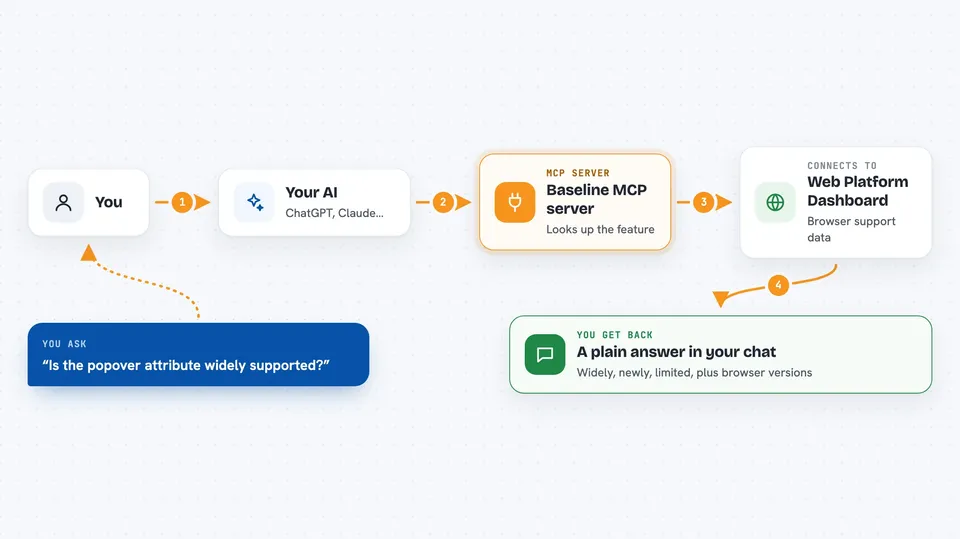
You ask your AI a question about a web feature, like whether it is safe to use. The AI sends your question to this helper. The helper talks to the Web Platform Dashboard and asks for the Baseline status of that feature. It also gets which browsers support it and in which versions. Then your AI shows you the answer in plain words in the chat.
 Click to zoom
What you can do with it
- Check the Baseline status of a web feature
- See which browsers support a feature and in which versions
- Find out when a feature was added to browsers
- Search for features and get their support details
- Filter results by browser, like Chrome, Edge, Firefox, or Safari
- Get usage data for a feature
Try asking your AI
- “Is the popover attribute widely supported?”
- “What is the Baseline status of container queries?”
- “Which browsers support the :has() selector and since when?”
- “Show me features that are newly available in Firefox”
What it gives back to you
You get a short answer in the chat, like widely, newly, limited, or no_data. It also shows which browsers support the feature and the version numbers where it appeared. Sometimes it includes usage numbers. Everything is written out in the conversation, so you can read it right away.
Before you start
What you need
- The Deno runtime installed, or a standalone binary from the releases page
- A Claude Desktop or VS Code setup where you can add MCP servers
Install it with your AI
Add Baseline MCP server to your AI, no technical skills needed
You don't install anything by hand. You copy one prompt, paste it into an AI that can work on your computer, and it checks, installs and connects the server for you, asking you when it needs something.
Sign in to get the install prompt
Members get a ready-made prompt that lets the Claude desktop app check Baseline MCP server, install it and connect it for them, step by step. You don't need any technical skills: you copy, paste and answer a few questions. Your connected AI can also find and install any of the 4,609 MCP servers here for you.
Who it's for
Web developers, writers, and anyone who needs a quick, plain answer about browser support for a web feature.


