
MCP server · Developer tools · official
Yocoolab MCP server
by Yocoolab · official
Lets your AI coding assistant read design feedback threads, screenshots and page selections from Yocoolab.
This is a small helper from Yocoolab that connects your AI coding assistant to your Yocoolab account. Yocoolab is where designers and teammates leave feedback on live web pages, and this helper lets your AI read that feedback and act on it. It is handy if you build websites or apps and get comments from designers or clients.
What is an MCP server? The 30-second version
On its own, your AI can only chat with you. An MCP server is a small helper program that gives your AI a new skill or a connection to an app or service. This one connects your AI to Yocoolab, so it can look up your feedback threads, page selections and activity there. Once it is set up, you just ask in plain words and the AI does the looking up for you.
What this MCP server does
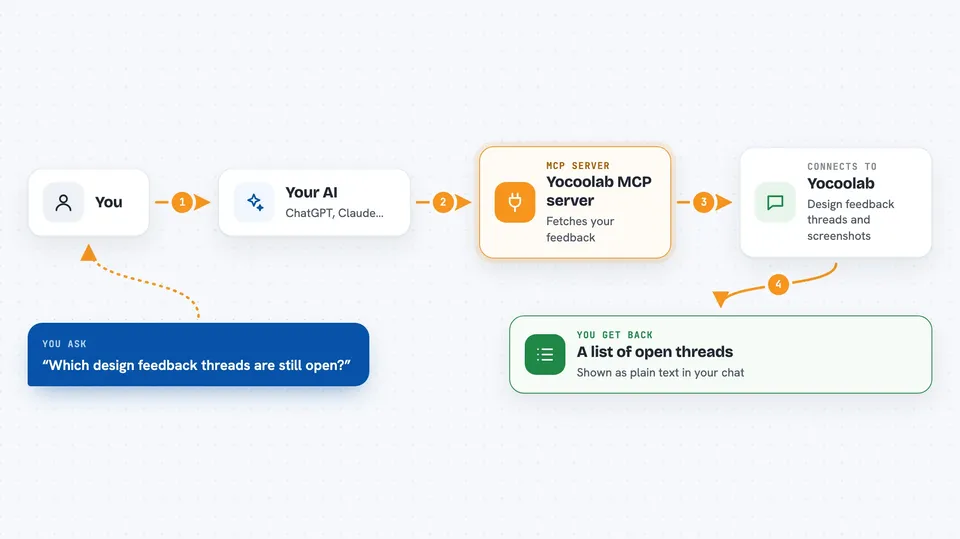
You ask your AI something about your design feedback, like which threads are still open. The AI uses this helper, which talks to your Yocoolab account over the internet. Yocoolab sends back the threads, the screenshots, the element details and the conversation. Your AI then shows you a summary or a list right in the chat, and can reply or mark things as done if you ask.
 Click to zoom
What you can do with it
- List the open design feedback threads on your project
- Pull the full context of a thread, including the selection, screenshot and messages
- Reply to a designer and mark a thread as addressed
- Open a pull request that closes out a feedback thread
- Look up which page element a comment was pinned to
- Read recent activity, files touched and AI conversations
- Check product analytics from Pendo if you use it
Try asking your AI
- “What design feedback threads are still open on my repo?”
- “Show me the full context for the newest thread, including the screenshot.”
- “Reply to that thread saying I fixed it, and mark it addressed.”
- “Open a pull request that closes out the login page feedback thread.”
What it gives back to you
You get back lists of threads, summaries of conversations, details about the page element that was selected, and screenshots when they exist. If you ask it to reply or mark something addressed, it tells you what it changed. Everything shows up as normal text in your chat, so you can read it like a message from a colleague.
Before you start
What you need
- Node.js 20 or newer on your computer
- A Yocoolab account and a token from the Yocoolab Chrome extension
- A GitHub token if you want it to open pull requests (the GitHub CLI can provide this automatically)
- The Yocoolab Chrome extension for page selections to work
Good to know
It can post replies and mark threads as addressed on your behalf, and it can open pull requests on GitHub, so check what it did before sharing the result with your team.
Install it with your AI
Add Yocoolab MCP server to your AI, no technical skills needed
You don't install anything by hand. You copy one prompt, paste it into an AI that can work on your computer, and it checks, installs and connects the server for you, asking you when it needs something.
Sign in to get the install prompt
Members get a ready-made prompt that lets the Claude desktop app check Yocoolab MCP server, install it and connect it for them, step by step. You don't need any technical skills: you copy, paste and answer a few questions. Your connected AI can also find and install any of the 4,609 MCP servers here for you.
Who it's for
Developers and web builders who get design feedback through Yocoolab and want their AI assistant to handle the back and forth.



