MCP server · Health and learning
NutriRef nutrition MCP server
by Younghef
Look up USDA nutrition facts, compare foods, and build recipes with your AI, paying a tiny amount per request.
NutriRef is a helper that lets your AI pull real nutrition numbers from the USDA FoodData Central database. You ask a question about a food, and the AI fetches the calories, protein, carbs, and other values for you. It is handy if you plan meals, check labels, or just want quick facts without opening a website.
What is an MCP server? The 30-second version
On its own, your AI can only chat with you. An MCP server is a small helper program that gives your AI a new skill or a connection to an app or service. This one connects your AI to NutriRef, which serves USDA nutrition data. Once it is set up, the AI can look up foods and do small nutrition calculations for you when you ask.
What this MCP server does
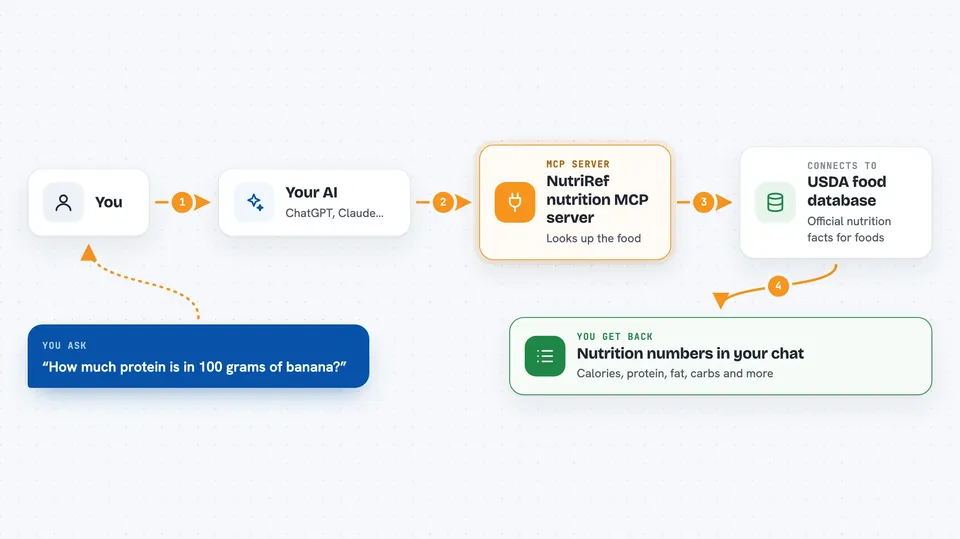
You type a request in plain words, like asking how much protein is in a banana. Your AI sends that request to the NutriRef helper. The helper talks to the NutriRef service, which looks the food up in the USDA database. NutriRef sends back the numbers, and your AI shows them to you in the chat. Each request costs a tiny amount of digital money, paid automatically from a wallet you set up.
 Click to zoom
What you can do with it
- Search for a food and see its basic nutrition facts
- Get detailed values for one specific food item
- Compare two or more foods to see which has more protein or less sodium
- Scale a recipe by grams and add up the totals
- Ask follow-up questions about the numbers your AI just fetched
Try asking your AI
- “How many calories and how much protein are in 100 grams of banana?”
- “Compare chicken breast, tofu, and lentils for protein and fat.”
- “Build a recipe with 200g rice, 150g chicken, and 100g broccoli and tell me the totals.”
- “What is the fiber and sugar content of a raw apple?”
What it gives back to you
You get back a short list of numbers, usually per 100 grams: calories, protein, fat, carbs, fiber, sugar, sodium, and a few vitamins and minerals. For comparisons, you get a table showing which food wins on each nutrient. For recipes, you get the scaled amounts and the summed totals. Everything appears as plain text in your chat.
Before you start
What you need
- Python installed on your computer (the README uses pip to install the helper)
- A small wallet with USDC on the Base network, plus its private key
- An MCP client like Claude Desktop or Claude Code
Good to know
Each request costs a small amount of real money from your wallet, so keep an eye on how often your AI calls it.
Install it with your AI
Add NutriRef nutrition MCP server to your AI, no technical skills needed
You don't install anything by hand. You copy one prompt, paste it into an AI that can work on your computer, and it checks, installs and connects the server for you, asking you when it needs something.
Sign in to get the install prompt
Members get a ready-made prompt that lets the Claude desktop app check NutriRef nutrition MCP server, install it and connect it for them, step by step. You don't need any technical skills: you copy, paste and answer a few questions. Your connected AI can also find and install any of the 4,361 MCP servers here for you.
Who it's for
People who plan meals, track nutrition, or need quick USDA food facts without opening a website, especially if they already use an AI assistant.