MCP server · Analytics
Autario Public Datasets
by Autario
Let your AI look up official world data and turn it into clear comparisons, stats and charts.
This connects your AI assistant to a huge library of public data from places like the World Bank, Eurostat, the OECD and the WHO. You can ask normal questions about economies, health, trade or populations, and your assistant fetches the real numbers instead of making them up. It is handy if you often hunt through websites looking for reliable figures.
What is an MCP server? The 30-second version
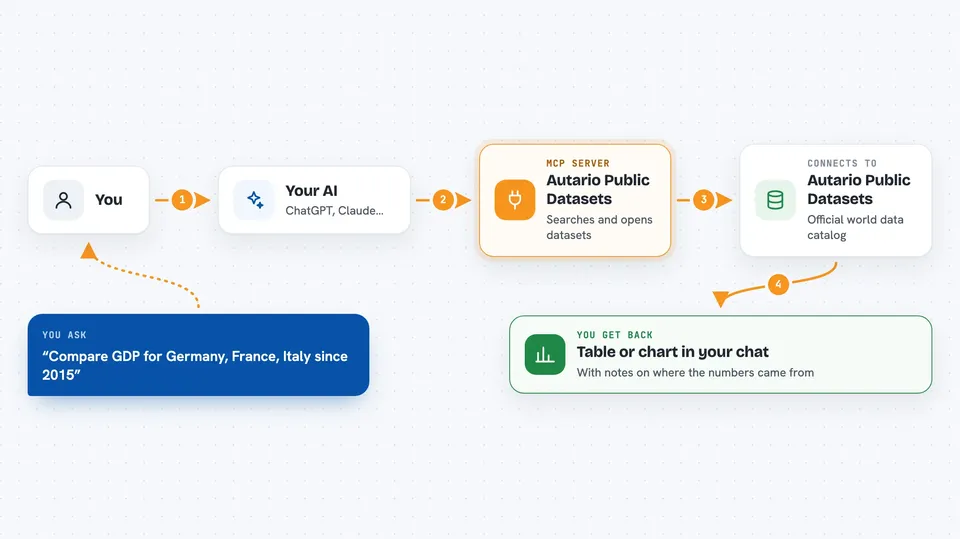
On its own, your AI can only talk based on what it already learned. An MCP server is a little helper program that plugs a new ability into your AI. This particular helper links your AI to the Autario platform, where lots of public datasets sit side by side. So when you ask a question, your assistant goes off to Autario, finds matching data and brings it back to you.
What this MCP server does
When you ask something like how much country X spent compared to others, your AI sends that request to this helper. The helper searches the Autario catalog, opens the right dataset and pulls out the actual values. Then it hands those results back to your AI, along with notes on where they came from. Your AI turns all of that into a tidy table or explanation in your chat. If you have publishing turned on, it can save a finished chart online too.
 Click to zoom
What you can do with it
- Search thousands of public datasets by subject
- Pull yearly or monthly values for almost any country
- Join several measures together in one comparison
- Run simple statistical checks such as averages and correlations
- Check whether a number really matches its original source
- Build and publish a chart straight from the conversation
Try asking your AI
- “Show me gross domestic product for Germany, France and Italy since 2015”
- “How has child mortality changed worldwide over the past twenty years”
- “Make a line chart comparing energy use per person in five European countries”
- “Which indicator tracks well with national debt levels?”
What it gives back to you
Most replies arrive as compact lists or tables inside your chat, showing the measure, the place and the dates covered. Statistical calls bring extra details like sample counts, average differences and easy-to-read explanations. When you publish a chart, you receive a lasting address ending in autario.com/chart followed by a short code. Nothing gets saved anywhere until you deliberately choose to publish.
Install it with your AI
Add Autario Public Datasets to your AI, no technical skills needed
You don't install anything by hand. You copy one prompt, paste it into an AI that can work on your computer, and it checks, installs and connects the server for you, asking you when it needs something.
Sign in to get the install prompt
Members get a ready-made prompt that lets the Claude desktop app check Autario Public Datasets, install it and connect it for them, step by step. You don't need any technical skills: you copy, paste and answer a few questions. Your connected AI can also find and install any of the 4,609 MCP servers here for you.
Who it's for
Researchers, analysts, students and anyone else who regularly digs up facts about economics, demographics or global development.