MCP server · Research
Apiverket MCP server
by vinvuk
Lets your AI look up Swedish public data like company details, statistics, weather and transport.
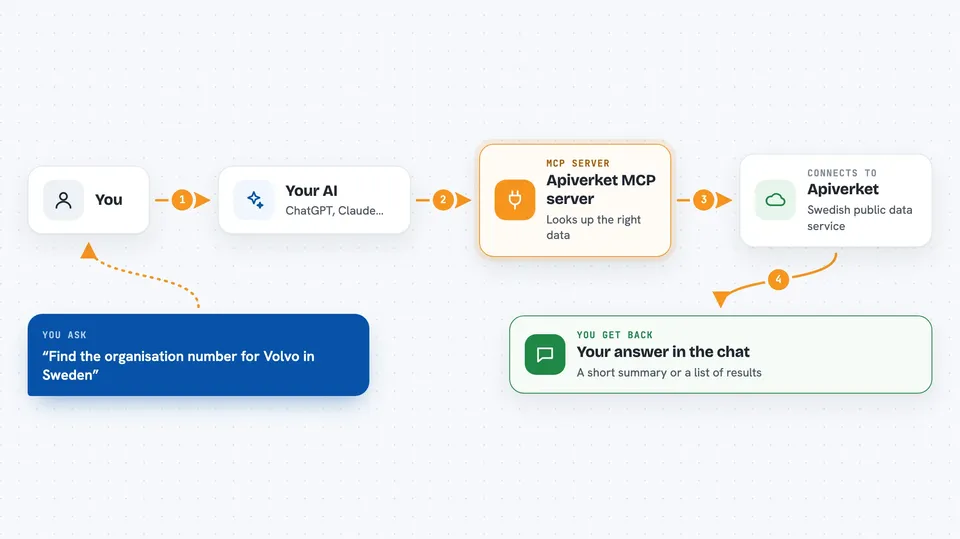
This is a helper that connects your AI assistant to Apiverket, a service that gathers Swedish public data in one place. Once it is set up, you can just ask your AI questions about Swedish companies, statistics, weather, trains and more, and it will fetch the answers for you. It is handy for anyone who works with Swedish data but does not want to visit many different websites.
What is an MCP server? The 30-second version
On its own, your AI can only chat with you using what it already knows. An MCP server is a small helper program that gives your AI a new skill or a connection to an outside service. This one connects your AI to Apiverket, so it can look things up there when you ask. You do not need to understand how it works under the hood; you just install it once and then talk to your AI as usual.
What this MCP server does
You ask your AI a question, for example about a Swedish company or the weather in Stockholm. The AI uses this helper to search Apiverket for the right data source, then asks Apiverket for the actual information. Apiverket sends the data back, and the AI shows it to you in the chat, often as a list or a short summary. If something goes wrong, like hitting a daily limit, the helper tells the AI what happened so it can explain it to you.
 Click to zoom
What you can do with it
- Look up Swedish company details by name or organisation number
- Check weather forecasts and warnings for Swedish cities
- Find train departures and public transport information
- Search Swedish job listings and job categories
- Get statistics about municipalities, population and regions
- Browse government documents, parliament data and police events
- Check your Apiverket account tier and remaining daily quota
Try asking your AI
- “Find the organisation number for Volvo in Sweden”
- “What is the weather forecast for Stockholm this week”
- “Show me train departures from Stockholm Central”
- “How many people live in Gothenburg municipality”
What it gives back to you
You get answers in your chat, usually as a short summary or a list of results. For example, a company search returns names and organisation numbers, and a weather query returns a forecast. If the data is large, the helper may show only part of it and tell you how to see more. It can also tell you when you have hit a daily limit and when it resets.
Before you start
What you need
- Node.js version 18 or newer on your computer
- An Apiverket API key (a kind of password for apps; you can start with the free sandbox key sk_test_demo)
Good to know
The sandbox key only gives test data, so for real information you need a live key, and free live keys have daily limits that can stop your requests until the next day.
Install it with your AI
Add Apiverket MCP server to your AI, no technical skills needed
You don't install anything by hand. You copy one prompt, paste it into an AI that can work on your computer, and it checks, installs and connects the server for you, asking you when it needs something.
Sign in to get the install prompt
Members get a ready-made prompt that lets the Claude desktop app check Apiverket MCP server, install it and connect it for them, step by step. You don't need any technical skills: you copy, paste and answer a few questions. Your connected AI can also find and install any of the 4,361 MCP servers here for you.
Who it's for
Anyone who works with Swedish public data, like analysts, journalists, researchers or business people who want quick answers without visiting many websites.