
MCP server · Notes
Repo Memory MCP server
by yubinkim444
Lets your AI remember facts, decisions and warnings about your codebase, shared with teammates through git.
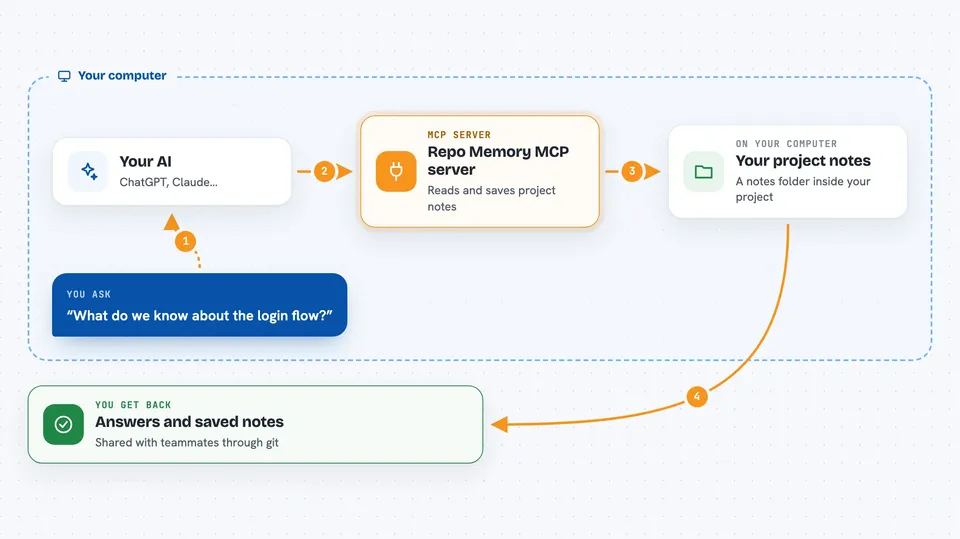
Repo Memory is a small helper that gives your AI a notebook about your code project. When your AI figures out something useful, like where a piece of code lives or why a choice was made, it writes that down in a folder inside your project. The next time you or a teammate opens the project with any AI tool, it reads those notes first instead of starting from scratch.
What is an MCP server? The 30-second version
On its own, your AI can only chat with you. An MCP server is a small helper program that gives your AI a new skill or a connection to something outside the chat. This one connects your AI to a notes folder inside your code project, so it can look up what was already learned and write down new findings. You ask your AI a question, and behind the scenes it quietly checks or updates those notes for you.
What this MCP server does
You ask your AI something about your project, like where the login code lives. The AI uses this helper to read the notes folder inside your project. If the answer is already there, it tells you right away without searching again. If the AI discovers something new while working, it can add a note, a decision or a warning to that folder. When you commit and push your project with git, those notes travel to your teammates too.
 Click to zoom
What you can do with it
- Read everything your AI already learned about a project
- Save a verified fact, like where a file or function lives
- Record why a technical choice was made
- Write down a warning about something that wasted time
- List only the facts about one area, like login or payments
- Share all of this with teammates by committing the notes folder
Try asking your AI
- “Before we start, check the repo memory for anything about the login flow.”
- “Save a fact that the payment code lives in src/billing/charge.py around lines 30 to 90.”
- “Write down a decision that we picked this library because it supports async.”
- “List all the gotchas we have recorded so far.”
What it gives back to you
You get back plain answers in the chat, like a short summary of what was already known or a list of saved facts. When your AI saves something, it confirms that the note was added. The notes themselves live as simple text files inside your project folder, so you can open and read them yourself anytime.
Before you start
What you need
- Python 3.10 or newer on your computer
- A code project that uses git
- An AI tool that supports MCP servers, like Claude Desktop, Cursor or Cline
Good to know
The notes folder is shared with everyone who has your project, so anything your AI writes there can be seen by teammates, and wrong notes will stay until someone removes them.
Install it with your AI
Add Repo Memory MCP server to your AI, no technical skills needed
You don't install anything by hand. You copy one prompt, paste it into an AI that can work on your computer, and it checks, installs and connects the server for you, asking you when it needs something.
Sign in to get the install prompt
Members get a ready-made prompt that lets the Claude desktop app check Repo Memory MCP server, install it and connect it for them, step by step. You don't need any technical skills: you copy, paste and answer a few questions. Your connected AI can also find and install any of the 4,361 MCP servers here for you.
Who it's for
Developers and small teams who use AI coding tools on the same project and are tired of explaining the same things over and over.


