MCP server · Developer tools
Code Relay MCP server
by zarcherlot
Let your coding AI build code on one computer and prove it works on another, with a receipt of what happened.
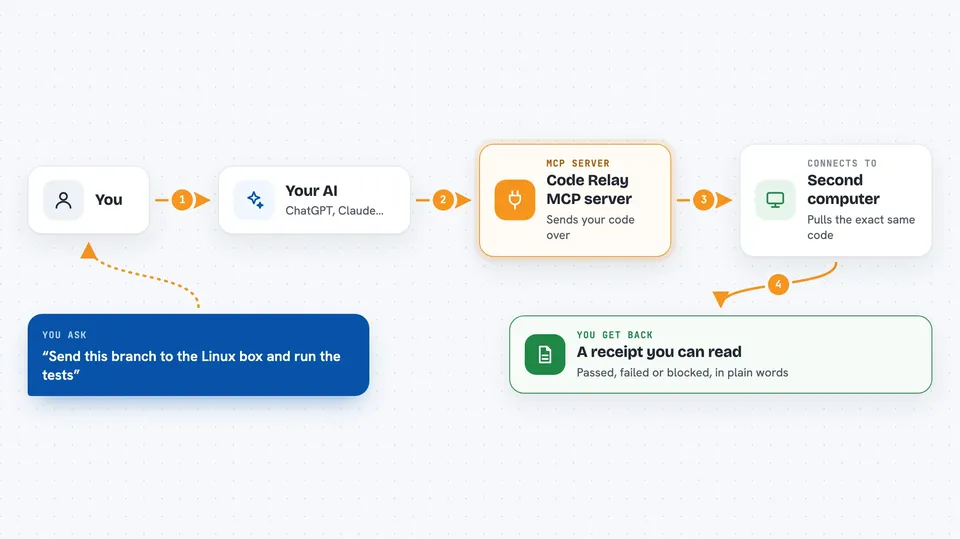
Code Relay is a helper that connects your coding AI to a second computer so the code it writes can be tested in a real place, not just on your laptop. It is handy if you write code on Windows or a Mac but the thing you are building only really runs on Linux, a private network, or a machine with special hardware. Your AI writes the change, the other machine runs the check, and a receipt comes back telling your AI whether it passed or failed.
What is an MCP server? The 30-second version
On its own, your AI can only chat with you. An MCP server is a small helper program that gives your AI a new skill or a connection to another place. Code Relay is that helper here: it links your AI to a second computer (called the Target Host) where the real testing happens. When you ask your AI to check something, it uses Code Relay to send the work over and read the result back.
What this MCP server does
You ask your AI to make a change and check it somewhere real. Your AI uses Code Relay to package up the code and the branch it belongs to, and sends it to the other machine. That machine pulls the exact same version of the code, runs the checks you allowed, and writes down what happened. Code Relay brings that write-up back to your AI as a receipt. Your AI reads the receipt and either tells you it passed or tries a fix and sends it again.
 Click to zoom
What you can do with it
- Send a code change from your computer to a second machine for real testing
- Tie every check to an exact branch and version of the code so nothing gets mixed up
- Run only the commands you have allowed, with time limits and capped output
- Get back a clear pass, fail, or blocked result for each check
- Create a short-lived link so another machine can join the same check
- See the status of a run and load the receipt it produced
- Ask your AI to read a receipt and decide what to fix next
Try asking your AI
- “Send this branch to the Linux box and run the test suite there”
- “Create a checkpoint invite so my GPU machine can join this branch”
- “Fetch the receipt from the last run and tell me what failed”
- “Analyze the receipt and suggest the next fix”
What it gives back to you
You get a receipt: a short write-up of what was checked and whether it passed, failed, or was blocked. It includes the exact version of the code that was tested and the results of each allowed command. In the chat, your AI reads that receipt and explains it to you in plain words, then suggests what to do next.
Before you start
What you need
- A coding AI tool that supports MCP, such as Codex, Claude Code, Cursor, or VS Code
- A second computer (the Target Host) where the real checks will run
- Node.js installed so the npx command can run
- A GitHub Actions self-hosted runner set up as a code-relay-checkpoint for checkpoint runs
Good to know
This runs commands on a second machine and can change files there, so only allow commands you trust and keep the other machine's access limited.
Install it with your AI
Add Code Relay MCP server to your AI, no technical skills needed
You don't install anything by hand. You copy one prompt, paste it into an AI that can work on your computer, and it checks, installs and connects the server for you, asking you when it needs something.
Sign in to get the install prompt
Members get a ready-made prompt that lets the Claude desktop app check Code Relay MCP server, install it and connect it for them, step by step. You don't need any technical skills: you copy, paste and answer a few questions. Your connected AI can also find and install any of the 4,609 MCP servers here for you.
Who it's for
Developers and small teams who write code on one machine but need to prove it works on another, such as Linux, a private network, or a machine with special hardware.