MCP server · Finance and crypto
Marketaux MCP server
by Zolo-Ryan
Lets your AI search market and financial news by company, industry, country, or date.
This is a small helper that connects your AI to Marketaux, a service that gathers market and financial news. Once it is set up, you can ask your AI for news about a company, a sector, or a country, and it will go and find matching articles for you. It is handy if you follow markets or need quick news checks without opening a dozen tabs.
What is an MCP server? The 30-second version
On its own, your AI can only chat with you using what it already knows. An MCP server is a small helper program that gives your AI a new skill or a connection to an outside service. This one connects your AI to Marketaux, a financial news service. So when you ask about recent news for a stock or an industry, your AI can actually look it up there and bring the results back to you.
What this MCP server does
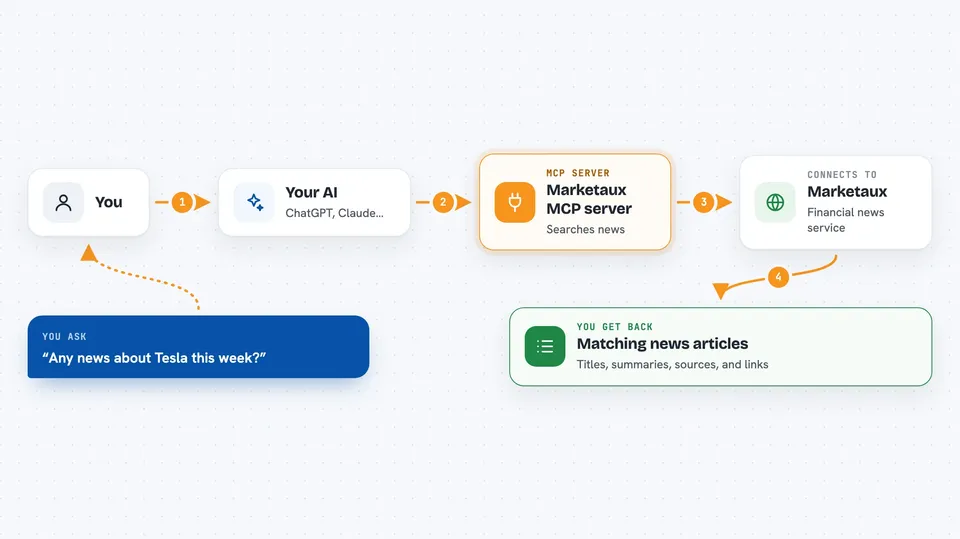
You ask your AI something like "any news about Tesla this week?" Your AI passes that request to this helper. The helper talks to the Marketaux news service and searches for matching articles. It can narrow the search by stock symbol, company or entity type, industry, country, language, or a date or date range. Then it hands the matching news back to your AI, which shows it to you in the chat.
 Click to zoom
What you can do with it
- Search financial news by stock symbol
- Filter news by industry, such as tech or energy
- Look up news from a specific country
- Limit results to a certain language
- Find articles published on a specific day
- Find articles published before or after a date
- Search by entity type, such as company or person
Try asking your AI
- “Find recent news about Apple and Microsoft”
- “What is the latest news about the energy industry in the US?”
- “Show me news about Nvidia published in the last week”
- “Any news from Japan about car makers yesterday?”
What it gives back to you
You get back a list of matching news articles, usually with a title, a short description, the source, and a link. Your AI can summarize them for you or group them by company or topic. If nothing matches your filters, it will simply tell you it found no results.
Before you start
What you need
- A free Marketaux account
- An API key from Marketaux (a kind of password for apps; you get it from your Marketaux dashboard after signing up)
- The Claude desktop app (or another AI app that supports MCP servers)
- Node.js installed on your computer to run the server
Good to know
This is an unofficial third-party tool, not made by Marketaux, and it only supports the free tier of their API, so results may be limited.
Install it with your AI
Add Marketaux MCP server to your AI, no technical skills needed
You don't install anything by hand. You copy one prompt, paste it into an AI that can work on your computer, and it checks, installs and connects the server for you, asking you when it needs something.
Sign in to get the install prompt
Members get a ready-made prompt that lets the Claude desktop app check Marketaux MCP server, install it and connect it for them, step by step. You don't need any technical skills: you copy, paste and answer a few questions. Your connected AI can also find and install any of the 4,609 MCP servers here for you.
Who it's for
People who follow markets, do quick financial research, or need a fast news check on companies, industries, or countries.