
MCP server · Developer tools
VMware AVI MCP server
by zw008
Lets your AI check and manage Avi load balancer virtual services, pools, certificates and AKO Kubernetes pods.
This is a helper for people who look after VMware Avi (also called NSX Advanced Load Balancer) and its AKO Kubernetes setup. It lets your AI assistant check load balancer status, drain servers for maintenance, watch certificates and look into AKO problems, all by asking in plain words. It is handy if you are an ops or platform engineer who already works with Avi.
What is an MCP server? The 30-second version
On its own, your AI can only chat. An MCP server is a small helper program that gives your AI a new skill or a connection to an app or service. This one connects your AI to your Avi Controller and your Kubernetes cluster, so it can look things up and make changes there when you ask. You install it once, and then your AI can talk to Avi for you.
What this MCP server does
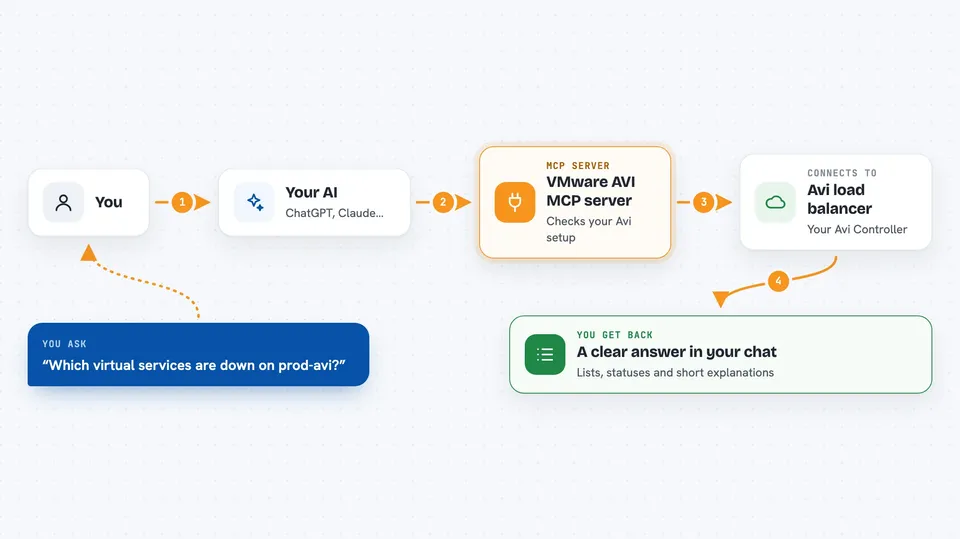
You ask your AI a question in normal words, like which virtual services are down. The AI passes that request to this helper, which talks to your Avi Controller (and to Kubernetes for AKO). The helper sends back the answer or makes the change you asked for. You see the result right in the chat, as a list, a status, or a short summary. Some actions, like disabling a server or restarting AKO, ask for confirmation first.
 Click to zoom
What you can do with it
- List virtual services and check their status
- Enable or disable a virtual service
- List pool members and drain or restore traffic on one
- Check SSL certificates and see which expire soon
- Look at traffic analytics and error logs for a virtual service
- Check Service Engine health
- Check AKO pod status, logs, version and restart it
- Diagnose why a Kubernetes Ingress is not creating a virtual service
Try asking your AI
- “List all virtual services on the prod-avi controller”
- “Drain pool member 10.1.1.5 in my-pool for maintenance”
- “Which SSL certificates expire in the next 30 days”
- “Why is my Ingress in the web namespace not creating a virtual service”
What it gives back to you
It gives back lists, statuses, health checks, metrics and short explanations, shown right in your chat. For example, asking about certificates returns the names and expiry dates, and asking about a pool returns each member and whether it is healthy. When it makes a change, like disabling a member, it tells you what it did. Analytics come back as numbers for throughput, latency and error rates.
Before you start
What you need
- A VMware Avi (NSX ALB) Controller you can reach, with a username and password
- The vmware-avi tool installed (uv tool install vmware-avi or pip install vmware-avi)
- A config file at ~/.vmware-avi/config.yaml with your controller details
- For AKO features, a kubeconfig file so it can reach your Kubernetes cluster
Good to know
It can change live things, like disabling a virtual service or a pool member, restarting AKO, or upgrading AKO config, so double check before you confirm.
Install it with your AI
Add VMware AVI MCP server to your AI, no technical skills needed
You don't install anything by hand. You copy one prompt, paste it into an AI that can work on your computer, and it checks, installs and connects the server for you, asking you when it needs something.
Sign in to get the install prompt
Members get a ready-made prompt that lets the Claude desktop app check VMware AVI MCP server, install it and connect it for them, step by step. You don't need any technical skills: you copy, paste and answer a few questions. Your connected AI can also find and install any of the 4,361 MCP servers here for you.
Who it's for
Platform, cloud and network engineers who run VMware Avi load balancers and AKO on Kubernetes.




